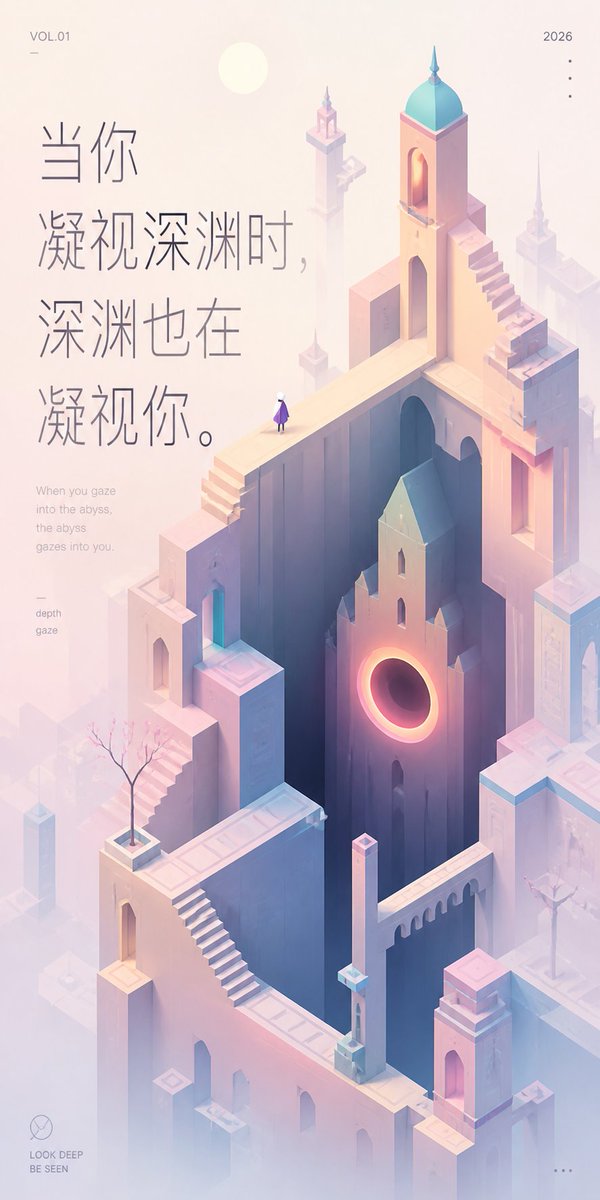
Tapeta z cytatem Pastel Abyss
Generuje spokojną tapetę z pionowym cytatem, nawiązującą do niemożliwej architektury Monument Valley i kontemplacyjnej dwujęzycznej typografii.
To jest przykładowy przykład GPT Image 2 dla Grafika i plakat . Skorzystaj z poniższego przykładu gotowego do skopiowania, aby wygenerować podobne materiały wizualne i sprawdź atrybucję Awesome GPT Image 2 Prompts oraz prawa do użytku komercyjnego przed ponownym wykorzystaniem.
Potrzebujesz pełnego zestawu podpowiedzi? Użyj Grafika i plakat aby uzyskać więcej powiązanych przykładów, odwiedź centrum tematyczne lub otwórz GPT Image 2 szybki katalog aby zobaczyć pełny przykładowy indeks, struktury wielokrotnego użytku i informacje o źródle.
Free 1K preview
Generate one preview image instantly, no sign-up required.
2161/4000
Opis
Monit o przygotowanie do kopiowania
Create a tall vertical inspirational art wallpaper in a quiet Monument Valley–inspired isometric style, soft healing pastel palette, and lots of misty negative space. The scene is an impossible architectural city made of pale peach, lavender, cream, and powder-blue stone: high narrow towers, arched doorways, bridges, staircases, parapets, and floating platforms arranged around a deep dark vertical abyss in the center. Include exactly one tiny lone human figure standing on an upper bridge, wearing a purple cloak or dress and white head, looking into the abyss. Add one prominent building face near the middle-right with a glowing circular portal like a warm orange-pink eclipse, casting light into the deep shaft. Add exactly two small bare ornamental trees in square planters, one on the lower-left terrace and one on the right terrace. The architecture should include multiple surreal stairways, including one long diagonal staircase in the lower center-left and one stepped staircase climbing the upper-right tower; the tallest tower has a turquoise domed roof and a small spire. Use a pale sun disk near the upper left, atmospheric fog, soft bloom, delicate shadows, and minimal linework. Place large vertical Chinese quote typography on the upper-left in thin elegant gray strokes: {argument name="quote text" default="When you gaze into the abyss, the abyss gazes also into you."}. Beneath it, add a small English translation in light gray: {argument name="English translation" default="When you gaze into the abyss, the abyss gazes into you."}. Add small editorial poster details: top-left text {argument name="volume label" default="VOL.01"} with a tiny horizontal line below it, top-right text {argument name="year" default="2026"} with exactly four small vertical dots below, a small left-side keyword block reading “depth” and “gaze,” a bottom-left minimalist circle logo above the words “LOOK DEEP” and “BE SEEN,” and exactly three small horizontal dots at the bottom-right. Keep the overall composition airy, refined, contemplative, and premium, with the quote occupying the left third and the surreal city rising through the center and right.Zmienne monitujące
Edytowalne symbole zastępcze argumentów znalezione w monicie, wraz z ich wartościami domyślnymi.
Zmienny
quote text
Domyślny
When you gaze into the abyss, the abyss gazes also into you.
Zmienny
English translation
Domyślny
When you gaze into the abyss, the abyss gazes into you.
Zmienny
volume label
Domyślny
VOL.01
Zmienny
year
Domyślny
2026
Best for
- - Grafika i plakat visual exploration
- - Image generation and reference-image edits
- - Reusable briefs that keep source attribution visible
Change these parts
- - Subject, product, character, or scene
- - Aspect ratio, camera, lighting, and background
- - Brand, text, color, and output constraints
Recommended model and settings
- - Model: gpt-image-2
- - Input mode: Tekst na obraz
- - Aspect ratio: source
- - Commercial status: review original source
How to use this prompt
- 1. Copy the prompt and preserve its structure for the first test.
- 2. Replace the subject, context, and publishing channel.
- 3. Change one camera, lighting, or style variable per iteration.
- 4. Inspect the output, source, text, and rights before reuse.
Limitations, source, and reuse cautions
- - Generated output is an editable draft, not factual, legal, or rights evidence.
- - Review the linked source, people, brands, logos, text, and third-party media before commercial use.
Zaimportowano z Awesome GPT Image 2 Prompts . Wymagane jest podanie źródła. Status do użytku komercyjnego to allowed ; przed płatnym użyciem sprawdź prawa autorskie do źródła.
Więcej przypadków w tej kategorii
Priorytety według kategorii, zgodności trybu wprowadzania, jakości i niższego ryzyka.

Tuxedo Cat Photo and Line Art Diptych
Tekst na obraz

Autumn Cozy Casual Outfit Prompt
Tekst na obraz

Cute Focus Desk Flat Lay and Kawaii Illustration
Tekst na obraz

Street Selfie with Cat in Matching Cap
Tekst na obraz

Hell Hound Character Sheet Infographic
Tekst na obraz

MotoGP POV Cornering Shot
Tekst na obraz
Ponowne wykorzystanie i źródło notatek
Użyj tego monitu bezpiecznie po zapoznaniu się ze sprawą.
- 1.Skopiuj monit lub otwórz go bezpośrednio w Dovoo za pomocą przycisku generowania.
- 2.Dostosuj zmienne, proporcje obrazu i obrazy referencyjne do własnego przypadku użycia.
- 3.Przed publikacją lub płatnym wykorzystaniem należy sprawdzić prawa autorskie do źródła, wymogi dotyczące atrybucji oraz ryzyko związane z marką lub podobizną.