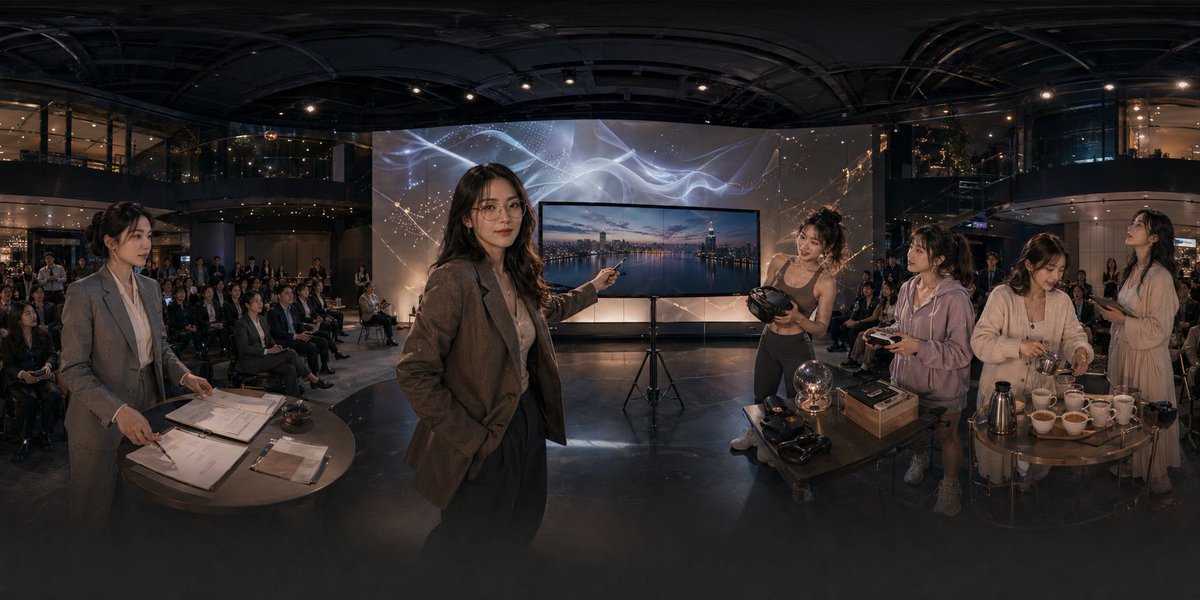
Panoramiczna scena atrium wydarzenia technologicznego
To polecenie generuje kinową, ultraszeroką scenę korporacyjną w nowoczesnym atrium, przydatną do zilustrowania premiery technologicznej, wciągającego wydarzenia demonstracyjnego lub prezentacji startupu.
To jest przykładowy przykład GPT Image 2 dla Wnętrza i architektura . Skorzystaj z poniższego przykładu gotowego do skopiowania, aby wygenerować podobne materiały wizualne i sprawdź atrybucję Awesome GPT Image 2 Prompts oraz prawa do użytku komercyjnego przed ponownym wykorzystaniem.
Potrzebujesz pełnego zestawu podpowiedzi? Użyj Wnętrza i architektura aby uzyskać więcej powiązanych przykładów, odwiedź centrum tematyczne lub otwórz GPT Image 2 szybki katalog aby zobaczyć pełny przykładowy indeks, struktury wielokrotnego użytku i informacje o źródle.
Free 1K preview
Generate one preview image instantly, no sign-up required.
1799/4000
Opis
Monit o przygotowanie do kopiowania
A cinematic ultra-wide panoramic scene inside a modern multi-story event atrium at night, photographed like a 360-degree conference showcase with dramatic warm low-key lighting and glossy dark architectural surfaces. In the center foreground, a professional woman in a brown blazer and dark trousers stands confidently and points toward a large flat-screen display on a tripod; the screen shows a twilight city skyline over water. Behind the display is a tall illuminated backdrop with abstract flowing white light ribbons and faint constellation-like gold sparkles. The venue is filled with a seated audience arranged in rows across the background, watching the presentation. On the left foreground, 1 woman in a gray business suit stands beside a round table covered with paperwork, clipboards, a pen, and a small service bell, as if handling registration or event administration. On the right foreground, there are 4 women gathered around two small round tables demonstrating products and hospitality items: 1 athletic woman in a fitted top holds a VR headset, 1 casually dressed woman in a light hoodie holds a controller, 1 woman in a cream cardigan works with cups and utensils, and 1 woman in a light dress stands nearby holding a phone or small object. The right-side tables contain exactly 11 visible items of note: 1 glowing glass orb lamp, 2 VR headsets, 1 rectangular product box, 1 metallic thermos or coffee pot, and 6 white teacups arranged in a row. The scene should feel like an upscale tech lifestyle launch, blending business presentation, immersive gadgets, and cafe service in one space. Use realistic human proportions, documentary-style staging, polished corporate event photography, subtle reflections on the floor, deep depth, and a seamless extra-wide panorama composition.
Best for
- - Wnętrza i architektura visual exploration
- - Image generation and reference-image edits
- - Reusable briefs that keep source attribution visible
Change these parts
- - Subject, product, character, or scene
- - Aspect ratio, camera, lighting, and background
- - Brand, text, color, and output constraints
Recommended model and settings
- - Model: gpt-image-2
- - Input mode: Tekst na obraz
- - Aspect ratio: source
- - Commercial status: review original source
How to use this prompt
- 1. Copy the prompt and preserve its structure for the first test.
- 2. Replace the subject, context, and publishing channel.
- 3. Change one camera, lighting, or style variable per iteration.
- 4. Inspect the output, source, text, and rights before reuse.
Limitations, source, and reuse cautions
- - Generated output is an editable draft, not factual, legal, or rights evidence.
- - Review the linked source, people, brands, logos, text, and third-party media before commercial use.
Zaimportowano z Awesome GPT Image 2 Prompts . Wymagane jest podanie źródła. Status do użytku komercyjnego to allowed ; przed płatnym użyciem sprawdź prawa autorskie do źródła.
Więcej przypadków w tej kategorii
Priorytety według kategorii, zgodności trybu wprowadzania, jakości i niższego ryzyka.






Ponowne wykorzystanie i źródło notatek
Użyj tego monitu bezpiecznie po zapoznaniu się ze sprawą.
- 1.Skopiuj monit lub otwórz go bezpośrednio w Dovoo za pomocą przycisku generowania.
- 2.Dostosuj zmienne, proporcje obrazu i obrazy referencyjne do własnego przypadku użycia.
- 3.Przed publikacją lub płatnym wykorzystaniem należy sprawdzić prawa autorskie do źródła, wymogi dotyczące atrybucji oraz ryzyko związane z marką lub podobizną.