Pachinko Physics Debug Layout
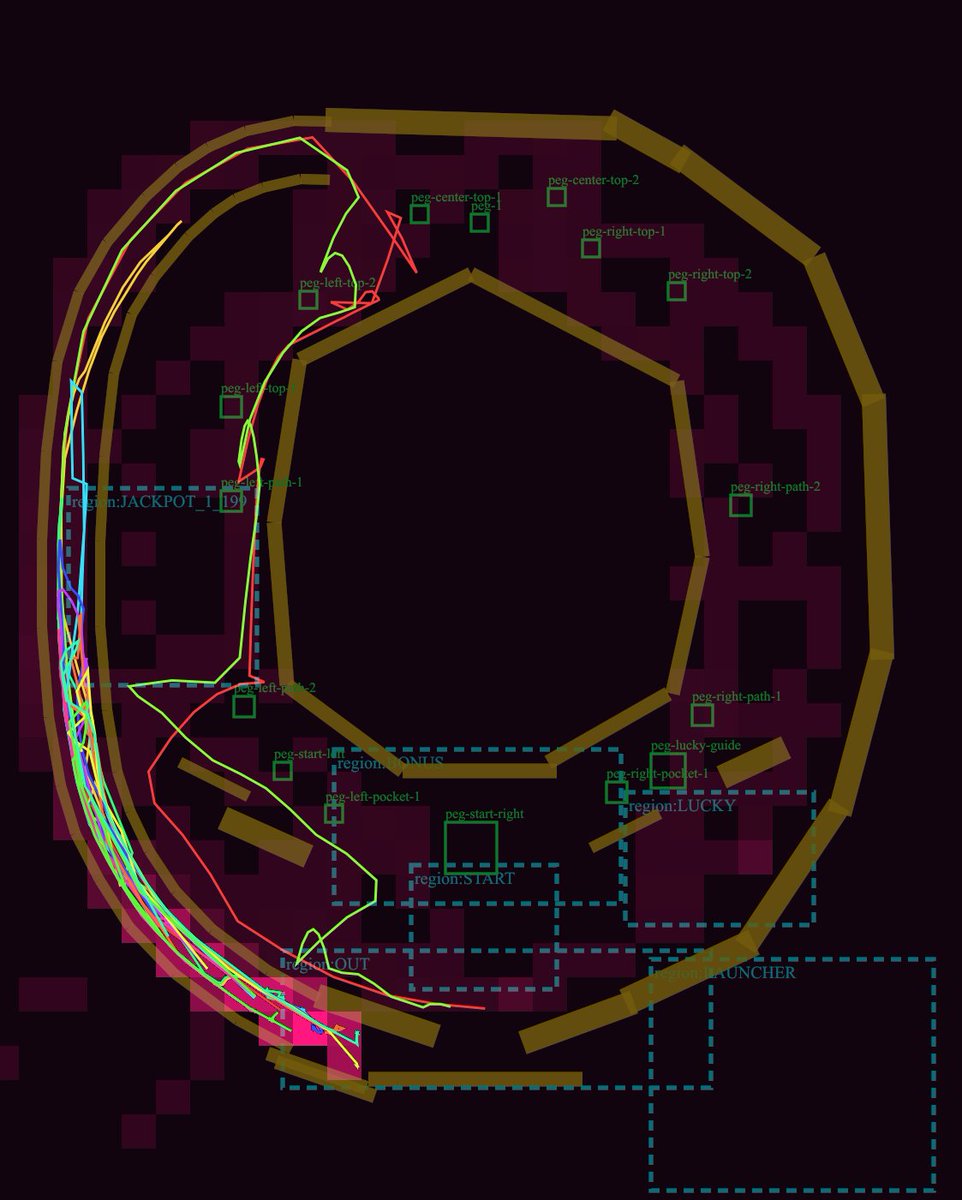
A dark technical pachinko playfield diagram with rails, peg labels, dashed regions, and neon simulated ball trajectories for game-layout review.
To jest przykładowy przykład GPT Image 2 dla Grafika i plakat . Skorzystaj z poniższego przykładu gotowego do skopiowania, aby wygenerować podobne materiały wizualne i sprawdź atrybucję Awesome GPT Image 2 Prompts oraz prawa do użytku komercyjnego przed ponownym wykorzystaniem.
Potrzebujesz pełnego zestawu podpowiedzi? Użyj Grafika i plakat aby uzyskać więcej powiązanych przykładów, odwiedź centrum tematyczne lub otwórz GPT Image 2 szybki katalog aby zobaczyć pełny przykładowy indeks, struktury wielokrotnego użytku i informacje o źródle.
Free 1K preview
Generate one preview image instantly, no sign-up required.
3429/4000
Opis
Monit o przygotowanie do kopiowania
Goal: Create a dark technical debug visualization of a pachinko machine playfield layout, showing ball lanes, collision rails, pegs, named gameplay regions, and simulated ball trajectories.

Canvas: Square-ish 4:5 technical diagram on a nearly black burgundy background, with a transparent-engineering-overlay feel. Use a dark maroon grid of blocky rectangular obstacle silhouettes behind the layout.

Main layout: Draw a large pachinko board occupying almost the full canvas. The board is formed by thick angular golden-brown rails: one large outer oval/octagonal loop around the perimeter, one large inner polygonal ring around an empty central dark void, and several short rail segments near the bottom and lower-right. Keep the rails chunky, beveled, and slightly translucent, like debug collision geometry.

Trajectory paths: Add exactly 5 thin neon ball-path traces over the rails and lanes: 1 cyan path hugging the far-left launch lane, 1 hot pink path weaving near the left edge and bottom exit, 1 lime green path that curves from the upper-left across the mid-left and down to the bottom, 1 red path that crosses sharply through the left-middle and upper-left, and 1 yellow path following the outer left arc. The paths should overlap and look like simulated pachinko ball travel, with sharp turns and curved segments.

Debug regions: Draw dashed cyan rectangular region boxes with small cyan labels. Include exactly 7 labeled regions: "region:JACKPOT_1" at left-middle, "region:STATIC" near the lower-left/middle, "region:START" centered lower-middle, "region:LUCKY" right-lower-middle, "region:LAUNCHER" bottom-right, "region:OUT" lower-left exit area, and one tall dashed launch/channel region along the left side.

Pegs and labels: Add exactly 15 small green square peg markers with green debug labels. Place them around the central playfield: 2 near the upper-left labeled "peg-left-top-1" and "peg-left-top-2"; 3 near the top center labeled "peg-center-top-1", "peg-center-top-2", and "peg-1"; 3 on the upper-right labeled "peg-right-top-1", "peg-right-top-2", and "peg-right-path-2"; 3 on the lower-right/lower-middle labeled "peg-right-path-1", "peg-lucky-guide", and "peg-right-pocket-1"; 4 in the lower-left/lower-middle labeled "peg-left-path-1", "peg-left-pocket-1", "peg-start-left", and "peg-start-right". Make labels small, thin, and green, as if from a game-engine editor overlay.

Additional details: Include one tiny cyan number box reading "19" near the left-middle jackpot area. Add a few small red guide triangles and line fragments near the top-left lane. The diagram should look like a GPT-generated game-layout review screenshot rather than polished UI art.

Visual style: Low-light debug render, dark maroon and black palette, golden collision rails, cyan dashed UI overlays, green peg annotations, neon trajectory lines. No photorealism, no characters, no real pachinko machine cabinet, no decorative anime art.

Customizable concept: Build the layout as a {argument name="machine type" default="pachinko"} physics debug map titled by implication around {argument name="gameplay focus" default="ball trajectory and lane review"}. Use rail color {argument name="rail color" default="muted golden brown"}, background color {argument name="background color" default="near-black burgundy"}, and trajectory colors {argument name="trajectory colors" default="cyan, hot pink, lime green, red, yellow"}.
Zmienne monitujące
Edytowalne symbole zastępcze argumentów znalezione w monicie, wraz z ich wartościami domyślnymi.
Zmienny
machine type
Domyślny
pachinko
Zmienny
gameplay focus
Domyślny
ball trajectory and lane review
Zmienny
rail color
Domyślny
muted golden brown
Zmienny
background color
Domyślny
near-black burgundy
Zmienny
trajectory colors
Domyślny
cyan, hot pink, lime green, red, yellow
Best for
- - Grafika i plakat visual exploration
- - Image generation and reference-image edits
- - Reusable briefs that keep source attribution visible
Change these parts
- - Subject, product, character, or scene
- - Aspect ratio, camera, lighting, and background
- - Brand, text, color, and output constraints
Recommended model and settings
- - Model: gpt-image-2
- - Input mode: Tekst na obraz
- - Aspect ratio: source
- - Commercial status: review original source
How to use this prompt
- 1. Copy the prompt and preserve its structure for the first test.
- 2. Replace the subject, context, and publishing channel.
- 3. Change one camera, lighting, or style variable per iteration.
- 4. Inspect the output, source, text, and rights before reuse.
Limitations, source, and reuse cautions
- - Generated output is an editable draft, not factual, legal, or rights evidence.
- - Review the linked source, people, brands, logos, text, and third-party media before commercial use.
Zaimportowano z Awesome GPT Image 2 Prompts . Wymagane jest podanie źródła. Status do użytku komercyjnego to allowed ; przed płatnym użyciem sprawdź prawa autorskie do źródła.
Więcej przypadków w tej kategorii
Priorytety według kategorii, zgodności trybu wprowadzania, jakości i niższego ryzyka.






Ponowne wykorzystanie i źródło notatek
Użyj tego monitu bezpiecznie po zapoznaniu się ze sprawą.
- 1.Skopiuj monit lub otwórz go bezpośrednio w Dovoo za pomocą przycisku generowania.
- 2.Dostosuj zmienne, proporcje obrazu i obrazy referencyjne do własnego przypadku użycia.
- 3.Przed publikacją lub płatnym wykorzystaniem należy sprawdzić prawa autorskie do źródła, wymogi dotyczące atrybucji oraz ryzyko związane z marką lub podobizną.