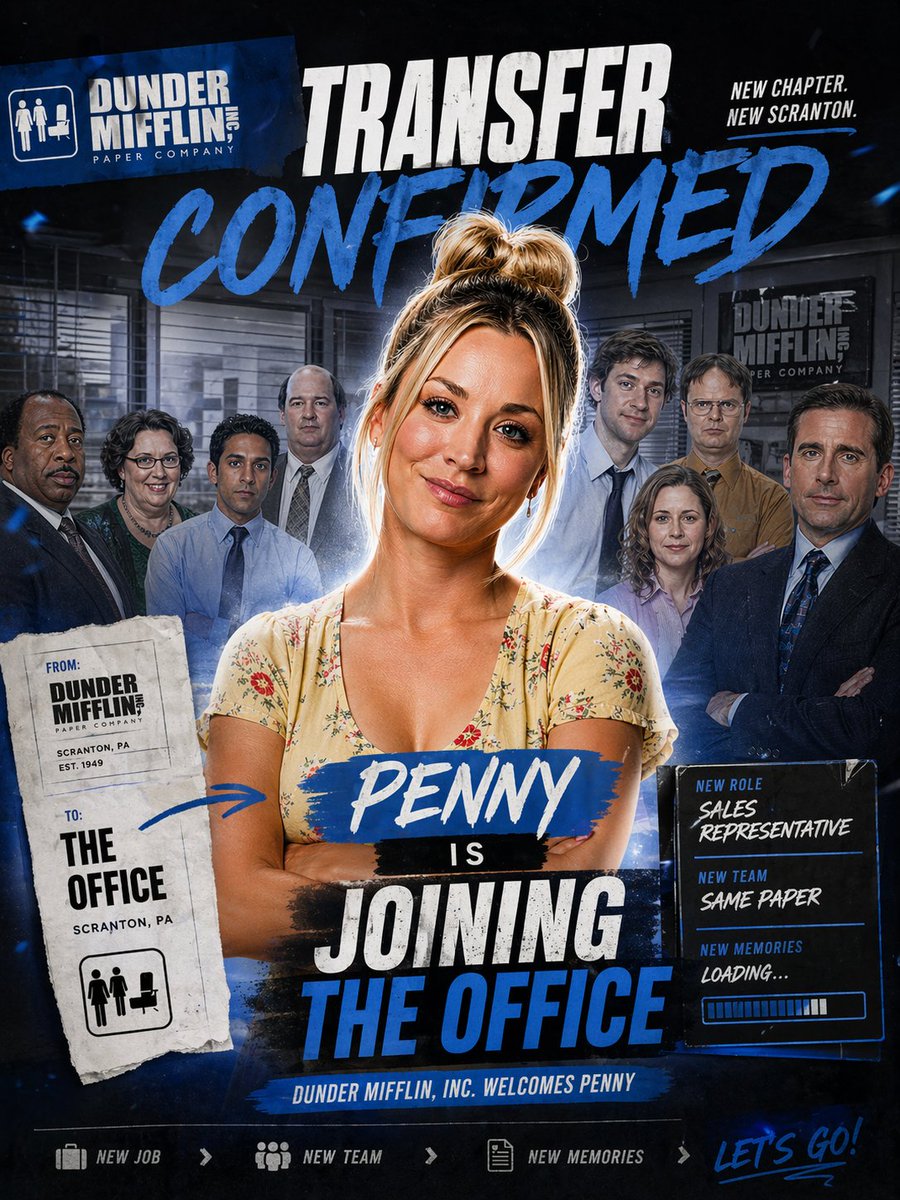
Plakat z informacją o przeniesieniu biura
Odważny plakat w stylu telewizyjnym, zapowiadający dołączenie nowej postaci do zespołu biurowego, idealny do edycji przez fanów, parodii promocyjnych lub grafik przedstawiających obsadę.
To jest przykładowy przykład GPT Image 2 dla Grafika i plakat . Skorzystaj z poniższego przykładu gotowego do skopiowania, aby wygenerować podobne materiały wizualne i sprawdź atrybucję Awesome GPT Image 2 Prompts oraz prawa do użytku komercyjnego przed ponownym wykorzystaniem.
Free 1K preview
Generate one preview image instantly, no sign-up required.
Free text preview doesn’t preserve reference-image consistency.
Opis
Monit o przygotowanie do kopiowania
Design a dramatic square promotional poster in the style of a TV sitcom cast transfer announcement, with a dark navy and black office-themed background, gritty sports-poster energy, bold blue paint strokes, white distressed typography, and layered collage composition. At the center, place a confident woman named {argument name="character name" default="Penny"} standing from the waist up with arms crossed, wearing a light cream floral V-neck dress, messy blonde hair in a high bun, softly rim-lit with a subtle glow around her silhouette. Behind her, show exactly 8 office coworkers arranged as a blurred ensemble cast in staggered rows inside a corporate office interior with blinds, desks, and framed company signage; keep them secondary and slightly shadowed so the central woman dominates the composition. At the top left, include a tilted blue company logo block reading "DUNDER MIFFLIN INC. PAPER COMPANY" with a small office icon. Across the top center, add a huge distressed white headline "TRANSFER" and beneath it an even larger blue brush-script word "CONFIRMED". At the top right, add the small stacked slogan "NEW CHAPTER. NEW SCRANTON." On the left side, place a torn-paper transfer slip with a stamped, photocopied look; it should contain exactly 2 labeled sections, "FROM:" with "DUNDER MIFFLIN PAPER COMPANY, SCRANTON, PA, EST. 1949" and "TO:" with "THE OFFICE, SCRANTON, PA", plus a small office icon at the bottom. Add a hand-drawn blue arrow from this slip pointing toward the central woman. Across the woman's torso, place a blue paint-stroke nameplate with "{argument name="character name" default="Penny"}" in white script, followed by a small black strip with "IS", then a large stacked headline in distressed white and blue block text reading "JOINING THE OFFICE". On the right side, add a glowing dark info panel with exactly 3 labeled lines: "NEW ROLE" with "{argument name="job title" default="SALES REPRESENTATIVE"}", "NEW TEAM" with "{argument name="team tagline" default="SAME PAPER"}", and "NEW MEMORIES" with "LOADING...", plus a horizontal progress bar beneath. Along the bottom center, include a narrow blue banner reading "DUNDER MIFFLIN, INC. WELCOMES {argument name="character name" default="Penny"}". At the very bottom, create a footer strip with exactly 4 elements: a briefcase icon and "NEW JOB", a team icon and "NEW TEAM", a document icon and "NEW MEMORIES", and on the far right a handwritten blue script phrase "{argument name="footer text" default="LET'S GO!"}". Use a high-contrast blue-white-black palette, cinematic compositing, subtle dust and texture overlays, energetic paint smears, and a premium fan-edit social media announcement aesthetic.Zmienne monitujące
Edytowalne symbole zastępcze argumentów znalezione w monicie, wraz z ich wartościami domyślnymi.
Best for
- - Grafika i plakat visual exploration
- - Image generation and reference-image edits
- - Reusable briefs that keep source attribution visible
Change these parts
- - Subject, product, character, or scene
- - Aspect ratio, camera, lighting, and background
- - Brand, text, color, and output constraints
Recommended model and settings
- - Model: gpt-image-2
- - Input mode: Obraz na obraz
- - Aspect ratio: source
- - Commercial status: review original source
How to use this prompt
- 1. Copy the prompt and preserve its structure for the first test.
- 2. Replace the subject, context, and publishing channel.
- 3. Change one camera, lighting, or style variable per iteration.
- 4. Inspect the output, source, text, and rights before reuse.
Limitations, source, and reuse cautions
- - Generated output is an editable draft, not factual, legal, or rights evidence.
- - Review the linked source, people, brands, logos, text, and third-party media before commercial use.
Więcej przypadków w tej kategorii
Priorytety według kategorii, zgodności trybu wprowadzania, jakości i niższego ryzyka.






Ponowne wykorzystanie i źródło notatek
Użyj tego monitu bezpiecznie po zapoznaniu się ze sprawą.
- 1.Skopiuj monit lub otwórz go bezpośrednio w Dovoo za pomocą przycisku generowania.
- 2.Dostosuj zmienne, proporcje obrazu i obrazy referencyjne do własnego przypadku użycia.
- 3.Przed publikacją lub płatnym wykorzystaniem należy sprawdzić prawa autorskie do źródła, wymogi dotyczące atrybucji oraz ryzyko związane z marką lub podobizną.