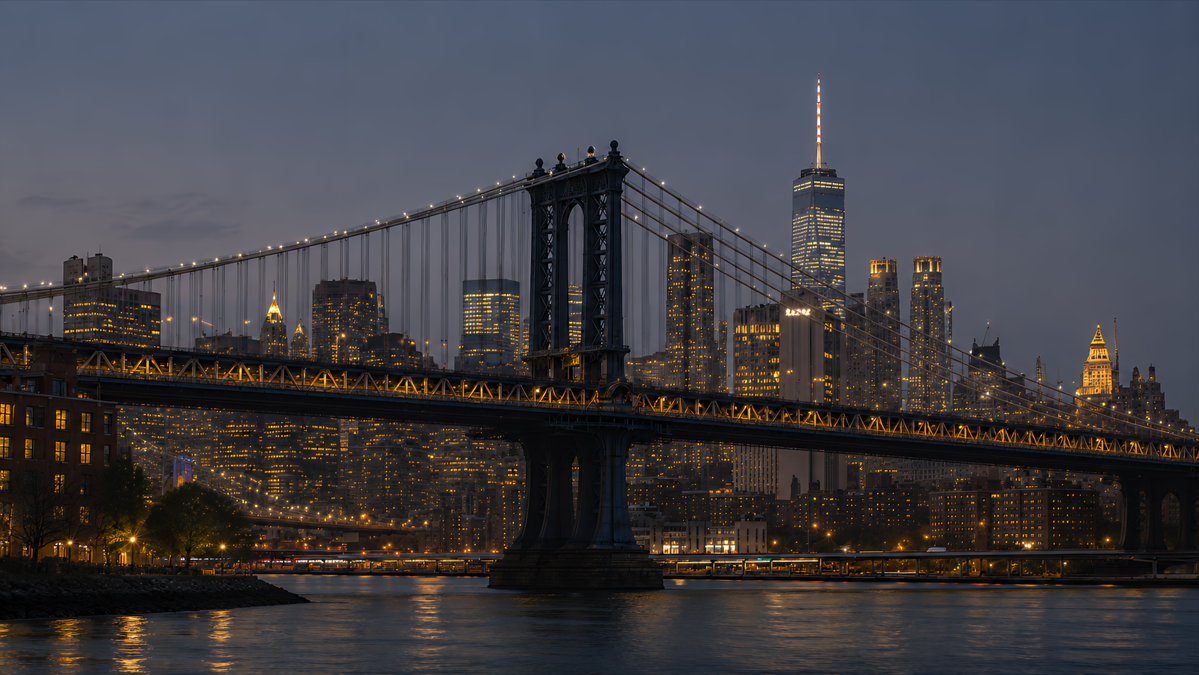
NYC Bridge Blue Hour Wallpaper
Creates a cinematic 16:9 photorealistic New York desktop wallpaper by transforming a skyline reference into a Manhattan Bridge blue-hour waterfront scene.
To jest przykładowy przykład GPT Image 2 dla Krajobraz i przyroda . Skorzystaj z poniższego przykładu gotowego do skopiowania, aby wygenerować podobne materiały wizualne i sprawdź atrybucję Awesome GPT Image 2 Prompts oraz prawa do użytku komercyjnego przed ponownym wykorzystaniem.
Potrzebujesz pełnego zestawu podpowiedzi? Użyj Krajobraz i przyroda aby uzyskać więcej powiązanych przykładów, odwiedź centrum tematyczne lub otwórz GPT Image 2 szybki katalog aby zobaczyć pełny przykładowy indeks, struktury wielokrotnego użytku i informacje o źródle.
Free 1K preview
Generate one preview image instantly, no sign-up required.
1007/4000
Opis
Monit o przygotowanie do kopiowania
Using the provided New York skyline reference as the visual and lighting base, create a {argument name="resolution target" default="4K desktop wallpaper"} in a wide 16:9 composition. Change the viewpoint to a waterfront scene featuring the Manhattan Bridge spanning across the foreground, with its dark steel towers, suspension cables, and warm string lights clearly visible. Replace the original Empire State Building-centered skyline with a Lower Manhattan skyline in the background, including One World Trade Center rising prominently on the right side. Shift the mood to {argument name="time of day" default="blue hour after sunset"}: a deep muted blue-gray sky, glowing office windows, warm amber bridge lights, and soft reflections on the river. Add a calm East River foreground with subtle ripples, shoreline silhouettes, and realistic city haze for depth. Style should be photorealistic, cinematic, crisp, high-detail, polished for wallpaper use, with no people, no text, no logos, and no watermark.Zmienne monitujące
Edytowalne symbole zastępcze argumentów znalezione w monicie, wraz z ich wartościami domyślnymi.
Zmienny
resolution target
Domyślny
4K desktop wallpaper
Zmienny
time of day
Domyślny
blue hour after sunset
Best for
- - Krajobraz i przyroda visual exploration
- - Image generation and reference-image edits
- - Reusable briefs that keep source attribution visible
Change these parts
- - Subject, product, character, or scene
- - Aspect ratio, camera, lighting, and background
- - Brand, text, color, and output constraints
Recommended model and settings
- - Model: gpt-image-2
- - Input mode: Tekst na obraz
- - Aspect ratio: source
- - Commercial status: review original source
How to use this prompt
- 1. Copy the prompt and preserve its structure for the first test.
- 2. Replace the subject, context, and publishing channel.
- 3. Change one camera, lighting, or style variable per iteration.
- 4. Inspect the output, source, text, and rights before reuse.
Limitations, source, and reuse cautions
- - Generated output is an editable draft, not factual, legal, or rights evidence.
- - Review the linked source, people, brands, logos, text, and third-party media before commercial use.
Zaimportowano z Awesome GPT Image 2 Prompts . Wymagane jest podanie źródła. Status do użytku komercyjnego to allowed ; przed płatnym użyciem sprawdź prawa autorskie do źródła.
Więcej przypadków w tej kategorii
Priorytety według kategorii, zgodności trybu wprowadzania, jakości i niższego ryzyka.

MotoGP POV Cornering Shot
Tekst na obraz

Street Selfie with Cat in Matching Cap
Tekst na obraz

Orange Rooftop Fashion Photo Prompt
Tekst na obraz

GPT Image 2 Real-Life Character Street Snap
Tekst na obraz

Luxury Travel Fashion Portrait Prompt
Tekst na obraz

Gray Denim Lace-Up Top Prompt for GPT Image 2
Tekst na obraz
Ponowne wykorzystanie i źródło notatek
Użyj tego monitu bezpiecznie po zapoznaniu się ze sprawą.
- 1.Skopiuj monit lub otwórz go bezpośrednio w Dovoo za pomocą przycisku generowania.
- 2.Dostosuj zmienne, proporcje obrazu i obrazy referencyjne do własnego przypadku użycia.
- 3.Przed publikacją lub płatnym wykorzystaniem należy sprawdzić prawa autorskie do źródła, wymogi dotyczące atrybucji oraz ryzyko związane z marką lub podobizną.