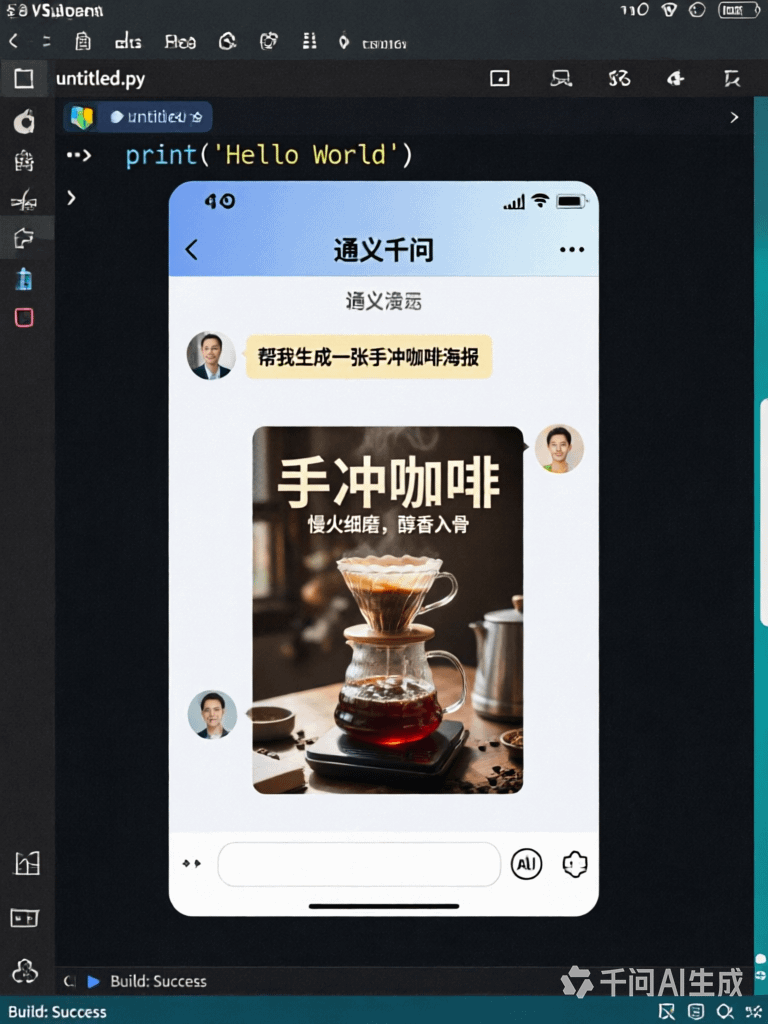
Nested Picture-in-Picture Software UI
A complex prompt used to test the rendering depth and detail of GPT Image 2, featuring a software editor nested within a chat app and artwork.
To jest przykładowy przykład GPT Image 2 dla Inna inspiracja . Skorzystaj z poniższego przykładu gotowego do skopiowania, aby wygenerować podobne materiały wizualne i sprawdź atrybucję Awesome GPT Image 2 Prompts oraz prawa do użytku komercyjnego przed ponownym wykorzystaniem.
Potrzebujesz pełnego zestawu podpowiedzi? Użyj Inna inspiracja aby uzyskać więcej powiązanych przykładów, odwiedź centrum tematyczne lub otwórz GPT Image 2 szybki katalog aby zobaczyć pełny przykładowy indeks, struktury wielokrotnego użytku i informacje o źródle.
Free 1K preview
Generate one preview image instantly, no sign-up required.
602/4000
Opis
Monit o przygotowanie do kopiowania
Generate a 'picture-in-picture' image with visual depth. The outermost layer is a realistic {argument name="programming interface" default="VSCode programming interface"}, nested with a {argument name="app name" default="Qwen App"} chat interface. In the chat, I am sending a message saying: '{argument name="request content" default="help me generate a hand-brewed coffee poster"}'. The app replies with an exquisite coffee poster, which is also clearly displayed in the chat interface. Each UI layer must maintain realistic style and detail, with clear micro-details like time digits and button text.Zmienne monitujące
Edytowalne symbole zastępcze argumentów znalezione w monicie, wraz z ich wartościami domyślnymi.
Zmienny
programming interface
Domyślny
VSCode programming interface
Zmienny
app name
Domyślny
Qwen App
Zmienny
request content
Domyślny
help me generate a hand-brewed coffee poster
Best for
- - Inna inspiracja visual exploration
- - Image generation and reference-image edits
- - Reusable briefs that keep source attribution visible
Change these parts
- - Subject, product, character, or scene
- - Aspect ratio, camera, lighting, and background
- - Brand, text, color, and output constraints
Recommended model and settings
- - Model: gpt-image-2
- - Input mode: Tekst na obraz
- - Aspect ratio: source
- - Commercial status: review original source
How to use this prompt
- 1. Copy the prompt and preserve its structure for the first test.
- 2. Replace the subject, context, and publishing channel.
- 3. Change one camera, lighting, or style variable per iteration.
- 4. Inspect the output, source, text, and rights before reuse.
Limitations, source, and reuse cautions
- - Generated output is an editable draft, not factual, legal, or rights evidence.
- - Review the linked source, people, brands, logos, text, and third-party media before commercial use.
Zaimportowano z Awesome GPT Image 2 Prompts . Wymagane jest podanie źródła. Status do użytku komercyjnego to allowed ; przed płatnym użyciem sprawdź prawa autorskie do źródła.
Więcej przypadków w tej kategorii
Priorytety według kategorii, zgodności trybu wprowadzania, jakości i niższego ryzyka.






Ponowne wykorzystanie i źródło notatek
Użyj tego monitu bezpiecznie po zapoznaniu się ze sprawą.
- 1.Skopiuj monit lub otwórz go bezpośrednio w Dovoo za pomocą przycisku generowania.
- 2.Dostosuj zmienne, proporcje obrazu i obrazy referencyjne do własnego przypadku użycia.
- 3.Przed publikacją lub płatnym wykorzystaniem należy sprawdzić prawa autorskie do źródła, wymogi dotyczące atrybucji oraz ryzyko związane z marką lub podobizną.