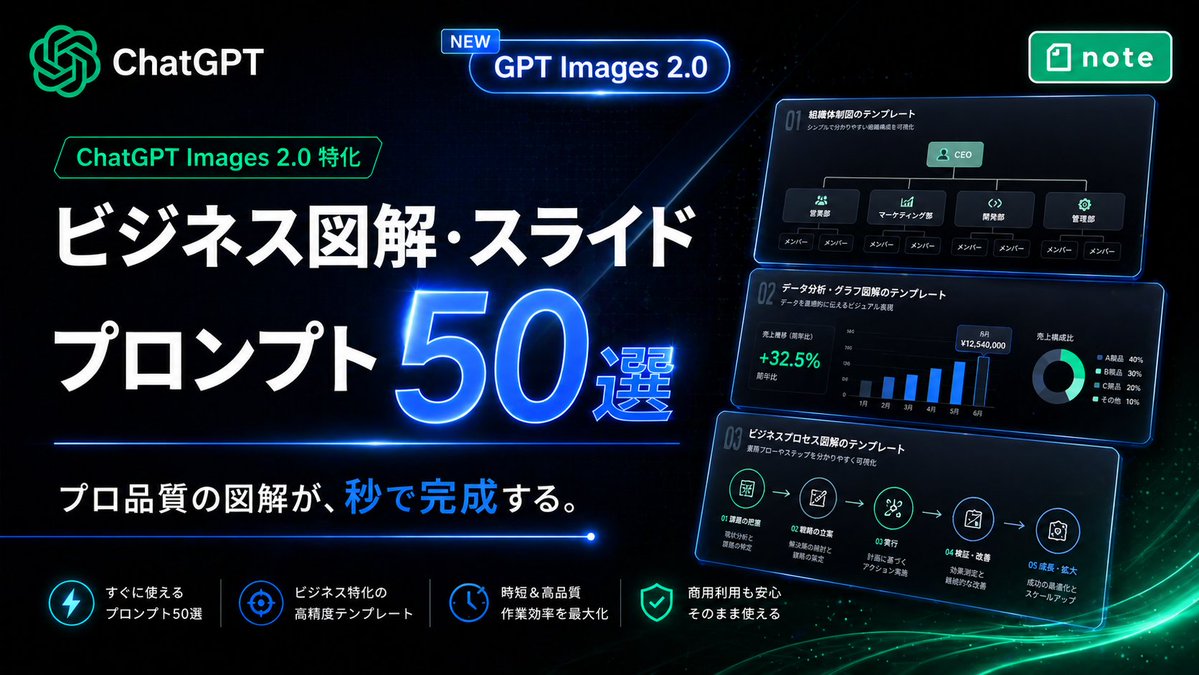
Neonowa japońska sztuczna inteligencja z banerem promocyjnym
Futurystyczny baner promocyjny w stylu japońskiej strony docelowej, służący do sprzedaży szablonów obrazów ChatGPT do tworzenia diagramów biznesowych, slajdów i infografik.
To jest przykładowy przykład GPT Image 2 dla Produkt i handel . Skorzystaj z poniższego przykładu gotowego do skopiowania, aby wygenerować podobne materiały wizualne i sprawdź atrybucję Awesome GPT Image 2 Prompts oraz prawa do użytku komercyjnego przed ponownym wykorzystaniem.
Potrzebujesz pełnego zestawu podpowiedzi? Użyj Produkt i handel aby uzyskać więcej powiązanych przykładów, odwiedź centrum tematyczne lub otwórz GPT Image 2 szybki katalog aby zobaczyć pełny przykładowy indeks, struktury wielokrotnego użytku i informacje o źródle.
Free 1K preview
Generate one preview image instantly, no sign-up required.
2957/4000
Opis
Monit o przygotowanie do kopiowania
Create a high-impact Japanese promotional hero banner for a digital product about business infographic and slide prompts, in a futuristic neon tech style. Use a wide 16:9 composition with a deep black background, subtle dark blue grid texture, glowing blue light streaks, and soft green energy waves sweeping across the bottom right. The overall look should feel premium, cyber-luminous, modern SaaS marketing, with crisp contrast and polished UI lighting.

Place the ChatGPT logo and the word "ChatGPT" in the top left, glowing in green and white. Near the upper center, add a rounded glowing blue capsule badge with a small tag that says "NEW" and main text "GPT Images 2.0". In the top right, place a green rounded rectangular app-style badge with the note logo and the word "note".

On the left half, build the main headline stack in Japanese. Add a small green outlined label reading "ChatGPT Images 2.0 特化" above the headline. Then place a very large bold white headline on two lines: "ビジネス図解・スライド" and "プロンプト". Next to the second line, place an oversized glowing electric-blue number "50" with a bright neon rim light and the smaller text "選" attached to its lower right. Below the headline, add a thin horizontal blue neon divider line. Under it, place the subheadline in Japanese: "プロ品質の図解が、秒で完成する。" with the character group "秒で" highlighted in bright blue while the rest remains white.

On the right half, show 3 stacked floating dark UI cards with blue neon outlines, each slightly tilted and glowing, like business slide templates preview thumbnails. Count exactly 3 cards. The top card should show an organization chart template with the title "01 組織体制図のテンプレート", a small subtitle line, a CEO box at top, 4 department boxes beneath it, and 8 member boxes total along the bottom row. The middle card should show a data-analysis dashboard template titled "01 データ分析・グラフ図解のテンプレート", with a green percentage "+32.5%", a monthly vertical bar chart with 6 bars labeled from 1月 to 6月, and a donut chart legend with exactly 4 items. The bottom card should show a business process flow template titled "01 ビジネスプロセス図解のテンプレート", with a 5-step horizontal icon flow connected by arrows and small Japanese labels under each step.

Along the bottom, create a row of exactly 4 feature items separated by thin vertical dividers. Each feature item should have a glowing circular icon and two-line Japanese text in white. The 4 features are: "すぐに使える プロンプト50選", "ビジネス特化の 高精度テンプレート", "時短&高品質 作業効率を最大化", and "商用利用も安心 そのまま使える". Use icon styles resembling lightning, target/crosshair, clock, and shield respectively.

Typography should be bold, geometric sans-serif, with extremely large Japanese headline text, clean alignment, and strong hierarchy. Emphasize blue and green neon glows, glossy reflections, luminous edges, and a sleek conversion-focused landing-page aesthetic. No people, no photography, only graphic design, UI cards, icons, and Japanese marketing text.
Best for
- - Produkt i handel visual exploration
- - Image generation and reference-image edits
- - Reusable briefs that keep source attribution visible
Change these parts
- - Subject, product, character, or scene
- - Aspect ratio, camera, lighting, and background
- - Brand, text, color, and output constraints
Recommended model and settings
- - Model: gpt-image-2
- - Input mode: Tekst na obraz
- - Aspect ratio: source
- - Commercial status: review original source
How to use this prompt
- 1. Copy the prompt and preserve its structure for the first test.
- 2. Replace the subject, context, and publishing channel.
- 3. Change one camera, lighting, or style variable per iteration.
- 4. Inspect the output, source, text, and rights before reuse.
Limitations, source, and reuse cautions
- - Generated output is an editable draft, not factual, legal, or rights evidence.
- - Review the linked source, people, brands, logos, text, and third-party media before commercial use.
Zaimportowano z Awesome GPT Image 2 Prompts . Wymagane jest podanie źródła. Status do użytku komercyjnego to allowed ; przed płatnym użyciem sprawdź prawa autorskie do źródła.
Więcej przypadków w tej kategorii
Priorytety według kategorii, zgodności trybu wprowadzania, jakości i niższego ryzyka.






Ponowne wykorzystanie i źródło notatek
Użyj tego monitu bezpiecznie po zapoznaniu się ze sprawą.
- 1.Skopiuj monit lub otwórz go bezpośrednio w Dovoo za pomocą przycisku generowania.
- 2.Dostosuj zmienne, proporcje obrazu i obrazy referencyjne do własnego przypadku użycia.
- 3.Przed publikacją lub płatnym wykorzystaniem należy sprawdzić prawa autorskie do źródła, wymogi dotyczące atrybucji oraz ryzyko związane z marką lub podobizną.