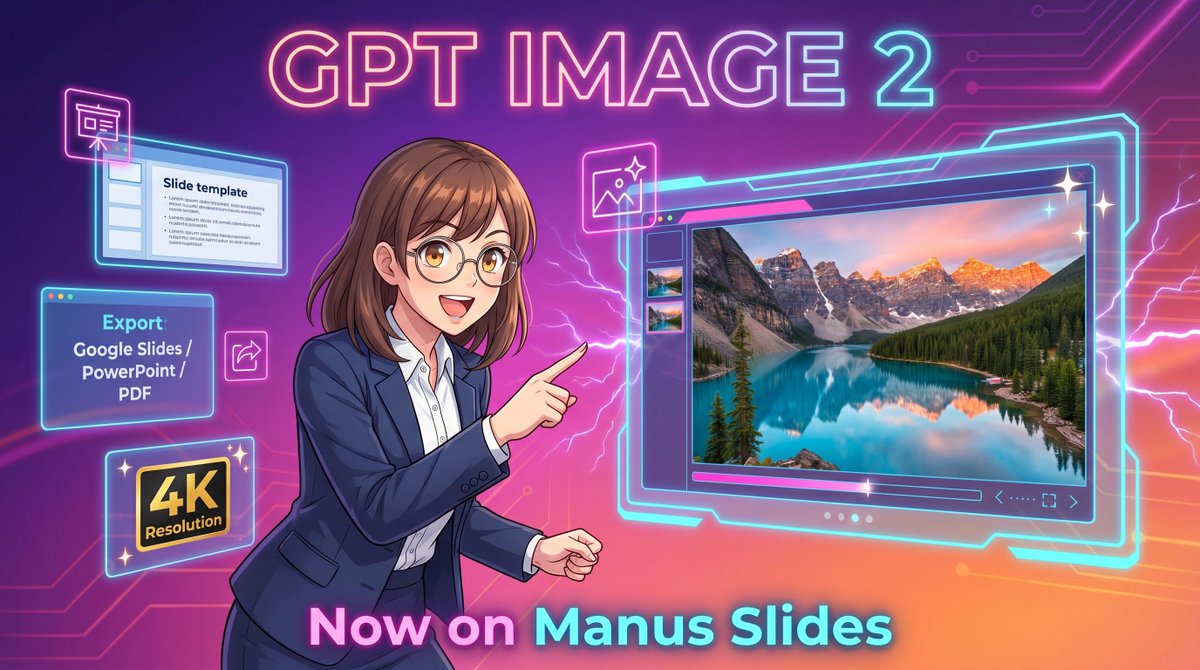
Plakat promocyjny Neon GPT Image 2
Ten monit generuje futurystyczny baner promocyjny w stylu anime, przeznaczony do generowania obrazów przez sztuczną inteligencję w oprogramowaniu do prezentacji. Idealny do ogłaszania produktów i marketingu w mediach społecznościowych.
To jest przykładowy przykład GPT Image 2 dla Grafika i plakat . Skorzystaj z poniższego przykładu gotowego do skopiowania, aby wygenerować podobne materiały wizualne i sprawdź atrybucję Awesome GPT Image 2 Prompts oraz prawa do użytku komercyjnego przed ponownym wykorzystaniem.
Free 1K preview
Generate one preview image instantly, no sign-up required.
Opis
Monit o przygotowanie do kopiowania
A vibrant futuristic promotional illustration in a wide 16:9 composition, styled like polished anime-tech advertising art. The background is a glowing purple-to-pink-to-orange gradient with neon circuit traces running across the top right and left edges, plus electric lightning effects behind the character and around the interface elements. At the top center, place large luminous headline text reading {argument name="headline text" default="GPT IMAGE 2"} in a bold rounded sans-serif font with a pink, cyan, and violet neon glow. In the center-left foreground, show a half-body anime-style businesswoman with {argument name="hair color" default="medium brown"} shoulder-length hair with soft bangs and slightly curled ends, wearing thin glasses, a navy business suit, and a white button-up shirt. Show every face clearly with natural, detailed facial features, but her pose is energetic and confident: she faces right and points with her right index finger toward a large floating software window. On the right half of the image, show a large glowing futuristic image-generation interface outlined in cyan neon, with a main preview panel displaying a highly detailed 4K photoreal mountain lake landscape at sunset: turquoise water, evergreen forest, dramatic rocky peaks with snow, and warm pink-orange sky reflections. Include 3 small vertical thumbnail previews along the left side of this interface, a slim control bar below the main image, and tiny navigation icons in the lower right of the panel. Around the woman on the left side, add 4 floating neon-outlined feature cards: a top-left slide editor window with the visible title “Slide template” and simple bullet lines, a mid-left export box with the visible text “Export” and “Google Slides / PowerPoint / PDF”, a bottom-left black-and-gold badge reading “4K Resolution”, and a small square image icon near the woman’s pointing hand. Add 3 sparkle stars around the large interface for a glossy premium look. At the bottom center, place large glowing gradient text reading {argument name="bottom text" default="Now on Manus Slides"}. Make the entire scene sleek, high-contrast, glossy, and commercial, with crisp line art, soft cel shading, neon rim lighting, and a clean tech-launch poster aesthetic.Zmienne monitujące
Edytowalne symbole zastępcze argumentów znalezione w monicie, wraz z ich wartościami domyślnymi.
Best for
- - Grafika i plakat visual exploration
- - Image generation and reference-image edits
- - Reusable briefs that keep source attribution visible
Change these parts
- - Subject, product, character, or scene
- - Aspect ratio, camera, lighting, and background
- - Brand, text, color, and output constraints
Recommended model and settings
- - Model: gpt-image-2
- - Input mode: Tekst na obraz
- - Aspect ratio: source
- - Commercial status: review original source
How to use this prompt
- 1. Copy the prompt and preserve its structure for the first test.
- 2. Replace the subject, context, and publishing channel.
- 3. Change one camera, lighting, or style variable per iteration.
- 4. Inspect the output, source, text, and rights before reuse.
Limitations, source, and reuse cautions
- - Generated output is an editable draft, not factual, legal, or rights evidence.
- - Review the linked source, people, brands, logos, text, and third-party media before commercial use.
Więcej przypadków w tej kategorii
Priorytety według kategorii, zgodności trybu wprowadzania, jakości i niższego ryzyka.






Ponowne wykorzystanie i źródło notatek
Użyj tego monitu bezpiecznie po zapoznaniu się ze sprawą.
- 1.Skopiuj monit lub otwórz go bezpośrednio w Dovoo za pomocą przycisku generowania.
- 2.Dostosuj zmienne, proporcje obrazu i obrazy referencyjne do własnego przypadku użycia.
- 3.Przed publikacją lub płatnym wykorzystaniem należy sprawdzić prawa autorskie do źródła, wymogi dotyczące atrybucji oraz ryzyko związane z marką lub podobizną.