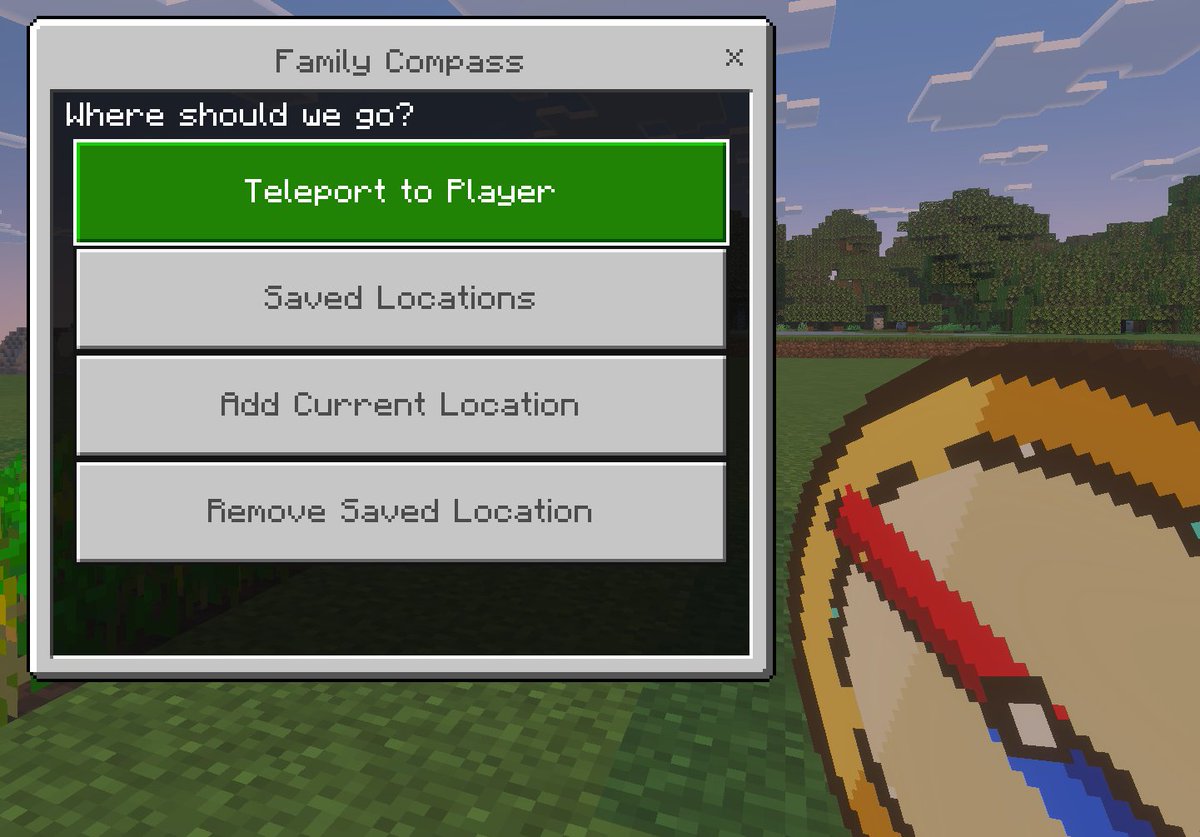
Minecraft Family Compass UI
Makieta zrzutu ekranu z gry Minecraft w stylu Bedrock, zawierająca niestandardowe menu teleportacji i przenośny kompas, idealna do zaprezentowania moda do gry, dodatku lub przyjaznego dzieciom narzędzia nawigacyjnego.
To jest przykładowy przykład GPT Image 2 dla Anime i gry . Skorzystaj z poniższego przykładu gotowego do skopiowania, aby wygenerować podobne materiały wizualne i sprawdź atrybucję Awesome GPT Image 2 Prompts oraz prawa do użytku komercyjnego przed ponownym wykorzystaniem.
Free 1K preview
Generate one preview image instantly, no sign-up required.
Opis
Monit o przygotowanie do kopiowania
A clean in-game screenshot mockup in the visual style of Minecraft Bedrock Edition, showing a custom teleport menu overlay titled {argument name="window title" default="Family Compass"}. The background is a bright outdoor Minecraft scene with blocky grass in the foreground, a line of leafy trees in the middle distance, and a pale blue sky with rectangular clouds. On the left side, a large Bedrock-style UI window dominates the frame, with a light gray panel, darker gray border, and a small close X in the top-right corner. Centered at the top of the window is the title text. Inside the panel, a dark header bar asks {argument name="prompt text" default="Where should we go?"}. Below it are exactly 4 large horizontal rectangular buttons stacked vertically with even spacing. The first button is highlighted bright green with white pixel-style text reading {argument name="primary button" default="Teleport to Player"}. The next 3 buttons are light gray with medium gray pixel-style text reading, in order, "Saved Locations", "Add Current Location", and "Remove Saved Location". In the lower-right foreground, partially cropped and held as if by the player, is an oversized pixel-art compass item with a tan face, gold rim, and a red needle angled diagonally downward, rendered in chunky Minecraft item icon style. Use authentic Minecraft Bedrock UI proportions, pixelated font, crisp blocky edges, soft in-game lighting, and a polished game-screenshot composition with the menu as the main focus.Zmienne monitujące
Edytowalne symbole zastępcze argumentów znalezione w monicie, wraz z ich wartościami domyślnymi.
Best for
- - Anime i gry visual exploration
- - Image generation and reference-image edits
- - Reusable briefs that keep source attribution visible
Change these parts
- - Subject, product, character, or scene
- - Aspect ratio, camera, lighting, and background
- - Brand, text, color, and output constraints
Recommended model and settings
- - Model: gpt-image-2
- - Input mode: Tekst na obraz
- - Aspect ratio: source
- - Commercial status: review original source
How to use this prompt
- 1. Copy the prompt and preserve its structure for the first test.
- 2. Replace the subject, context, and publishing channel.
- 3. Change one camera, lighting, or style variable per iteration.
- 4. Inspect the output, source, text, and rights before reuse.
Limitations, source, and reuse cautions
- - Generated output is an editable draft, not factual, legal, or rights evidence.
- - Review the linked source, people, brands, logos, text, and third-party media before commercial use.
Więcej przypadków w tej kategorii
Priorytety według kategorii, zgodności trybu wprowadzania, jakości i niższego ryzyka.






Ponowne wykorzystanie i źródło notatek
Użyj tego monitu bezpiecznie po zapoznaniu się ze sprawą.
- 1.Skopiuj monit lub otwórz go bezpośrednio w Dovoo za pomocą przycisku generowania.
- 2.Dostosuj zmienne, proporcje obrazu i obrazy referencyjne do własnego przypadku użycia.
- 3.Przed publikacją lub płatnym wykorzystaniem należy sprawdzić prawa autorskie do źródła, wymogi dotyczące atrybucji oraz ryzyko związane z marką lub podobizną.