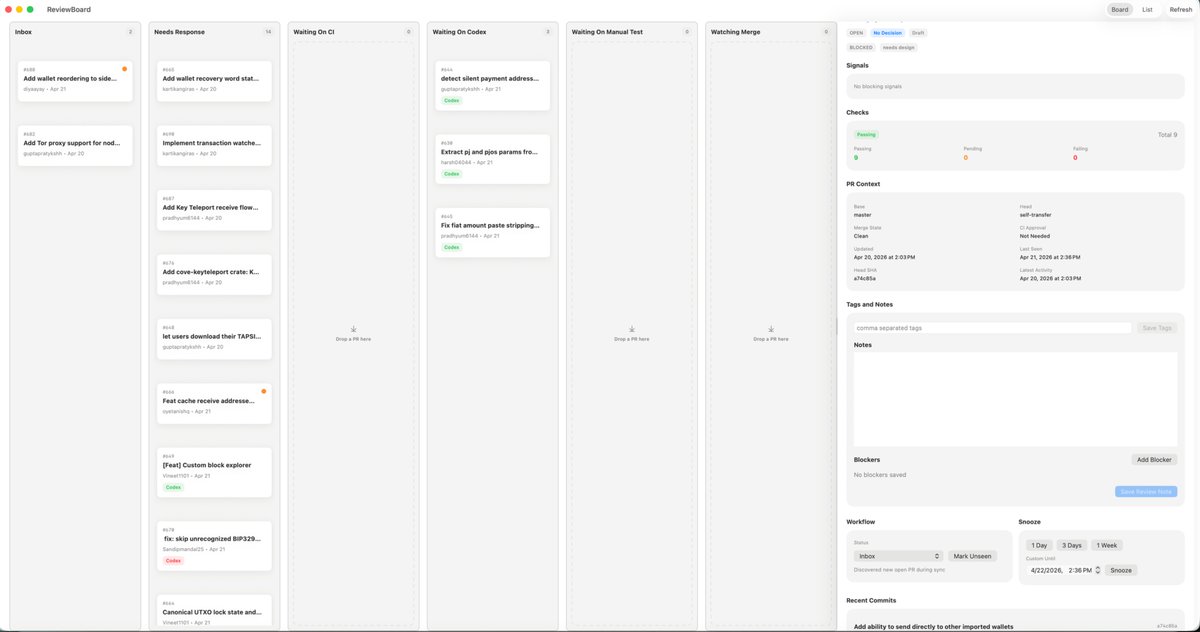
Interfejs użytkownika aplikacji Kanban Review dla systemu macOS
Dopracowany, uproszczony model pulpitu nawigacyjnego w stylu Kanban dla systemu macOS, służący do przeprojektowania aplikacji do zwiększania produktywności lub triażu inżynierskiego.
To jest przykładowy przykład GPT Image 2 dla Produkt i handel . Skorzystaj z poniższego przykładu gotowego do skopiowania, aby wygenerować podobne materiały wizualne i sprawdź atrybucję Awesome GPT Image 2 Prompts oraz prawa do użytku komercyjnego przed ponownym wykorzystaniem.
Potrzebujesz pełnego zestawu podpowiedzi? Użyj Produkt i handel aby uzyskać więcej powiązanych przykładów, odwiedź centrum tematyczne lub otwórz GPT Image 2 szybki katalog aby zobaczyć pełny przykładowy indeks, struktury wielokrotnego użytku i informacje o źródle.
Free 1K preview
Generate one preview image instantly, no sign-up required.
4000/4000
Opis
Monit o przygotowanie do kopiowania
{
  "type": "desktop app UI mockup",
  "platform": "macOS",
  "style": "clean light-mode productivity dashboard, soft gray background, rounded cards, subtle shadows, thin dividers, minimalist modern SaaS aesthetic, dense but calm layout",
  "app": {
    "name": "ReviewBoard",
    "window_controls": "top-left macOS red yellow green traffic lights"
  },
  "layout": {
    "structure": "single wide application window split into 7 vertical columns plus a right inspector panel",
    "sections": [
      {
        "title": "Inbox",
        "position": "far left column",
        "count": 2,
        "labels": [
          "Add wallet reordering to side...",
          "Add Tor proxy support for nod..."
        ]
      },
      {
        "title": "Needs Response",
        "position": "second column from left",
        "count": 7,
        "labels": [
          "Add wallet recovery word sta...",
          "Implement transaction watche...",
          "Add Key Teleport receive flow...",
          "Add cove-keyteleport crate: K...",
          "let users download their TAPSI...",
          "Feat cache receive addresse...",
          "[Feat] Custom block explorer"
        ]
      },
      {
        "title": "Waiting On CI",
        "position": "third column",
        "count": 0,
        "labels": []
      },
      {
        "title": "Waiting On Codex",
        "position": "fourth column",
        "count": 3,
        "labels": [
          "detect silent payment address...",
          "Extract pi and pjs params fro...",
          "Fix fiat amount paste stripping..."
        ]
      },
      {
        "title": "Waiting On Manual Test",
        "position": "fifth column",
        "count": 0,
        "labels": []
      },
      {
        "title": "Watching Merge",
        "position": "sixth column",
        "count": 0,
        "labels": []
      },
      {
        "title": "Inspector",
        "position": "far right sidebar",
        "count": 8,
        "labels": [
          "Signals",
          "Checks",
          "PR Context",
          "Tags and Notes",
          "Notes",
          "Blockers",
          "Workflow",
          "Recent Commits"
        ]
      }
    ],
    "top_right_controls": {
      "count": 3,
      "labels": [
        "Board",
        "List",
        "Refresh"
      ]
    }
  },
  "board": {
    "column_style": "tall pale gray kanban lanes with header labels, tiny count chevrons, and centered empty-state drop targets in empty lanes",
    "cards": {
      "shape": "small white rounded rectangles with faint shadow and thin border",
      "metadata": "issue or PR number at top left, bold truncated title, author and date line below, occasional small colored status pill such as green Code or red Codex, some cards with a tiny orange notification dot at top right"
    }
  },
  "inspector": {
    "tabs": {
      "count": 3,
      "labels": [
        "OPEN",
        "NEEDS DESIGN",
        "DRAFT"
      ],
      "active": "NEEDS DESIGN"
    },
    "signals": "empty light gray panel with text indicating no blocking signals",
    "checks": {
      "summary": "horizontal status card with three columns for Passing, Pending, and Failing, plus Total 9 on the right",
      "counts": {
        "Passing": 9,
        "Pending": 0,
        "Failing": 0
      }
    },
    "pr_context": {
      "fields": [
        "Base",
        "Head",
        "Merge State",
        "CI Approval",
        "Clean",
        "Last Need",
        "Updated",
        "Apr 21, 2026 at 2:36 PM",
        "Last Push",
        "Apr 20, 2026 at 2:03 PM",
        "SHA",
        "a7c48b5a"
      ]
    },
    "tags_and_notes": {
      "elements": 3,
      "labels": [
        "comma separated tags",
        "Save Tags",
        "Notes"
      ]
    },
    "blockers": {
      "elements": 3,
      "labels": [
        "No blockers saved",
        "Add Blocker",
        "Save Review Note"
      ]
    },
    "workflow": {
      "groups": 2,
      "labels": [
        "Inbox",
        "Snooze"
      ],
      "buttons": [
        "Mark Unseen",
        "1 Day",
        "3 Days",
        "1 Week",
        "Snooze"
      ]
    },
    "recent_commits": {
      "visible_count": 1,
      "labels": [
        "Add ability to send directly to other imported wallets"
      ]
    }
  },
  "camera": "straight-on full-window screenshot",
  "text_rendering": "tiny crisp UI text, realistic product design presentation",
  "color_palette": {
    "background": "very light warm gray",
    "columns": "light gray",
    "cards": "white",
    "accent": "green active states, pale blue selected tab, orange notification dots, muted black text"
  }
}
Best for
- - Produkt i handel visual exploration
- - Image generation and reference-image edits
- - Reusable briefs that keep source attribution visible
Change these parts
- - Subject, product, character, or scene
- - Aspect ratio, camera, lighting, and background
- - Brand, text, color, and output constraints
Recommended model and settings
- - Model: gpt-image-2
- - Input mode: Tekst na obraz
- - Aspect ratio: source
- - Commercial status: review original source
How to use this prompt
- 1. Copy the prompt and preserve its structure for the first test.
- 2. Replace the subject, context, and publishing channel.
- 3. Change one camera, lighting, or style variable per iteration.
- 4. Inspect the output, source, text, and rights before reuse.
Limitations, source, and reuse cautions
- - Generated output is an editable draft, not factual, legal, or rights evidence.
- - Review the linked source, people, brands, logos, text, and third-party media before commercial use.
Zaimportowano z Awesome GPT Image 2 Prompts . Wymagane jest podanie źródła. Status do użytku komercyjnego to allowed ; przed płatnym użyciem sprawdź prawa autorskie do źródła.
Więcej przypadków w tej kategorii
Priorytety według kategorii, zgodności trybu wprowadzania, jakości i niższego ryzyka.






Ponowne wykorzystanie i źródło notatek
Użyj tego monitu bezpiecznie po zapoznaniu się ze sprawą.
- 1.Skopiuj monit lub otwórz go bezpośrednio w Dovoo za pomocą przycisku generowania.
- 2.Dostosuj zmienne, proporcje obrazu i obrazy referencyjne do własnego przypadku użycia.
- 3.Przed publikacją lub płatnym wykorzystaniem należy sprawdzić prawa autorskie do źródła, wymogi dotyczące atrybucji oraz ryzyko związane z marką lub podobizną.