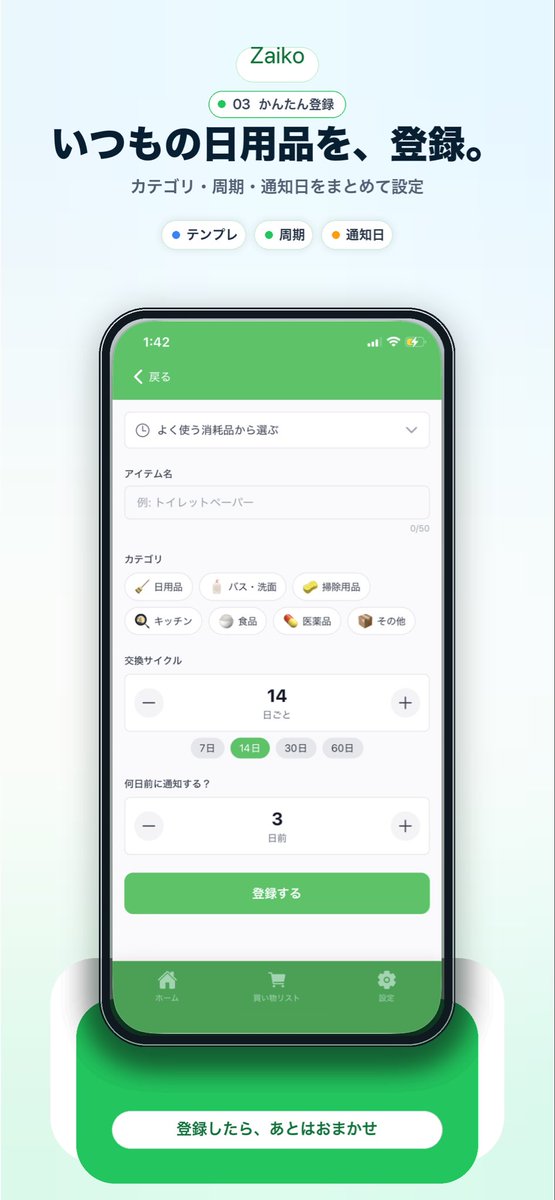
Makieta promocyjna japońskiej aplikacji inwentaryzacyjnej
Generuje dopracowaną wizualizację marketingową w pionie dla japońskiej aplikacji do zarządzania zapasami gospodarstwa domowego z interfejsem użytkownika skierowanym do smartfona, nagłówkiem i mocnym wezwaniem do działania na dole.
To jest przykładowy przykład GPT Image 2 dla Grafika i plakat . Skorzystaj z poniższego przykładu gotowego do skopiowania, aby wygenerować podobne materiały wizualne i sprawdź atrybucję Awesome GPT Image 2 Prompts oraz prawa do użytku komercyjnego przed ponownym wykorzystaniem.
Free 1K preview
Generate one preview image instantly, no sign-up required.
Opis
Monit o przygotowanie do kopiowania
{
  "type": "mobile app promotional screenshot poster",
  "app": {
    "name": "{argument name=\"app name\" default=\"Zaiko\"}",
    "platform": "iPhone-style inventory and household supplies management app",
    "theme": {
      "primary": "fresh green",
      "background": "very light mint gray gradient",
      "accent": "soft white",
      "text": "dark navy"
    }
  },
  "layout": {
    "orientation": "vertical",
    "composition": "single centered smartphone mockup with marketing copy above and CTA card below",
    "sections": [
      {
        "title": "brand header",
        "position": "top center",
        "count": 2,
        "labels": [
          "Zaiko",
          "03 かんたん登録"
        ]
      },
      {
        "title": "hero text",
        "position": "upper center",
        "count": 2,
        "labels": [
          "いつもの日用品を、登録。",
          "カテゴリ・周期・通知日をまとめて設定"
        ]
      },
      {
        "title": "feature chips",
        "position": "below hero text",
        "count": 3,
        "labels": [
          "テンプレ",
          "Cycle",
          "Reminder date"
        ]
      },
      {
        "title": "app screen form",
        "position": "inside phone center",
        "count": 10,
        "labels": [
          "戻る",
          "よく使う消耗品から選ぶ",
          "アイテム名",
          "カテゴリ",
          "交換サイクル",
          "何日前に通知する?",
          "登録する",
          "ホーム",
          "買い物リスト",
          "Settings"
        ]
      },
      {
        "title": "category chips",
        "position": "mid screen inside phone",
        "count": 7,
        "labels": [
          "Daily necessities",
          "バス・洗面",
          "Cleaning supplies",
          "キッチン",
          "Food",
          "Medicine",
          "その他"
        ]
      },
      {
        "title": "cycle options",
        "position": "lower-mid screen inside phone",
        "count": 4,
        "labels": [
          "7 days",
          "14 days",
          "30 days",
          "60 days"
        ]
      },
      {
        "title": "bottom callout",
        "position": "bottom center",
        "count": 1,
        "labels": [
          "登録したら、あとはおまかせ"
        ]
      }
    ]
  },
  "visuals": {
    "style": "clean modern Japanese startup landing page screenshot, polished UI mockup, soft shadows, rounded cards, minimal interface, App Store marketing aesthetic",
    "background": "pale mint vertical canvas with subtle glow behind the device",
    "top_badge": "small rounded white pill with green outline and green text",
    "phone": {
      "color": "black bezel",
      "angle": "front view",
      "size": "large and centered",
      "screen": {
        "header": "green app bar",
        "status_time": "1:42",
        "form_fields": [
          "dropdown selector",
          "text input with placeholder 例: トイレットペーパー",
          "category chip grid",
          "stepper for replacement cycle showing 14",
          "stepper for notification days showing 3",
          "green submit button"
        ],
        "selected_states": [
          "14 days highlighted in green",
          "green primary button",
          "green bottom tab bar"
        ]
      },
      "shadow": "soft diffuse shadow under phone"
    },
    "bottom_card": {
      "shape": "large rounded green rectangle behind a white pill button",
      "text": "{argument name=\"cta text\" default=\"登録したら、あとはおまかせ\"}",
      "effect": "soft glow and layered rounded white side panels"
    }
  },
  "text_customization": {
    "headline": "{argument name=\"headline text\" default=\"いつもの日用品を、登録。\"}",
    "subheadline": "{argument name=\"subheadline text\" default=\"カテゴリ・周期・通知日をまとめて設定\"}"
  },
  "color_customization": {
    "primary": "{argument name=\"primary color\" default=\"fresh green\"}"
  }
}
Zmienne monitujące
Edytowalne symbole zastępcze argumentów znalezione w monicie, wraz z ich wartościami domyślnymi.
Best for
- - Grafika i plakat visual exploration
- - Image generation and reference-image edits
- - Reusable briefs that keep source attribution visible
Change these parts
- - Subject, product, character, or scene
- - Aspect ratio, camera, lighting, and background
- - Brand, text, color, and output constraints
Recommended model and settings
- - Model: gpt-image-2
- - Input mode: Tekst na obraz
- - Aspect ratio: source
- - Commercial status: review original source
How to use this prompt
- 1. Copy the prompt and preserve its structure for the first test.
- 2. Replace the subject, context, and publishing channel.
- 3. Change one camera, lighting, or style variable per iteration.
- 4. Inspect the output, source, text, and rights before reuse.
Limitations, source, and reuse cautions
- - Generated output is an editable draft, not factual, legal, or rights evidence.
- - Review the linked source, people, brands, logos, text, and third-party media before commercial use.
Więcej przypadków w tej kategorii
Priorytety według kategorii, zgodności trybu wprowadzania, jakości i niższego ryzyka.






Ponowne wykorzystanie i źródło notatek
Użyj tego monitu bezpiecznie po zapoznaniu się ze sprawą.
- 1.Skopiuj monit lub otwórz go bezpośrednio w Dovoo za pomocą przycisku generowania.
- 2.Dostosuj zmienne, proporcje obrazu i obrazy referencyjne do własnego przypadku użycia.
- 3.Przed publikacją lub płatnym wykorzystaniem należy sprawdzić prawa autorskie do źródła, wymogi dotyczące atrybucji oraz ryzyko związane z marką lub podobizną.