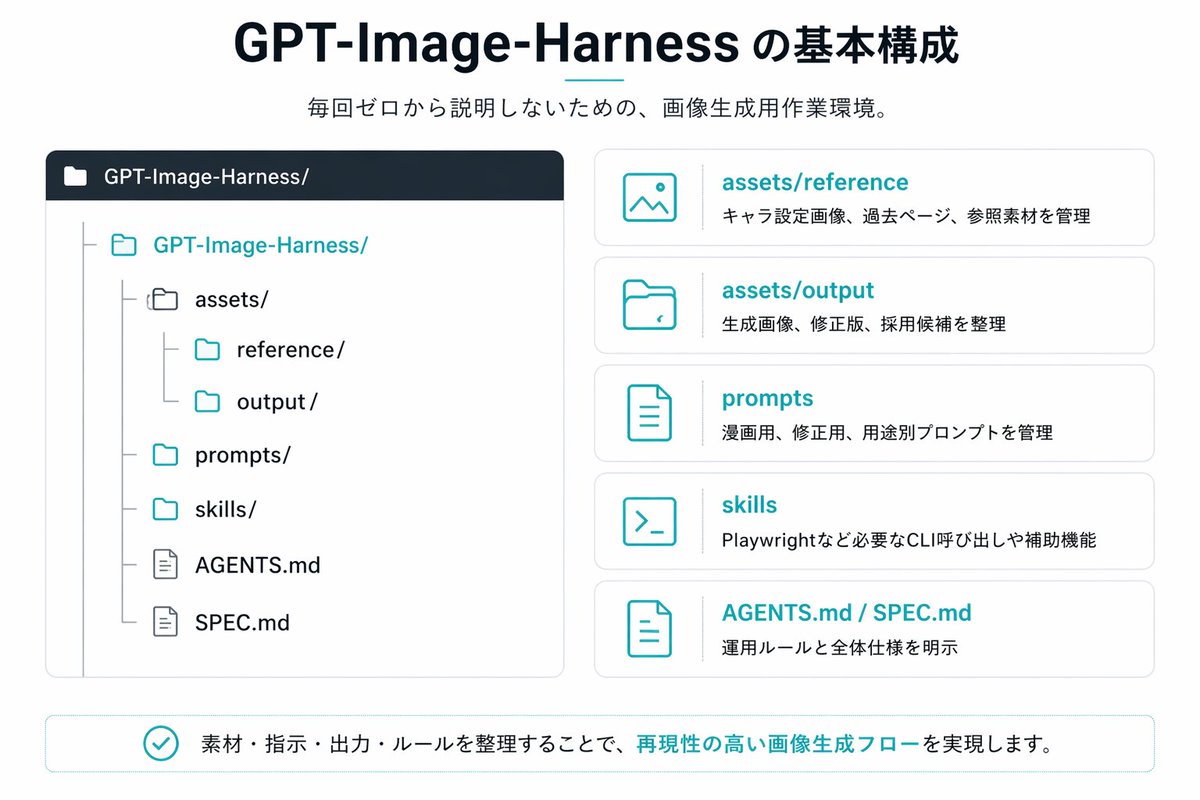
Japońska infografika GPT-Image-Harness
Przejrzysta infografika w stylu japońskiej prezentacji, prezentująca strukturę repozytorium i pięć kart objaśniających, idealna do dokumentowania przepływu pracy związanego z generowaniem obrazów AI lub systemu folderów projektu.
To jest przykładowy przykład GPT Image 2 dla Grafika i plakat . Skorzystaj z poniższego przykładu gotowego do skopiowania, aby wygenerować podobne materiały wizualne i sprawdź atrybucję Awesome GPT Image 2 Prompts oraz prawa do użytku komercyjnego przed ponownym wykorzystaniem.
Free 1K preview
Generate one preview image instantly, no sign-up required.
Opis
Monit o przygotowanie do kopiowania
{
  "type": "Japanese infographic slide",
  "style": "clean flat vector presentation graphic, minimal corporate design, white background, dark navy and teal accent colors, subtle light gray borders, crisp typography, balanced spacing",
  "canvas": {
    "aspect_ratio": "16:9"
  },
  "title_block": {
    "headline": "{argument name=\"headline text\" default=\"GPT-Image-Harness の基本構成\"}",
    "subheadline": "{argument name=\"subheadline text\" default=\"毎回ゼロから説明しないための、画像生成用作業環境。\"}",
    "headline_alignment": "center top",
    "headline_style": "bold sans-serif, very large, dark navy",
    "accent": "short horizontal teal line under headline"
  },
  "layout": {
    "sections": [
      {
        "title": "repository tree",
        "position": "left large panel",
        "count": 1,
        "panel_style": "rounded rectangle with light gray outline and dark navy header bar",
        "header_label": "GPT-Image-Harness/",
        "content": {
          "type": "folder tree",
          "root": "GPT-Image-Harness/",
          "items_count": 8,
          "items": [
            "assets/",
            "reference/",
            "output/",
            "prompts/",
            "skills/",
            "AGENTS.md",
            "SPEC.md"
          ],
          "hierarchy": "assets contains reference and output; root also contains prompts, skills, AGENTS.md, and SPEC.md",
          "icon_style": "outline folder and document icons, teal for active folders, gray for nested guides"
        }
      },
      {
        "title": "feature cards",
        "position": "right stacked column",
        "count": 5,
        "panel_style": "five separate rounded white cards with light gray outline, evenly spaced vertically",
        "labels": [
          "assets/reference",
          "assets/output",
          "prompts",
          "skills",
          "AGENTS.md / SPEC.md"
        ],
        "descriptions": [
          "キャラ設定画像、過去ページ、参照素材を管理",
          "生成画像、修正版、採用候補を整理",
          "漫画用、修正版、用途別プロンプトを管理",
          "Playwrightなど必要なCLI呼び出しや補助機能",
          "運用ルールと全体仕様を明示"
        ],
        "icons": [
          "image icon",
          "folder icon",
          "document icon",
          "terminal icon",
          "document icon"
        ],
        "title_color": "teal",
        "body_color": "dark gray"
      },
      {
        "title": "bottom message",
        "position": "bottom full width banner",
        "count": 1,
        "panel_style": "rounded rectangle with light teal outline",
        "content": {
          "icon": "teal circled checkmark",
          "text": "{argument name=\"footer message\" default=\"素材・指示・出力・ルールを整理することで、再現性の高い画像生成フローを実現します。\"}",
          "emphasis": "the phrase 再現性の高い画像生成フロー is teal and bold"
        }
      }
    ],
    "composition": "title and subtitle centered at top, large repository diagram on left, five explanatory cards on right, summary banner across bottom"
  },
  "text_language": "Japanese",
  "visual_details": {
    "left_panel_header_gradient": "dark navy to slightly lighter navy",
    "folder_tree_line_color": "light gray",
    "teal_hex_approx": "#22B8C7",
    "navy_hex_approx": "#0F2236",
    "background": "very light gray-white"
  }
}
Zmienne monitujące
Edytowalne symbole zastępcze argumentów znalezione w monicie, wraz z ich wartościami domyślnymi.
Best for
- - Grafika i plakat visual exploration
- - Image generation and reference-image edits
- - Reusable briefs that keep source attribution visible
Change these parts
- - Subject, product, character, or scene
- - Aspect ratio, camera, lighting, and background
- - Brand, text, color, and output constraints
Recommended model and settings
- - Model: gpt-image-2
- - Input mode: Tekst na obraz
- - Aspect ratio: source
- - Commercial status: review original source
How to use this prompt
- 1. Copy the prompt and preserve its structure for the first test.
- 2. Replace the subject, context, and publishing channel.
- 3. Change one camera, lighting, or style variable per iteration.
- 4. Inspect the output, source, text, and rights before reuse.
Limitations, source, and reuse cautions
- - Generated output is an editable draft, not factual, legal, or rights evidence.
- - Review the linked source, people, brands, logos, text, and third-party media before commercial use.
Więcej przypadków w tej kategorii
Priorytety według kategorii, zgodności trybu wprowadzania, jakości i niższego ryzyka.






Ponowne wykorzystanie i źródło notatek
Użyj tego monitu bezpiecznie po zapoznaniu się ze sprawą.
- 1.Skopiuj monit lub otwórz go bezpośrednio w Dovoo za pomocą przycisku generowania.
- 2.Dostosuj zmienne, proporcje obrazu i obrazy referencyjne do własnego przypadku użycia.
- 3.Przed publikacją lub płatnym wykorzystaniem należy sprawdzić prawa autorskie do źródła, wymogi dotyczące atrybucji oraz ryzyko związane z marką lub podobizną.