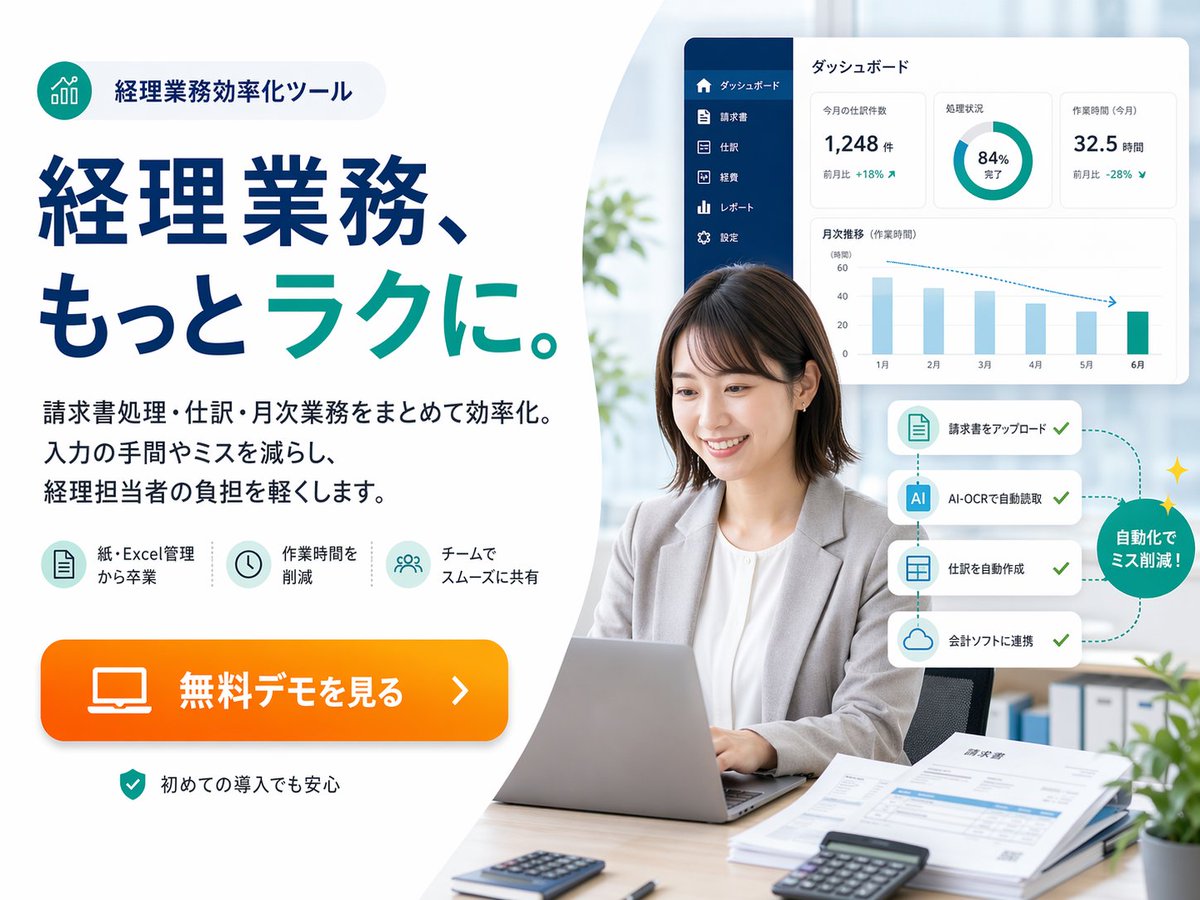
Japoński baner bohatera SaaS dla księgowości
Elegancki baner promocyjny w stylu japońskiej technologii finansowej, promujący narzędzie do automatyzacji księgowości, odpowiedni na strony docelowe, reklamy internetowe i materiały wizualne do marketingu SaaS.
To jest przykładowy przykład GPT Image 2 dla Produkt i handel . Skorzystaj z poniższego przykładu gotowego do skopiowania, aby wygenerować podobne materiały wizualne i sprawdź atrybucję Awesome GPT Image 2 Prompts oraz prawa do użytku komercyjnego przed ponownym wykorzystaniem.
Free 1K preview
Generate one preview image instantly, no sign-up required.
Opis
Monit o przygotowanie do kopiowania
{
  "automation_flow": {
    "callout": "自動化でミス削減!",
    "cards": [
      "請求書をアップロード",
      "AI-OCRで自動読取",
      "仕訳を自動作成",
      "会計ソフトに連携"
    ],
    "count": 4,
    "position": "mid-right beside the subject",
    "style": "four stacked white rounded cards connected by a dotted teal path with checkmarks, ending in a green circular badge with small sparkles"
  },
  "branding": {
    "badge": {
      "icon": "teal circular icon with ascending bar chart line graphic",
      "position": "top-left",
      "shape": "rounded pill with pale gray fill",
      "text": "経理業務効率化ツール"
    },
    "palette": {
      "accent": "bright orange",
      "background": "white and very light gray",
      "primary": "deep navy blue",
      "secondary": "teal green"
    }
  },
  "canvas": {
    "aspect_ratio": "4:3",
    "background": "soft light gray to white with a large curved white shape dividing left text area and right photo area"
  },
  "environment": {
    "background_elements": {
      "count": 4,
      "items": [
        "soft daylight through large window",
        "blurred green plant near center-left background",
        "binders on shelf lower right background",
        "small potted plant in the extreme lower-right corner"
      ]
    },
    "setting": "bright contemporary office"
  },
  "features": {
    "count": 3,
    "items": [
      {
        "icon": "document sheet icon in pale teal circle",
        "label": "紙・Excel管理から卒業"
      },
      {
        "icon": "clock icon in pale teal circle",
        "label": "作業時間を削減"
      },
      {
        "icon": "team/users icon in pale teal circle",
        "label": "チームでスムーズに共有"
      }
    ]
  },
  "layout": {
    "composition": "text-heavy ad on the left, realistic workplace portrait on the right, floating software interface cards above and beside the person",
    "sections": [
      {
        "count": 5,
        "labels": [
          "badge at top",
          "large headline",
          "3-line body copy",
          "3 feature icons",
          "orange CTA button"
        ],
        "position": "left half",
        "title": "left marketing copy area"
      },
      {
        "count": 6,
        "labels": [
          "businesswoman using laptop",
          "dashboard panel",
          "4-step automation cards",
          "green circular callout",
          "desk documents and calculators",
          "blurred office background"
        ],
        "position": "right half",
        "title": "right office photo area"
      }
    ]
  },
  "rendering": "high-resolution commercial ad composite, realistic photo for the person and desk, crisp vector typography, subtle drop shadows, spacious margins, Japanese web banner aesthetics",
  "style": "clean corporate web advertisement, modern fintech branding, bright office photography blended with vector UI overlays, high trust, polished and conversion-focused",
  "subject": {
    "count": 1,
    "desk_items": {
      "count": 5,
      "items": [
        "silver laptop open in front",
        "small calculator near front left",
        "black calculator near front right",
        "stack of papers and invoices on right side",
        "pen near papers"
      ]
    },
    "face_treatment": "Show every face clearly with natural, detailed facial features",
    "person": "Japanese businesswoman in her late 20s to 30s, seated at a desk, medium short dark brown bob haircut, light gray blazer over white blouse, neutral professional expression, hands on laptop keyboard",
    "pose": "front-facing but slightly angled left, sitting upright in an office chair"
  },
  "text": {
    "body": "請求書処理・仕訳・月次業務をまとめて効率化。入力の手間やミスを減らし、経理担当者の負担を軽くします。",
    "cta": "{argument name=\"button text\" default=\"無料デモを見る\"}",
    "headline": "経理業務、もっと{argument name=\"headline emphasis\" default=\"ラク\"}に。",
    "reassurance": "初めての導入でも安心"
  },
  "type": "Japanese SaaS promotional landing-page hero banner",
  "ui_panel": {
    "position": "upper-right floating above the subject",
    "sidebar": {
      "color": "dark navy vertical sidebar",
      "count": 6,
      "labels": [
        "ダッシュボード",
        "Invoice",
        "Entry",
        "Fee",
        "レポート",
        "Settings"
      ]
    },
    "style": "white rounded rectangle card with subtle shadow",
    "title": "ダッシュボード",
    "widgets": {
      "count": 4,
      "items": [
        {
          "delta": "MoM +18%",
          "label": "今月の仕訳数",
          "type": "metric card",
          "value": "1,248 items"
        },
        {
          "label": "Processing progress",
          "type": "donut chart",
          "value": "84% Complete"
        },
        {
          "delta": "MoM -28%",
          "label": "Work Time (This Month)",
          "type": "metric card",
          "value": "32.5 Hours"
        },
        {
          "label": "Monthly Trend (Work Time)",
          "months": [
            "January",
            "February",
            "March",
            "April",
            "May",
            "June"
          ],
          "type": "bar chart"
        }
      ]
    }
  }
}
Zmienne monitujące
Edytowalne symbole zastępcze argumentów znalezione w monicie, wraz z ich wartościami domyślnymi.
Best for
- - Produkt i handel visual exploration
- - Image generation and reference-image edits
- - Reusable briefs that keep source attribution visible
Change these parts
- - Subject, product, character, or scene
- - Aspect ratio, camera, lighting, and background
- - Brand, text, color, and output constraints
Recommended model and settings
- - Model: gpt-image-2
- - Input mode: Tekst na obraz
- - Aspect ratio: source
- - Commercial status: review original source
How to use this prompt
- 1. Copy the prompt and preserve its structure for the first test.
- 2. Replace the subject, context, and publishing channel.
- 3. Change one camera, lighting, or style variable per iteration.
- 4. Inspect the output, source, text, and rights before reuse.
Limitations, source, and reuse cautions
- - Generated output is an editable draft, not factual, legal, or rights evidence.
- - Review the linked source, people, brands, logos, text, and third-party media before commercial use.
Więcej przypadków w tej kategorii
Priorytety według kategorii, zgodności trybu wprowadzania, jakości i niższego ryzyka.






Ponowne wykorzystanie i źródło notatek
Użyj tego monitu bezpiecznie po zapoznaniu się ze sprawą.
- 1.Skopiuj monit lub otwórz go bezpośrednio w Dovoo za pomocą przycisku generowania.
- 2.Dostosuj zmienne, proporcje obrazu i obrazy referencyjne do własnego przypadku użycia.
- 3.Przed publikacją lub płatnym wykorzystaniem należy sprawdzić prawa autorskie do źródła, wymogi dotyczące atrybucji oraz ryzyko związane z marką lub podobizną.