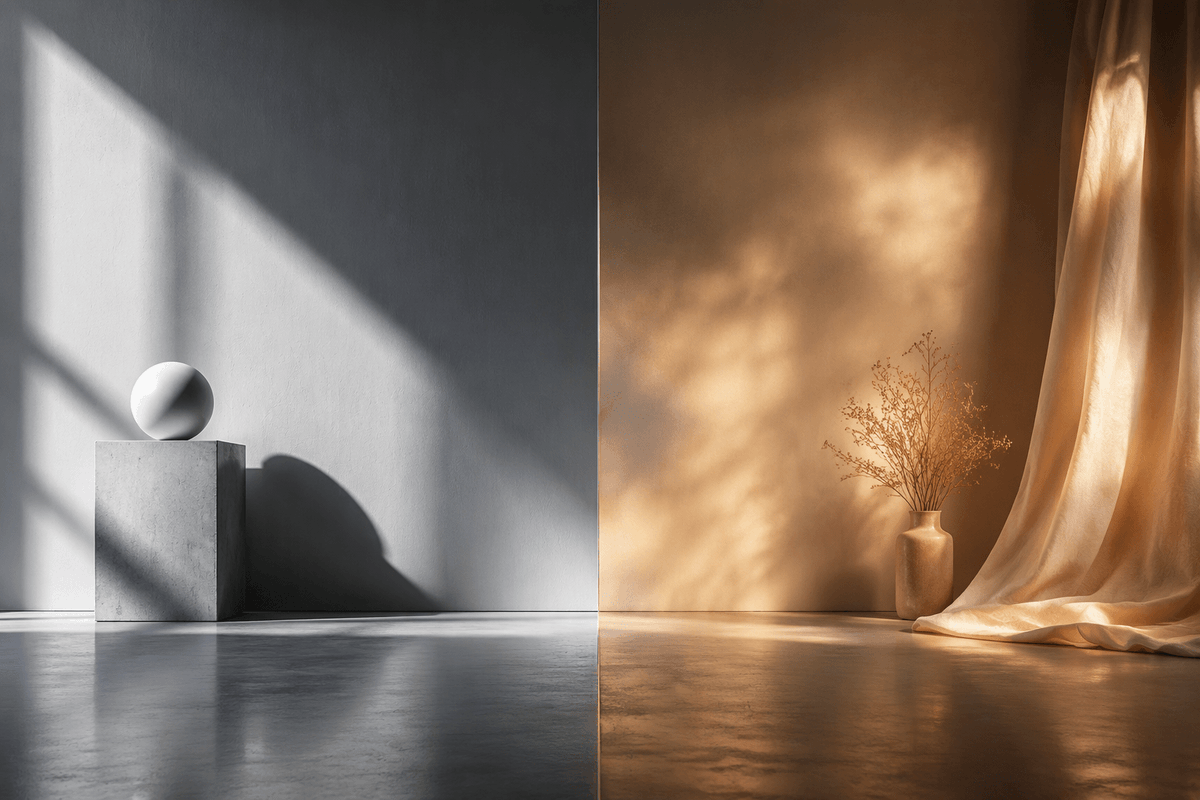
Split-Screen Hard vs Soft Light Interior
A photorealistic side-by-side studio scene comparing crisp cool hard sunlight with warm diffused atmospheric light for cinematic visual studies.
To jest przykładowy przykład GPT Image 2 dla Wnętrza i architektura . Skorzystaj z poniższego przykładu gotowego do skopiowania, aby wygenerować podobne materiały wizualne i sprawdź atrybucję Awesome GPT Image 2 Prompts oraz prawa do użytku komercyjnego przed ponownym wykorzystaniem.
Potrzebujesz pełnego zestawu podpowiedzi? Użyj Wnętrza i architektura aby uzyskać więcej powiązanych przykładów, odwiedź centrum tematyczne lub otwórz GPT Image 2 szybki katalog aby zobaczyć pełny przykładowy indeks, struktury wielokrotnego użytku i informacje o źródle.
Free 1K preview
Generate one preview image instantly, no sign-up required.
1554/4000
Opis
Monit o przygotowanie do kopiowania
Create a photorealistic cinematic split-screen interior still comparing two lighting moods, divided exactly down the vertical center by a thin straight seam. On the left half, show a cool monochrome minimalist studio corner with a smooth gray plaster wall and polished concrete floor; include exactly 2 geometric objects: a square concrete pedestal block near the lower left-center and a matte white sphere resting on top of it. Strong hard sunlight enters from an unseen window at the upper left, casting sharp diagonal window-frame shadows across the wall, the pedestal, and the floor, with a crisp oval shadow from the sphere. On the right half, show a warm amber-toned bohemian corner with a textured brown plaster wall and reflective concrete floor; include exactly 3 main objects: one small ceramic vase on the floor, one delicate bundle of dried branches inside the vase, and one sheer golden curtain hanging from the top right and pooling onto the floor. The right side lighting should be soft, diffused, glowing, and atmospheric, with mottled golden sunlight patterns on the wall and curtain. Use a wide 3:2 horizontal composition, symmetrical comparison layout, low camera height, realistic material textures, subtle floor reflections, no people, no text, no logos. The overall concept is {argument name="comparison theme" default="hard light versus soft light"}, with the left side in {argument name="left color mood" default="cool grayscale minimalism"} and the right side in {argument name="right color mood" default="warm golden ambience"}.Zmienne monitujące
Edytowalne symbole zastępcze argumentów znalezione w monicie, wraz z ich wartościami domyślnymi.
Zmienny
comparison theme
Domyślny
hard light versus soft light
Zmienny
left color mood
Domyślny
cool grayscale minimalism
Zmienny
right color mood
Domyślny
warm golden ambience
Best for
- - Wnętrza i architektura visual exploration
- - Image generation and reference-image edits
- - Reusable briefs that keep source attribution visible
Change these parts
- - Subject, product, character, or scene
- - Aspect ratio, camera, lighting, and background
- - Brand, text, color, and output constraints
Recommended model and settings
- - Model: gpt-image-2
- - Input mode: Tekst na obraz
- - Aspect ratio: source
- - Commercial status: review original source
How to use this prompt
- 1. Copy the prompt and preserve its structure for the first test.
- 2. Replace the subject, context, and publishing channel.
- 3. Change one camera, lighting, or style variable per iteration.
- 4. Inspect the output, source, text, and rights before reuse.
Limitations, source, and reuse cautions
- - Generated output is an editable draft, not factual, legal, or rights evidence.
- - Review the linked source, people, brands, logos, text, and third-party media before commercial use.
Zaimportowano z Awesome GPT Image 2 Prompts . Wymagane jest podanie źródła. Status do użytku komercyjnego to allowed ; przed płatnym użyciem sprawdź prawa autorskie do źródła.
Więcej przypadków w tej kategorii
Priorytety według kategorii, zgodności trybu wprowadzania, jakości i niższego ryzyka.






Ponowne wykorzystanie i źródło notatek
Użyj tego monitu bezpiecznie po zapoznaniu się ze sprawą.
- 1.Skopiuj monit lub otwórz go bezpośrednio w Dovoo za pomocą przycisku generowania.
- 2.Dostosuj zmienne, proporcje obrazu i obrazy referencyjne do własnego przypadku użycia.
- 3.Przed publikacją lub płatnym wykorzystaniem należy sprawdzić prawa autorskie do źródła, wymogi dotyczące atrybucji oraz ryzyko związane z marką lub podobizną.