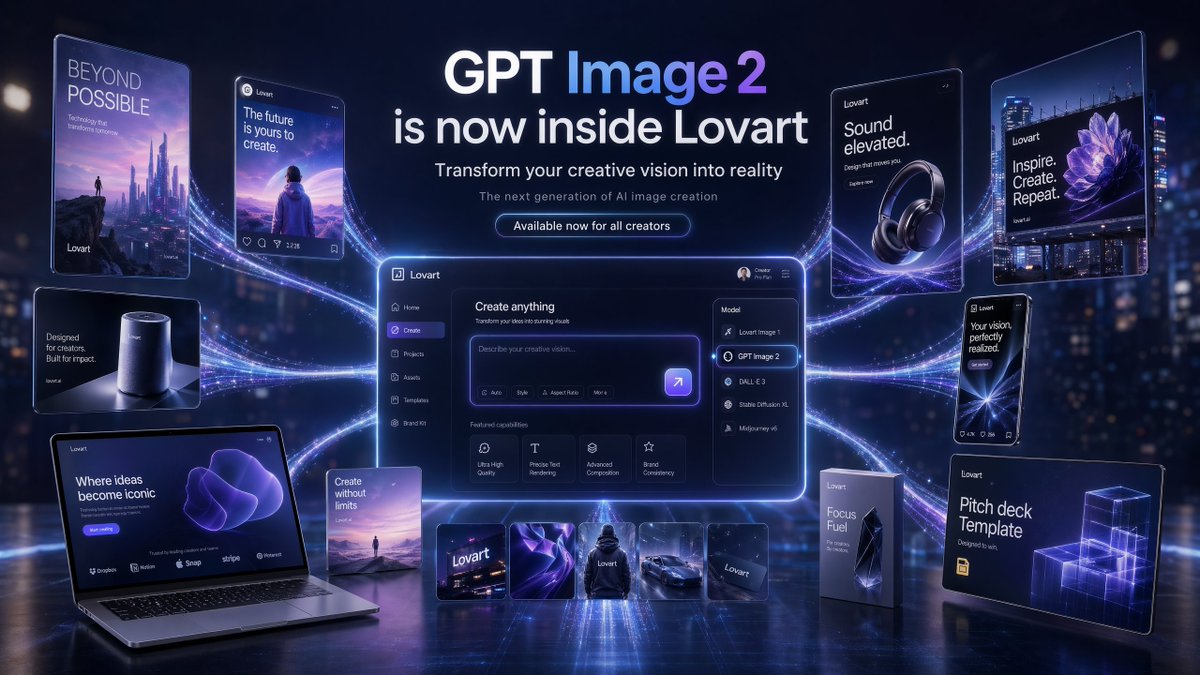
Futurystyczny baner startowy GPT Image 2
Bohater kampanii premium przedstawiający obraz GPT Image 2 w Lovart z centralnym panelem interfejsu użytkownika, wieloma połączonymi makietami promocyjnymi i dopracowanym futurystycznym brandingiem na potrzeby marketingu związanego z wprowadzeniem produktu na rynek.
To jest przykładowy przykład GPT Image 2 dla Produkt i handel . Skorzystaj z poniższego przykładu gotowego do skopiowania, aby wygenerować podobne materiały wizualne i sprawdź atrybucję Awesome GPT Image 2 Prompts oraz prawa do użytku komercyjnego przed ponownym wykorzystaniem.
Ten monit jest przeznaczony dla wielu obrazów referencyjnych. Otworzymy Dovoo z tym monitem i dostępnym obrazem podglądu; przed wygenerowaniem dodamy pozostałe odniesienia w Dovoo.
Free 1K preview
Generate one preview image instantly, no sign-up required.
Free text preview doesn’t preserve reference-image consistency.
Opis
Monit o przygotowanie do kopiowania
{
  "type": "futuristic AI product launch campaign hero banner",
  "style": "high-end 3D advertising composite with cinematic neon lighting, polished UI mockups, floating product cards, and glossy tech presentation aesthetics",
  "theme": {
    "primary colors": [
      "deep navy",
      "electric violet",
      "indigo",
      "white"
    ],
    "mood": "innovative, premium, futuristic, campaign-ready",
    "lighting": "dramatic blue-violet glow, rim lighting, luminous particle trails, soft bloom, reflective floor"
  },
  "canvas": {
    "aspect_ratio": "16:9",
    "background": "dark futuristic city-at-night bokeh with subtle skyscraper lights and atmospheric haze"
  },
  "headline_block": {
    "position": "top center",
    "count": 4,
    "lines": [
      "GPT Image 2",
      "is now inside Lovart",
      "Transform your creative vision into reality",
      "The next generation of AI image creation"
    ],
    "cta": "Available now for all creators",
    "typography": "clean modern sans-serif, bold white headline, smaller white and pale gray subtext, glowing rounded button"
  },
  "layout": {
    "centerpiece": "large glowing desktop app interface floating in the center with purple edge lighting and curved energy trails connecting all surrounding assets",
    "sections": [
      {
        "title": "left floating posters and devices",
        "position": "left side",
        "count": 5,
        "labels": [
          "BEYOND POSSIBLE vertical sci-fi poster with futuristic skyline and tiny figure",
          "social-style card reading 'The future is yours to create.' with a person facing a surreal landscape",
          "small smart speaker product card reading 'Designed for creators. Built for impact.'",
          "open laptop mockup reading 'Where ideas become iconic' with a purple abstract form on screen",
          "small vertical card reading 'Create without limits' with a tiny landscape scene"
        ]
      },
      {
        "title": "center application UI",
        "position": "middle",
        "count": 1,
        "labels": [
          "Lovart create interface with prompt box and model dropdown opened"
        ]
      },
      {
        "title": "model menu items",
        "position": "center-right inside UI",
        "count": 5,
        "labels": [
          "Lovart Image 1",
          "GPT Image 2",
          "DALL·E 3",
          "Stable Diffusion XL",
          "Midjourney v6"
        ]
      },
      {
        "title": "featured capability cards",
        "position": "lower middle inside UI",
        "count": 4,
        "labels": [
          "Ultra High Quality",
          "Precise Text Rendering",
          "Advanced Composition",
          "Brand Consistency"
        ]
      },
      {
        "title": "bottom asset strip",
        "position": "bottom center",
        "count": 5,
        "labels": [
          "Lovart logo card",
          "abstract purple fabric-like visual",
          "black hoodie mockup",
          "sports car render",
          "dark Lovart card"
        ]
      },
      {
        "title": "right floating posters and packages",
        "position": "right side",
        "count": 5,
        "labels": [
          "headphone ad reading 'Sound elevated.'",
          "large billboard-style poster reading 'Inspire. Create. Repeat.' with a purple flower image",
          "phone-style card reading 'Your vision, perfectly realized.'",
          "tall product box reading 'Focus Fuel'",
          "presentation board reading 'Pitch deck Template' with glowing wireframe cubes"
        ]
      }
    ]
  },
  "ui_details": {
    "app_brand": "Lovart",
    "main_panel_title": "Create anything",
    "prompt_placeholder": "Describe your creative vision...",
    "left_sidebar_count": 6,
    "left_sidebar_labels": [
      "Lovart",
      "Home",
      "Create",
      "Projects",
      "Assets",
      "Templates"
    ],
    "top_right_user_label": "Creator Pro Plan"
  },
  "composition": "symmetrical campaign composition, central software dashboard larger than all other elements, connected to surrounding posters and product mockups by multiple flowing luminous ribbons, reflective ground plane beneath all objects, crisp readable text, premium launch announcement aesthetic",
  "quality": "ultra-detailed, sharp typography, realistic reflections, clean interface design, commercial-grade product visualization"
}
Best for
- - Produkt i handel visual exploration
- - Image generation and reference-image edits
- - Reusable briefs that keep source attribution visible
Change these parts
- - Subject, product, character, or scene
- - Aspect ratio, camera, lighting, and background
- - Brand, text, color, and output constraints
Recommended model and settings
- - Model: gpt-image-2
- - Input mode: Wiele obrazów do obrazów
- - Aspect ratio: source
- - Commercial status: review original source
How to use this prompt
- 1. Copy the prompt and preserve its structure for the first test.
- 2. Replace the subject, context, and publishing channel.
- 3. Change one camera, lighting, or style variable per iteration.
- 4. Inspect the output, source, text, and rights before reuse.
Limitations, source, and reuse cautions
- - Generated output is an editable draft, not factual, legal, or rights evidence.
- - Review the linked source, people, brands, logos, text, and third-party media before commercial use.
Więcej przypadków w tej kategorii
Priorytety według kategorii, zgodności trybu wprowadzania, jakości i niższego ryzyka.






Ponowne wykorzystanie i źródło notatek
Użyj tego monitu bezpiecznie po zapoznaniu się ze sprawą.
- 1.Skopiuj monit lub otwórz go bezpośrednio w Dovoo za pomocą przycisku generowania.
- 2.Dostosuj zmienne, proporcje obrazu i obrazy referencyjne do własnego przypadku użycia.
- 3.Przed publikacją lub płatnym wykorzystaniem należy sprawdzić prawa autorskie do źródła, wymogi dotyczące atrybucji oraz ryzyko związane z marką lub podobizną.