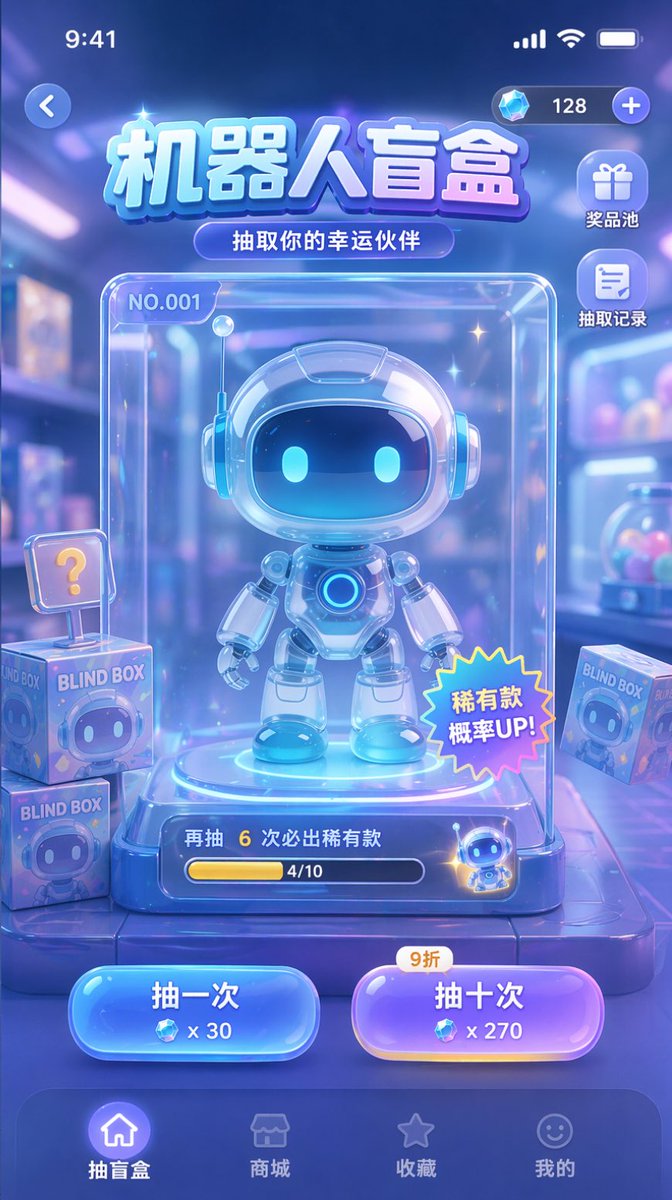
Makieta interfejsu użytkownika gry Gacha
Generuje makietę interfejsu użytkownika aplikacji mobilnej dla gry typu blind box lub gacha, zawierającą centralne wyświetlanie postaci, przyciski akcji i elementy nawigacyjne.
To jest przykładowy przykład GPT Image 2 dla Anime i gry . Skorzystaj z poniższego przykładu gotowego do skopiowania, aby wygenerować podobne materiały wizualne i sprawdź atrybucję Awesome GPT Image 2 Prompts oraz prawa do użytku komercyjnego przed ponownym wykorzystaniem.
Potrzebujesz pełnego zestawu podpowiedzi? Użyj Anime i gry aby uzyskać więcej powiązanych przykładów, odwiedź centrum tematyczne lub otwórz GPT Image 2 szybki katalog aby zobaczyć pełny przykładowy indeks, struktury wielokrotnego użytku i informacje o źródle.
Free 1K preview
Generate one preview image instantly, no sign-up required.
2360/4000
Opis
Monit o przygotowanie do kopiowania
{
  "type": "mobile game UI mockup",
  "theme": "sci-fi, cute, glassmorphism, neon blue and purple color palette",
  "header": {
    "status_bar": "standard iOS status bar at top",
    "top_controls": "back button on left, currency display with diamond icon and '128' on right",
    "title": "{argument name=\"main title\" default=\"Robot Blind Box\"}",
    "subtitle": "{argument name=\"subtitle\" default=\"Draw your lucky partner\"}"
  },
  "layout": {
    "side_menu": {
      "position": "top right below currency",
      "count": 2,
      "items": [
        {
          "icon": "gift",
          "label": "Prize pool"
        },
        {
          "icon": "document",
          "label": "Draw history"
        }
      ]
    },
    "centerpiece": {
      "description": "clear glass display case containing the main prize",
      "subject": "{argument name=\"robot character description\" default=\"cute chibi-style robot with glowing blue eyes and white glossy armor\"}",
      "case_details": [
        "label 'NO.001' in top left",
        "Star-shaped sticker with “Rare item drop rate UP!” in the bottom right corner",
        "Bottom progress bar, text displays “6 more draws to guarantee a rare item” and “4/10”"
      ]
    },
    "background_elements": {
      "description": "blurred toy store background",
      "floating_items": {
        "count": 3,
        "description": "square boxes labeled 'BLIND BOX' with robot faces, one with a '?' sign"
      }
    },
    "action_buttons": {
      "position": "bottom center above nav bar",
      "count": 2,
      "buttons": [
        {
          "color": "blue",
          "text": "{argument name=\"left button text\" default=\"Draw once\"}",
          "cost": "x 30"
        },
        {
          "color": "purple",
          "text": "{argument name=\"right button text\" default=\"Draw ten times\"}",
          "cost": "x 270",
          "tag": "90% off"
        }
      ]
    },
    "bottom_navigation": {
      "count": 4,
      "items": [
        {
          "icon": "home",
          "label": "Blind Box",
          "state": "active"
        },
        {
          "icon": "store",
          "label": "Mall"
        },
        {
          "icon": "star",
          "label": "Collection"
        },
        {
          "icon": "smiley",
          "label": "My"
        }
      ]
    }
  }
}
Zmienne monitujące
Edytowalne symbole zastępcze argumentów znalezione w monicie, wraz z ich wartościami domyślnymi.
Zmienny
main title
Domyślny
Robot Blind Box
Zmienny
subtitle
Domyślny
Draw your lucky partner
Zmienny
robot character description
Domyślny
cute chibi-style robot with glowing blue eyes and white glossy armor
Zmienny
left button text
Domyślny
Draw once
Zmienny
right button text
Domyślny
Draw ten times
Best for
- - Anime i gry visual exploration
- - Image generation and reference-image edits
- - Reusable briefs that keep source attribution visible
Change these parts
- - Subject, product, character, or scene
- - Aspect ratio, camera, lighting, and background
- - Brand, text, color, and output constraints
Recommended model and settings
- - Model: gpt-image-2
- - Input mode: Tekst na obraz
- - Aspect ratio: source
- - Commercial status: review original source
How to use this prompt
- 1. Copy the prompt and preserve its structure for the first test.
- 2. Replace the subject, context, and publishing channel.
- 3. Change one camera, lighting, or style variable per iteration.
- 4. Inspect the output, source, text, and rights before reuse.
Limitations, source, and reuse cautions
- - Generated output is an editable draft, not factual, legal, or rights evidence.
- - Review the linked source, people, brands, logos, text, and third-party media before commercial use.
Zaimportowano z Awesome GPT Image 2 Prompts . Wymagane jest podanie źródła. Status do użytku komercyjnego to allowed ; przed płatnym użyciem sprawdź prawa autorskie do źródła.
Więcej przypadków w tej kategorii
Priorytety według kategorii, zgodności trybu wprowadzania, jakości i niższego ryzyka.






Ponowne wykorzystanie i źródło notatek
Użyj tego monitu bezpiecznie po zapoznaniu się ze sprawą.
- 1.Skopiuj monit lub otwórz go bezpośrednio w Dovoo za pomocą przycisku generowania.
- 2.Dostosuj zmienne, proporcje obrazu i obrazy referencyjne do własnego przypadku użycia.
- 3.Przed publikacją lub płatnym wykorzystaniem należy sprawdzić prawa autorskie do źródła, wymogi dotyczące atrybucji oraz ryzyko związane z marką lub podobizną.