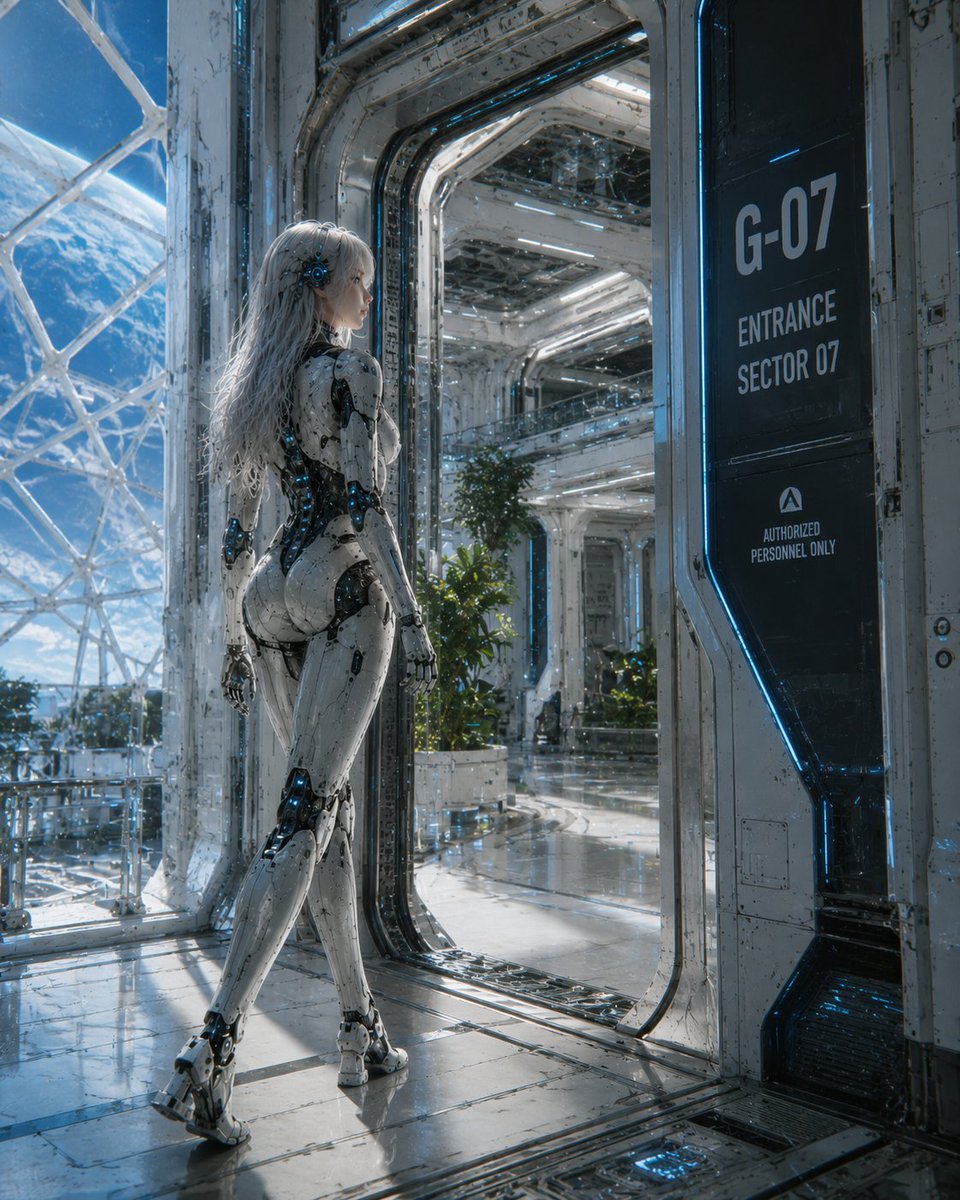
Female Android at Space Station Entrance
A photoreal cinematic sci-fi prompt for generating a female android standing in a futuristic orbital station corridor with Earth visible outside.
To jest przykładowy przykład GPT Image 2 dla Portret i charakter . Skorzystaj z poniższego przykładu gotowego do skopiowania, aby wygenerować podobne materiały wizualne i sprawdź atrybucję Awesome GPT Image 2 Prompts oraz prawa do użytku komercyjnego przed ponownym wykorzystaniem.
Potrzebujesz pełnego zestawu podpowiedzi? Użyj Portret i charakter aby uzyskać więcej powiązanych przykładów, odwiedź centrum tematyczne lub otwórz GPT Image 2 szybki katalog aby zobaczyć pełny przykładowy indeks, struktury wielokrotnego użytku i informacje o źródle.
Free 1K preview
Generate one preview image instantly, no sign-up required.
1526/4000
Opis
Monit o przygotowanie do kopiowania
Create a cinematic ultra-detailed sci-fi scene of a {argument name="character type" default="female android"} standing in a bright futuristic spaceship entrance corridor, viewed from behind in a full-body three-quarter pose. She has long flowing {argument name="hair color" default="white silver"} hair, a sleek white biomechanical humanoid body with black joint mechanisms, exposed blue glowing circuitry, polished armor panels, articulated hands and feet, Show every face clearly with natural, detailed facial features. The setting is a vast orbital spacecraft or space station with glossy reflective metal floors, white worn industrial walls, blue neon edge lighting, transparent glass panels, and large curved windows revealing Earth and space outside. On the right side, include one tall black wall sign with the exact visible text: “{argument name="door sign text" default="G-07 ENTRANCE SECTOR 07 AUTHORIZED PERSONNEL ONLY"}”. Show an open doorway leading deeper into a clean atrium-like interior with bright strip lights, plants in planters, railings, and layered futuristic architecture. Use realistic hard-surface detail, weathered panels, tiny scratches, cables, seams, reflections, and cool blue-white lighting. Mood: elegant, advanced, quiet, and cinematic. Composition should be vertical, with the android on the left foreground, the entrance portal centered, and the sign on the right. High-end concept art / photoreal sci-fi render, sharp focus, dramatic natural space light, no extra characters, no watermark.Zmienne monitujące
Edytowalne symbole zastępcze argumentów znalezione w monicie, wraz z ich wartościami domyślnymi.
Zmienny
character type
Domyślny
female android
Zmienny
hair color
Domyślny
white silver
Zmienny
door sign text
Domyślny
G-07 ENTRANCE SECTOR 07 AUTHORIZED PERSONNEL ONLY
Best for
- - Portret i charakter visual exploration
- - Image generation and reference-image edits
- - Reusable briefs that keep source attribution visible
Change these parts
- - Subject, product, character, or scene
- - Aspect ratio, camera, lighting, and background
- - Brand, text, color, and output constraints
Recommended model and settings
- - Model: gpt-image-2
- - Input mode: Tekst na obraz
- - Aspect ratio: source
- - Commercial status: review original source
How to use this prompt
- 1. Copy the prompt and preserve its structure for the first test.
- 2. Replace the subject, context, and publishing channel.
- 3. Change one camera, lighting, or style variable per iteration.
- 4. Inspect the output, source, text, and rights before reuse.
Limitations, source, and reuse cautions
- - Generated output is an editable draft, not factual, legal, or rights evidence.
- - Review the linked source, people, brands, logos, text, and third-party media before commercial use.
Zaimportowano z Awesome GPT Image 2 Prompts . Wymagane jest podanie źródła. Status do użytku komercyjnego to allowed ; przed płatnym użyciem sprawdź prawa autorskie do źródła.
Więcej przypadków w tej kategorii
Priorytety według kategorii, zgodności trybu wprowadzania, jakości i niższego ryzyka.

Hell Hound Character Sheet Infographic
Tekst na obraz

Cinematic Blue Backlit Portrait
Tekst na obraz

GPT Image 2 Real-Life Character Street Snap
Tekst na obraz

Studio Portrait of Woman with Sunglasses
Tekst na obraz

Street Selfie with Cat in Matching Cap
Tekst na obraz

Morning Bed Stretching Legs Prompt
Tekst na obraz
Ponowne wykorzystanie i źródło notatek
Użyj tego monitu bezpiecznie po zapoznaniu się ze sprawą.
- 1.Skopiuj monit lub otwórz go bezpośrednio w Dovoo za pomocą przycisku generowania.
- 2.Dostosuj zmienne, proporcje obrazu i obrazy referencyjne do własnego przypadku użycia.
- 3.Przed publikacją lub płatnym wykorzystaniem należy sprawdzić prawa autorskie do źródła, wymogi dotyczące atrybucji oraz ryzyko związane z marką lub podobizną.