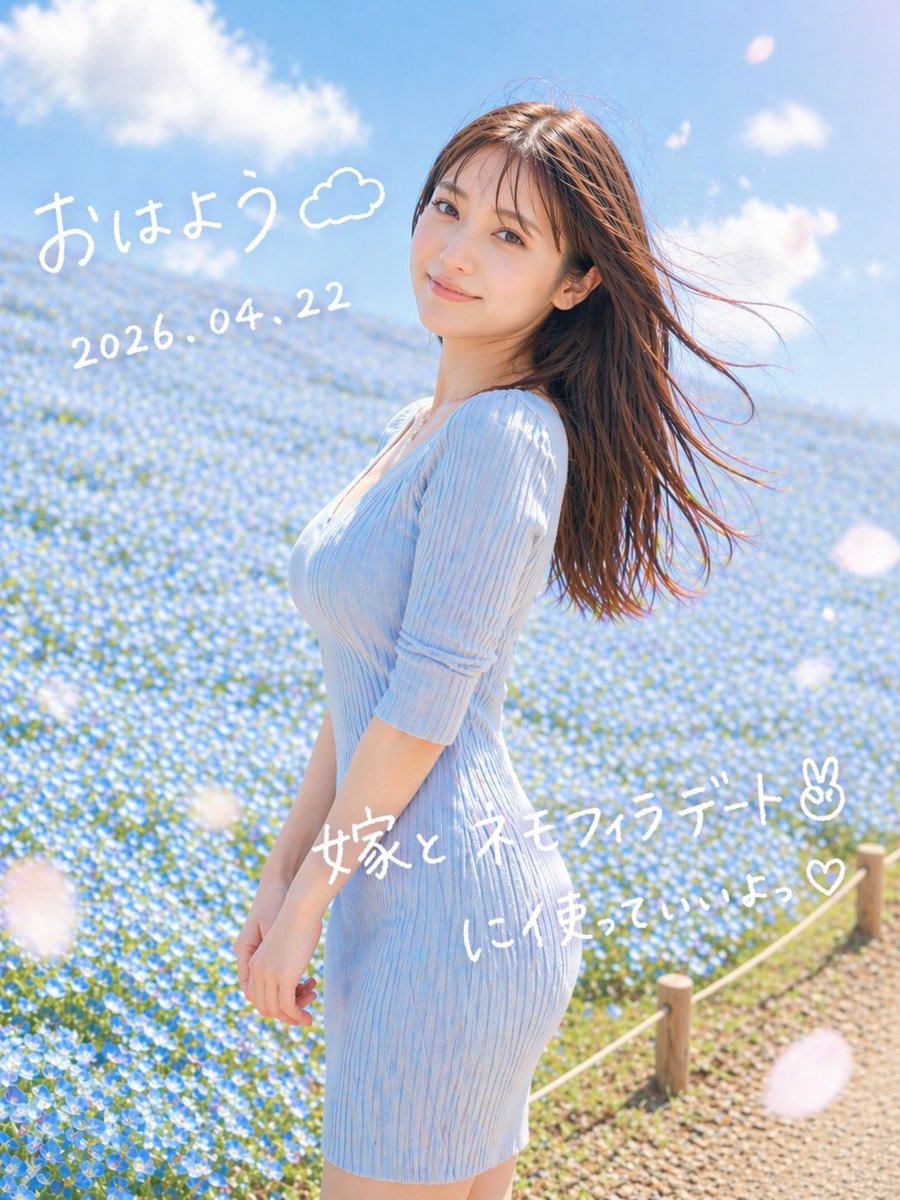
Marzycielski portret randkowy Nemophili
W ten sposób powstaje łagodny, romantyczny, pionowy portret kobiety na polu niebieskich kwiatów z ręcznie napisanym porannym tekstem w języku japońskim, idealny do wizualizacji w mediach społecznościowych.
To jest przykładowy przykład GPT Image 2 dla Portret i charakter . Skorzystaj z poniższego przykładu gotowego do skopiowania, aby wygenerować podobne materiały wizualne i sprawdź atrybucję Awesome GPT Image 2 Prompts oraz prawa do użytku komercyjnego przed ponownym wykorzystaniem.
Free 1K preview
Generate one preview image instantly, no sign-up required.
Opis
Monit o przygotowanie do kopiowania
A dreamy vertical spring portrait photo of a young woman standing in profile in a vast field of tiny blue nemophila flowers under a bright blue sky with soft white clouds. She wears a fitted ribbed knit dress in {argument name="dress color" default="pale sky blue"} with elbow-length sleeves, and her long straight brown hair is blowing dramatically to the right in the wind. Frame her from about mid-thigh upward, slightly off-center to the right, with the flower field filling the background and a small rope fence with wooden posts visible along the lower right edge beside a gravel path. Use soft natural morning sunlight, airy high-key exposure, gentle pastel tones, shallow depth of field, subtle lens bloom, and a romantic social-media snapshot aesthetic. Add a few large out-of-focus white flower petals drifting across the foreground. Overlay handwritten white Japanese text directly on the image: at the upper left, "{argument name="greeting text" default="おはよう"}" with a small doodled cloud beside it; below that, the date "{argument name="date text" default="2026.04.22"}"; across the lower middle-right, "{argument name="main note text" default="嫁と ネモフィラデート✌︎"}"; and beneath it, "{argument name="sub note text" default="に使っていいよっ♡"}". Keep the handwriting casual, playful, and slightly uneven like a marker pen on a photo.Zmienne monitujące
Edytowalne symbole zastępcze argumentów znalezione w monicie, wraz z ich wartościami domyślnymi.
Best for
- - Portret i charakter visual exploration
- - Image generation and reference-image edits
- - Reusable briefs that keep source attribution visible
Change these parts
- - Subject, product, character, or scene
- - Aspect ratio, camera, lighting, and background
- - Brand, text, color, and output constraints
Recommended model and settings
- - Model: gpt-image-2
- - Input mode: Tekst na obraz
- - Aspect ratio: source
- - Commercial status: review original source
How to use this prompt
- 1. Copy the prompt and preserve its structure for the first test.
- 2. Replace the subject, context, and publishing channel.
- 3. Change one camera, lighting, or style variable per iteration.
- 4. Inspect the output, source, text, and rights before reuse.
Limitations, source, and reuse cautions
- - Generated output is an editable draft, not factual, legal, or rights evidence.
- - Review the linked source, people, brands, logos, text, and third-party media before commercial use.
Więcej przypadków w tej kategorii
Priorytety według kategorii, zgodności trybu wprowadzania, jakości i niższego ryzyka.






Ponowne wykorzystanie i źródło notatek
Użyj tego monitu bezpiecznie po zapoznaniu się ze sprawą.
- 1.Skopiuj monit lub otwórz go bezpośrednio w Dovoo za pomocą przycisku generowania.
- 2.Dostosuj zmienne, proporcje obrazu i obrazy referencyjne do własnego przypadku użycia.
- 3.Przed publikacją lub płatnym wykorzystaniem należy sprawdzić prawa autorskie do źródła, wymogi dotyczące atrybucji oraz ryzyko związane z marką lub podobizną.