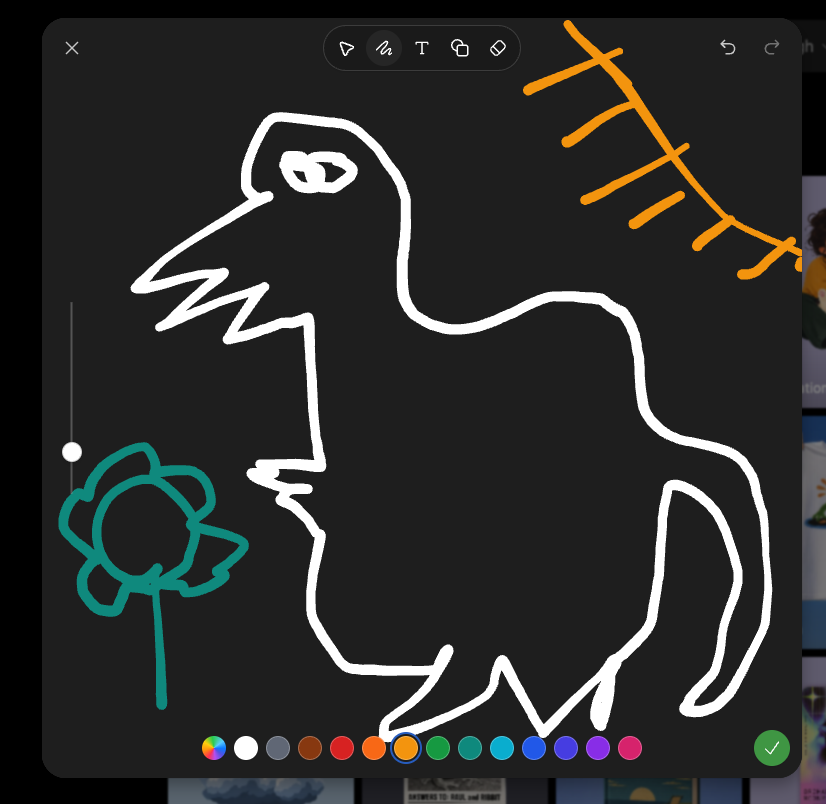
Dark Sketch Mode Monster Doodle
Generates a screenshot-style dark drawing interface with a crude monster doodle, color palette, toolbar, and sketch-mode controls.
To jest przykładowy przykład GPT Image 2 dla Inna inspiracja . Skorzystaj z poniższego przykładu gotowego do skopiowania, aby wygenerować podobne materiały wizualne i sprawdź atrybucję Awesome GPT Image 2 Prompts oraz prawa do użytku komercyjnego przed ponownym wykorzystaniem.
Potrzebujesz pełnego zestawu podpowiedzi? Użyj Inna inspiracja aby uzyskać więcej powiązanych przykładów, odwiedź centrum tematyczne lub otwórz GPT Image 2 szybki katalog aby zobaczyć pełny przykładowy indeks, struktury wielokrotnego użytku i informacje o źródle.
Free 1K preview
Generate one preview image instantly, no sign-up required.
2318/4000
Opis
Monit o przygotowanie do kopiowania
Goal: Create a screenshot-like image of a dark sketch/drawing mode interface showing a deliberately crude digital doodle being edited, as if in an image-generation app's sketch tool.

Canvas: Square-ish 4:3 screenshot, dark charcoal drawing panel centered with rounded corners over a dimmed gallery/app background barely visible at the right and bottom edges.

Layout: The main drawing area fills most of the frame. A top toolbar floats near the upper center, with a close X at top left and undo/redo icons at top right. A vertical brush-size slider sits on the left side with one white circular handle. A horizontal color palette runs along the bottom. A green circular checkmark confirmation button sits at the bottom right.

Main sketch: Draw a rough white line-art monster resembling a hunched fantasy boss creature, made with thick uneven brush strokes. It has one long pointed beak or snout facing left, a jagged open mouth, one scribbled oval eye near the top, a high arched back, a bulky torso, bent legs, and a long curved tail on the right. Add a small teal flower-like doodle on a stem at the lower left, facing the monster. Add an orange sketch of a sun or diagonal branch-like rays in the upper right corner.

Interface details: Include exactly 6 visible top toolbar icons: pointer/selection arrow, squiggle brush icon, letter T text tool, overlapping shapes/copy icon, eraser/diamond icon, and the surrounding rounded toolbar container. Include exactly 2 top-right history icons: undo and redo. Include exactly 1 close X icon at top left. Include exactly 1 vertical slider with 1 white knob. Include exactly 16 bottom color swatches, from left to right: multicolor rainbow circle, white, gray, brown, red, orange, yellow-orange selected with a blue ring, green, teal-green, cyan, blue, indigo, violet, purple, pink, plus exactly 1 green confirmation check button at the far right.

Visual style: Rough hand-drawn sketch mode, thick uneven strokes, dark UI, playful messy drawing, casual screenshot aesthetic. Use {argument name="creature outline color" default="white"}, {argument name="flower color" default="teal"}, {argument name="sun sketch color" default="orange"}, and {argument name="background panel color" default="dark charcoal"}. No polished rendering; keep it intentionally sloppy and simple.
Zmienne monitujące
Edytowalne symbole zastępcze argumentów znalezione w monicie, wraz z ich wartościami domyślnymi.
Zmienny
creature outline color
Domyślny
white
Zmienny
flower color
Domyślny
teal
Zmienny
sun sketch color
Domyślny
orange
Zmienny
background panel color
Domyślny
dark charcoal
Best for
- - Inna inspiracja visual exploration
- - Image generation and reference-image edits
- - Reusable briefs that keep source attribution visible
Change these parts
- - Subject, product, character, or scene
- - Aspect ratio, camera, lighting, and background
- - Brand, text, color, and output constraints
Recommended model and settings
- - Model: gpt-image-2
- - Input mode: Tekst na obraz
- - Aspect ratio: source
- - Commercial status: review original source
How to use this prompt
- 1. Copy the prompt and preserve its structure for the first test.
- 2. Replace the subject, context, and publishing channel.
- 3. Change one camera, lighting, or style variable per iteration.
- 4. Inspect the output, source, text, and rights before reuse.
Limitations, source, and reuse cautions
- - Generated output is an editable draft, not factual, legal, or rights evidence.
- - Review the linked source, people, brands, logos, text, and third-party media before commercial use.
Zaimportowano z Awesome GPT Image 2 Prompts . Wymagane jest podanie źródła. Status do użytku komercyjnego to allowed ; przed płatnym użyciem sprawdź prawa autorskie do źródła.
Więcej przypadków w tej kategorii
Priorytety według kategorii, zgodności trybu wprowadzania, jakości i niższego ryzyka.






Ponowne wykorzystanie i źródło notatek
Użyj tego monitu bezpiecznie po zapoznaniu się ze sprawą.
- 1.Skopiuj monit lub otwórz go bezpośrednio w Dovoo za pomocą przycisku generowania.
- 2.Dostosuj zmienne, proporcje obrazu i obrazy referencyjne do własnego przypadku użycia.
- 3.Przed publikacją lub płatnym wykorzystaniem należy sprawdzić prawa autorskie do źródła, wymogi dotyczące atrybucji oraz ryzyko związane z marką lub podobizną.