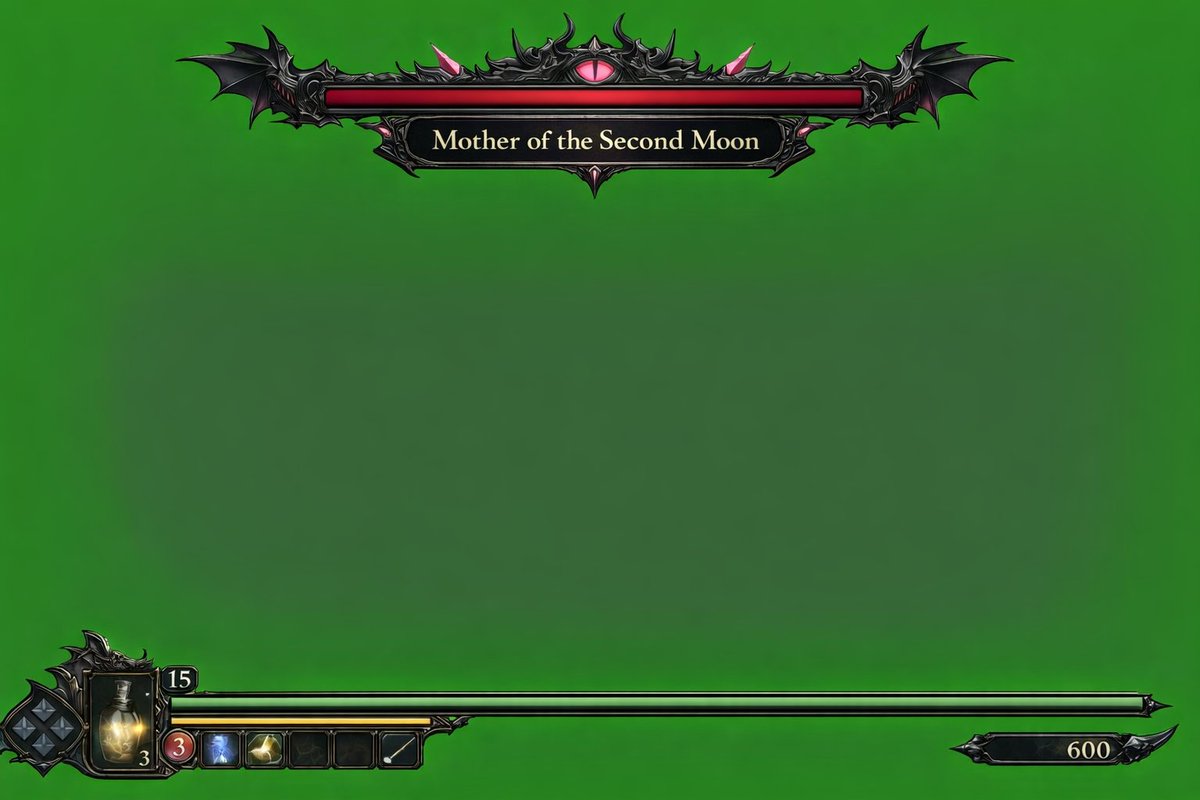
Dark Fantasy Game HUD na zielonym ekranie
Generuje nakładkę interfejsu użytkownika gry wideo w mrocznym klimacie fantasy na zielonym ekranie, zawierającą pasek zdrowia bossa i HUD statusu gracza.
To jest przykładowy przykład GPT Image 2 dla Anime i gry . Skorzystaj z poniższego przykładu gotowego do skopiowania, aby wygenerować podobne materiały wizualne i sprawdź atrybucję Awesome GPT Image 2 Prompts oraz prawa do użytku komercyjnego przed ponownym wykorzystaniem.
Potrzebujesz pełnego zestawu podpowiedzi? Użyj Anime i gry aby uzyskać więcej powiązanych przykładów, odwiedź centrum tematyczne lub otwórz GPT Image 2 szybki katalog aby zobaczyć pełny przykładowy indeks, struktury wielokrotnego użytku i informacje o źródle.
Free 1K preview
Generate one preview image instantly, no sign-up required.
1337/4000
Opis
Monit o przygotowanie do kopiowania
{
  "type": "video game HUD overlay",
  "background": "{argument name=\"background color\" default=\"solid chroma key green\"}",
  "theme": "{argument name=\"UI theme\" default=\"dark fantasy gothic\"}",
  "layout": {
    "top_center": {
      "component": "boss health bar",
      "design": "ornate black metal frame with bat wings on the edges and a glowing pink eye in the top center",
      "bar_color": "{argument name=\"boss health bar color\" default=\"red\"}",
      "label": "{argument name=\"boss name\" default=\"Mother of the Second Moon\"}"
    },
    "bottom_left": {
      "component": "player status HUD",
      "design": "intricate dark metal frame",
      "elements": [
        "diamond-shaped D-pad indicator",
        "glowing yellow potion flask with the number '3'",
        "number '15' in a small top frame",
        "long {argument name=\"player health bar color\" default=\"green\"} health bar extending to the right",
        "shorter yellow bar underneath the green bar",
        "row of 5 square quick-select inventory slots (slot 1: red circle with '3', slot 2: blue icon, slot 3: yellow icon, slot 4: empty, slot 5: white diagonal line)"
      ]
    },
    "bottom_right": {
      "component": "score or currency indicator",
      "design": "small black decorative plaque with the number '600'"
    }
  }
}
Zmienne monitujące
Edytowalne symbole zastępcze argumentów znalezione w monicie, wraz z ich wartościami domyślnymi.
Zmienny
background color
Domyślny
solid chroma key green
Zmienny
UI theme
Domyślny
dark fantasy gothic
Zmienny
boss health bar color
Domyślny
red
Zmienny
boss name
Domyślny
Mother of the Second Moon
Zmienny
player health bar color
Domyślny
green
Best for
- - Anime i gry visual exploration
- - Image generation and reference-image edits
- - Reusable briefs that keep source attribution visible
Change these parts
- - Subject, product, character, or scene
- - Aspect ratio, camera, lighting, and background
- - Brand, text, color, and output constraints
Recommended model and settings
- - Model: gpt-image-2
- - Input mode: Tekst na obraz
- - Aspect ratio: source
- - Commercial status: review original source
How to use this prompt
- 1. Copy the prompt and preserve its structure for the first test.
- 2. Replace the subject, context, and publishing channel.
- 3. Change one camera, lighting, or style variable per iteration.
- 4. Inspect the output, source, text, and rights before reuse.
Limitations, source, and reuse cautions
- - Generated output is an editable draft, not factual, legal, or rights evidence.
- - Review the linked source, people, brands, logos, text, and third-party media before commercial use.
Zaimportowano z Awesome GPT Image 2 Prompts . Wymagane jest podanie źródła. Status do użytku komercyjnego to allowed ; przed płatnym użyciem sprawdź prawa autorskie do źródła.
Więcej przypadków w tej kategorii
Priorytety według kategorii, zgodności trybu wprowadzania, jakości i niższego ryzyka.

Manga Desert Radio Telescope Road Trip
Tekst na obraz

Greyscale Puzzle Portrait with Color Accent
Tekst na obraz

Female Clown Cyborg Portrait
Tekst na obraz

Imperial Research Bunker on Volcanic Planet
Tekst na obraz

Glitch Aesthetic Surreal Portrait
Tekst na obraz

Grumpy Rhino Storybook Illustration
Tekst na obraz
Ponowne wykorzystanie i źródło notatek
Użyj tego monitu bezpiecznie po zapoznaniu się ze sprawą.
- 1.Skopiuj monit lub otwórz go bezpośrednio w Dovoo za pomocą przycisku generowania.
- 2.Dostosuj zmienne, proporcje obrazu i obrazy referencyjne do własnego przypadku użycia.
- 3.Przed publikacją lub płatnym wykorzystaniem należy sprawdzić prawa autorskie do źródła, wymogi dotyczące atrybucji oraz ryzyko związane z marką lub podobizną.