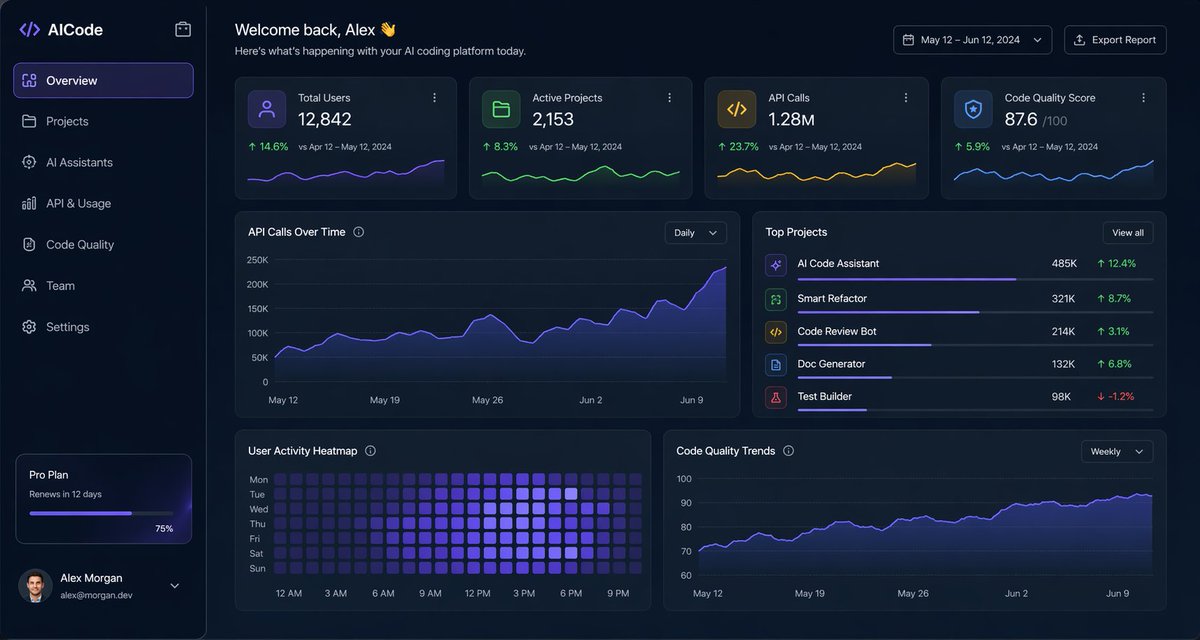
Interfejs użytkownika pulpitu nawigacyjnego Dark AI Coding
Dopracowany, ciemny panel analityczny dla platformy kodowania AI, odpowiedni do makiet projektów produktów SaaS, paneli administracyjnych i prezentacji interfejsu użytkownika w sieci WWW zawierających dużo danych.
To jest przykładowy przykład GPT Image 2 dla Inna inspiracja . Skorzystaj z poniższego przykładu gotowego do skopiowania, aby wygenerować podobne materiały wizualne i sprawdź atrybucję Awesome GPT Image 2 Prompts oraz prawa do użytku komercyjnego przed ponownym wykorzystaniem.
Free 1K preview
Generate one preview image instantly, no sign-up required.
Opis
Monit o przygotowanie do kopiowania
{
  "type": "dark SaaS analytics dashboard UI",
  "product": {
    "brand": "{argument name=\"brand name\" default=\"AICode\"}",
    "theme": "dark navy blue glassmorphism interface with subtle gradients, soft glow, rounded cards, thin borders, modern developer-tool aesthetic"
  },
  "canvas": {
    "aspect_ratio": "16:9",
    "background": "deep midnight blue with faint vignette and soft radial lighting"
  },
  "layout": {
    "structure": "left sidebar plus main content area",
    "sections": [
      {
        "title": "Sidebar",
        "position": "left",
        "count": 8,
        "labels": [
          "AICode",
          "Overview",
          "Projects",
          "AI Assistants",
          "API & Usage",
          "Code Quality",
          "Team",
          "Settings"
        ],
        "details": "logo at top, Overview selected with purple highlight, lower subscription card showing Pro Plan, renews in 12 days, horizontal progress bar at 75%, user profile at bottom with avatar, {argument name=\"user name\" default=\"Alex Morgan\"}, and email [email protected]"
      },
      {
        "title": "Header",
        "position": "top main area",
        "count": 4,
        "labels": [
          "Welcome back, Alex 👋",
          "Here's what's happening with your AI coding platform today.",
          "May 12 – Jun 12, 2024",
          "Export Report"
        ],
        "details": "large greeting on left, date range picker and export button on right"
      },
      {
        "title": "Metric cards",
        "position": "top row under header",
        "count": 4,
        "labels": [
          "Total Users",
          "Active Projects",
          "API Calls",
          "Code Quality Score"
        ],
        "values": [
          "12,842",
          "2,153",
          "1.28M",
          "876"
        ],
        "details": "each card has a small colored icon, large main value, comparison text vs Apr 12 – May 12, 2024, positive change percentages 14.6%, 8.3%, 23.7%, 5.9%, and a miniature line chart at the bottom; colors are purple, green, amber, and blue"
      },
      {
        "title": "Main analytics panels",
        "position": "middle and bottom rows",
        "count": 4,
        "labels": [
          "API Calls Over Time",
          "Top Projects",
          "User Activity Heatmap",
          "Code Quality Trends"
        ],
        "details": "API Calls Over Time is a wide area chart with Daily dropdown and rising purple line ending near 250K; Top Projects is a ranked list of 5 items with progress bars and percentage changes; User Activity Heatmap is a 7-row weekly heatmap with hour labels from 12 AM to 9 PM; Code Quality Trends is a line chart with Weekly dropdown and smooth upward purple trend from about 70 to low 90s"
      },
      {
        "title": "Top Projects list",
        "position": "middle right panel",
        "count": 5,
        "labels": [
          "AI Code Assistant",
          "Smart Refactor",
          "Code Review Bot",
          "Doc Generator",
          "Test Builder"
        ],
        "values": [
          "485K",
          "321K",
          "214K",
          "132K",
          "98K"
        ],
        "details": "green positive deltas for first four items 12.4%, 8.7%, 3.1%, 6.8%, and red negative delta -1.2% for Test Builder; each row has a colored square icon and thin horizontal progress bar"
      }
    ]
  },
  "style": {
    "visual_language": "premium fintech and AI product design mockup",
    "rendering": "crisp high-fidelity UI mockup, subtle shadows, neon edge lighting, polished charts, clean sans-serif typography",
    "primary_accent": "{argument name=\"accent color\" default=\"electric purple\"}",
    "secondary_accents": [
      "emerald green",
      "amber yellow",
      "cyan blue"
    ],
    "density": "information-rich but spacious, balanced grid, highly legible"
  }
}
Zmienne monitujące
Edytowalne symbole zastępcze argumentów znalezione w monicie, wraz z ich wartościami domyślnymi.
Best for
- - Inna inspiracja visual exploration
- - Image generation and reference-image edits
- - Reusable briefs that keep source attribution visible
Change these parts
- - Subject, product, character, or scene
- - Aspect ratio, camera, lighting, and background
- - Brand, text, color, and output constraints
Recommended model and settings
- - Model: gpt-image-2
- - Input mode: Tekst na obraz
- - Aspect ratio: source
- - Commercial status: review original source
How to use this prompt
- 1. Copy the prompt and preserve its structure for the first test.
- 2. Replace the subject, context, and publishing channel.
- 3. Change one camera, lighting, or style variable per iteration.
- 4. Inspect the output, source, text, and rights before reuse.
Limitations, source, and reuse cautions
- - Generated output is an editable draft, not factual, legal, or rights evidence.
- - Review the linked source, people, brands, logos, text, and third-party media before commercial use.
Więcej przypadków w tej kategorii
Priorytety według kategorii, zgodności trybu wprowadzania, jakości i niższego ryzyka.






Ponowne wykorzystanie i źródło notatek
Użyj tego monitu bezpiecznie po zapoznaniu się ze sprawą.
- 1.Skopiuj monit lub otwórz go bezpośrednio w Dovoo za pomocą przycisku generowania.
- 2.Dostosuj zmienne, proporcje obrazu i obrazy referencyjne do własnego przypadku użycia.
- 3.Przed publikacją lub płatnym wykorzystaniem należy sprawdzić prawa autorskie do źródła, wymogi dotyczące atrybucji oraz ryzyko związane z marką lub podobizną.