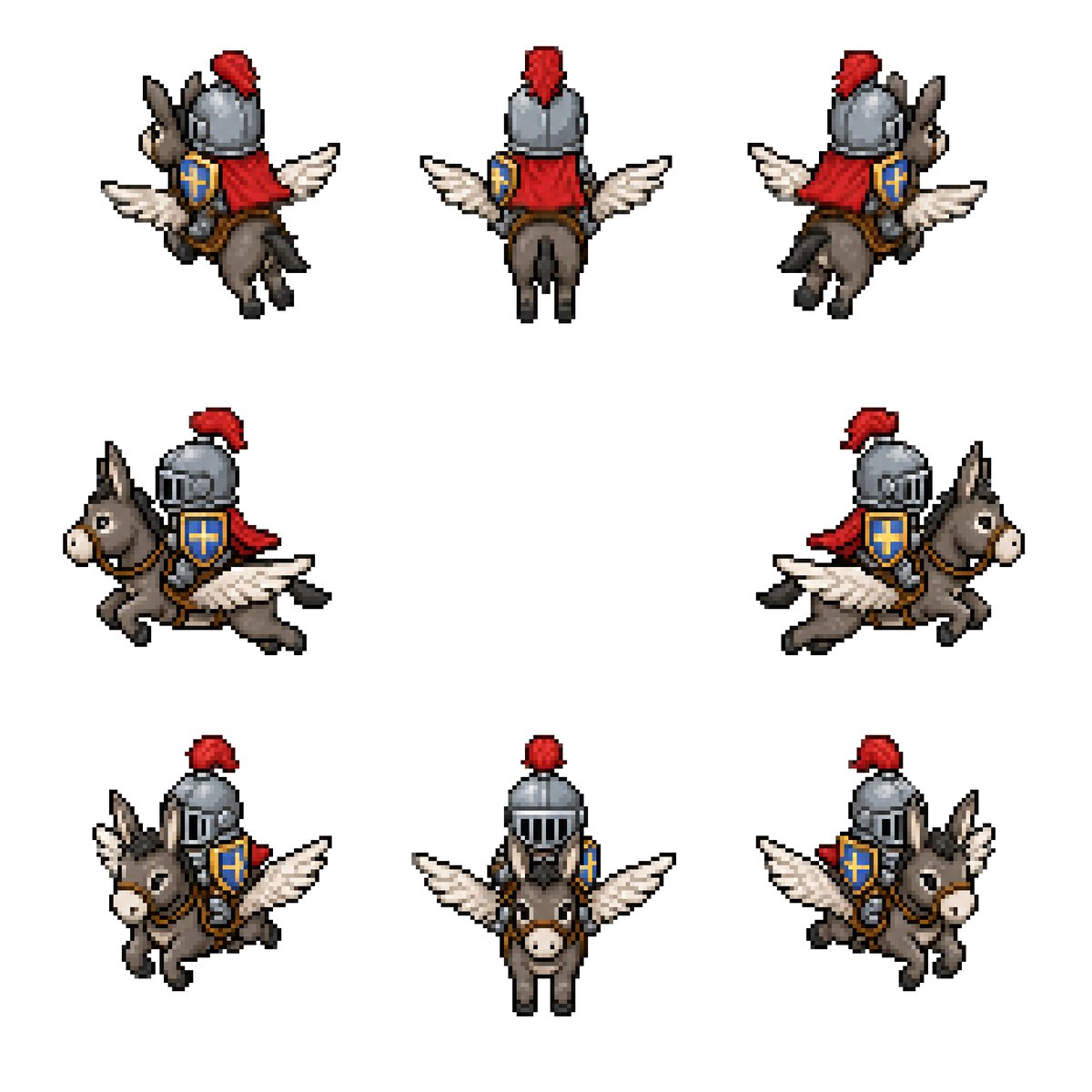
Sprite-sheet van de gevleugelde ezelridder
Genereert een retro pixel-art sprite sheet in 8 richtingen van een middeleeuwse ridder die op een gevleugelde ezel rijdt, voor fantasy game-assets.
Dit is een voorbeeld van een GPT Image 2 prompt voor Anime & Game . Gebruik de onderstaande kant-en-klare prompt om vergelijkbare afbeeldingen te genereren en controleer de Awesome GPT Image 2 Prompts en de rechten voor commercieel gebruik voordat u de afbeeldingen hergebruikt.
Heb je de volledige set prompts nodig? Gebruik dan de Anime & Game Ga naar het themacentrum voor meer gerelateerde voorbeelden, of open de GPT Image 2 prompt catalogus Voor de volledige voorbeeldenindex, herbruikbare structuren en bronvermelding.
Free 1K preview
Generate one preview image instantly, no sign-up required.
2329/4000
Snel
Schrijfklare prompt
Goal: Create a clean pixel-art sprite sheet for a fantasy game asset: {argument name="character concept" default="a medieval knight riding a winged donkey"}.

Canvas: Square 768×768 image on a plain white background, no borders, no UI, no text. Use a crisp retro RPG pixel-art style with visible chunky pixels, dark outlines, limited palette, and subtle dithering/shading.

Layout: Show exactly 8 separate sprites of the same mount-and-rider character, evenly spaced with large white gaps, arranged as 3 sprites on the top row, 2 sprites on the middle row, and 3 sprites on the bottom row. Each sprite should be roughly the same scale and read like an animation/rotation sheet.

Sprite count and views: 1) top-left: rear three-quarter view facing upper-left, 2) top-center: straight rear view, 3) top-right: rear three-quarter view facing upper-right, 4) middle-left: side view traveling left, 5) middle-right: side view traveling right, 6) bottom-left: front three-quarter view facing lower-left, 7) bottom-center: straight front view, 8) bottom-right: front three-quarter view facing lower-right.

Subject details: The mount is a small gray-brown donkey with long upright ears, pale muzzle, black hooves, simple bridle and saddle, and a pair of white feathered wings extended from its sides like a small pegasus. The rider is a compact armored knight wearing a rounded steel helmet with vertical visor slits, a bright red plume, a red cape or cloth drape, brown leather tack, and a blue shield with a gold cross emblem strapped at the side. Use {argument name="armor color" default="steel gray"}, {argument name="cape color" default="red"}, {argument name="shield color" default="blue and gold"}, and {argument name="mount color" default="gray-brown"}. Maintain the same proportions and costume details across all 8 sprites.

Visual style: Classic 16-bit fantasy RPG sprite sheet, isometric/top-down compatible proportions, high readability at small size, black and dark-brown pixel outlines, soft shadowless presentation, minimal anti-aliasing, no blur, no gradients beyond pixel shading.

Constraints: Keep exactly 8 sprites, do not add extra frames, labels, weapons, scenery, background texture, watermark, or character variations. All sprites must depict the same mounted knight and winged donkey from different directions.
Vraagvariabelen
Bewerkbare argumentplaceholders in de prompt, met hun standaardwaarden.
Variabele
character concept
Standaard
a medieval knight riding a winged donkey
Variabele
armor color
Standaard
steel gray
Variabele
cape color
Standaard
red
Variabele
shield color
Standaard
blue and gold
Variabele
mount color
Standaard
gray-brown
Best for
- - Anime & Game visual exploration
- - Image generation and reference-image edits
- - Reusable briefs that keep source attribution visible
Change these parts
- - Subject, product, character, or scene
- - Aspect ratio, camera, lighting, and background
- - Brand, text, color, and output constraints
Recommended model and settings
- - Model: gpt-image-2
- - Input mode: Tekst naar afbeelding
- - Aspect ratio: source
- - Commercial status: review original source
How to use this prompt
- 1. Copy the prompt and preserve its structure for the first test.
- 2. Replace the subject, context, and publishing channel.
- 3. Change one camera, lighting, or style variable per iteration.
- 4. Inspect the output, source, text, and rights before reuse.
Limitations, source, and reuse cautions
- - Generated output is an editable draft, not factual, legal, or rights evidence.
- - Review the linked source, people, brands, logos, text, and third-party media before commercial use.
Geïmporteerd van Awesome GPT Image 2 Prompts . Naamsvermelding is vereist. Commercieel gebruik is toegestaan volgens de status allowed ; controleer de rechten van de bron voordat u het tegen betaling gebruikt.
Meer gevallen in deze categorie
Geprioriteerd op basis van categorie, compatibiliteit met invoermodus, kwaliteit en lager risico.

Anime Girl Heterochromia Portrait
Tekst naar afbeelding

Hell Hound Character Sheet Infographic
Tekst naar afbeelding

MotoGP POV Cornering Shot
Tekst naar afbeelding

Cute Speech Bubble Mascot Profile Icon
Tekst naar afbeelding

GPT Image 2 Real-Life Character Street Snap
Tekst naar afbeelding

Luxury Travel Fashion Portrait Prompt
Tekst naar afbeelding
Hergebruik en bronvermeldingen
Gebruik deze prompt veilig nadat u de casus hebt bekeken.
- 1.Kopieer de prompt of open deze direct in Dovoo met de knop 'Genereren'.
- 2.Pas de variabelen, beeldverhouding en referentieafbeeldingen aan uw eigen toepassing aan.
- 3.Controleer vóór publicatie of betaald gebruik de auteursrechten, de vereisten voor naamsvermelding en de risico's met betrekking tot merk of beeltenis.