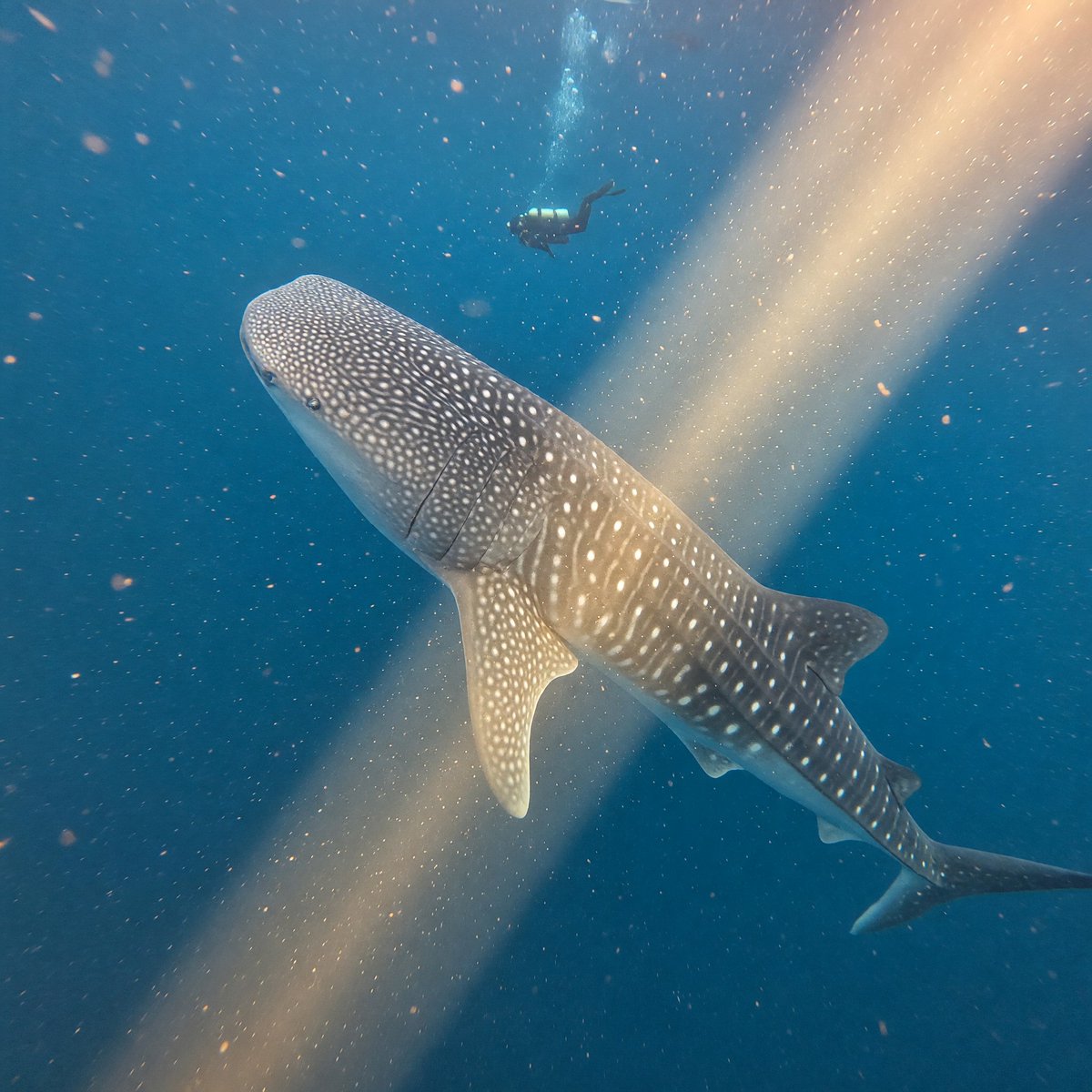
Walvishaai in Sunbeam
Een realistische onderwaterscène met een walvishaai die een gouden zonnestraal kruist, met een duiker op afstand als schaalvergelijking. Ideaal voor beelden in oceaandocumentaires.
Dit is een voorbeeld van een GPT Image 2 prompt voor Landschap & Natuur . Gebruik de onderstaande kant-en-klare prompt om vergelijkbare afbeeldingen te genereren en controleer de Awesome GPT Image 2 Prompts en de rechten voor commercieel gebruik voordat u de afbeeldingen hergebruikt.
Heb je de volledige set prompts nodig? Gebruik dan de Landschap & Natuur Ga naar het themacentrum voor meer gerelateerde voorbeelden, of open de GPT Image 2 prompt catalogus Voor de volledige voorbeeldenindex, herbruikbare structuren en bronvermelding.
Free 1K preview
Generate one preview image instantly, no sign-up required.
1035/4000
Snel
Schrijfklare prompt
Create a realistic wide-angle underwater wildlife photograph of a {argument name="main animal" default="whale shark"} swimming diagonally through deep blue ocean water, viewed from slightly above and in front so its broad spotted head dominates the lower-left foreground and its tapering body and tail recede toward the lower-right. The whale shark should have accurate white polka-dot and stripe markings across gray-blue skin, visible gill slits, pectoral fins, dorsal fins, and a graceful slow-swimming posture. A single scuba diver silhouette with fins and tank appears far above the shark near the upper center, small for scale. A warm golden sunbeam cuts diagonally from the upper-right toward the lower-left, illuminating suspended particles, bubbles, and plankton in the water. Use natural light, deep turquoise-to-navy color grading, soft underwater haze, realistic caustic glow, cinematic depth, subtle motion blur in drifting particles, and an immersive documentary feel. No text, no borders, no artificial aquarium setting.Vraagvariabelen
Bewerkbare argumentplaceholders in de prompt, met hun standaardwaarden.
Variabele
main animal
Standaard
whale shark
Best for
- - Landschap & Natuur visual exploration
- - Image generation and reference-image edits
- - Reusable briefs that keep source attribution visible
Change these parts
- - Subject, product, character, or scene
- - Aspect ratio, camera, lighting, and background
- - Brand, text, color, and output constraints
Recommended model and settings
- - Model: gpt-image-2
- - Input mode: Tekst naar afbeelding
- - Aspect ratio: source
- - Commercial status: review original source
How to use this prompt
- 1. Copy the prompt and preserve its structure for the first test.
- 2. Replace the subject, context, and publishing channel.
- 3. Change one camera, lighting, or style variable per iteration.
- 4. Inspect the output, source, text, and rights before reuse.
Limitations, source, and reuse cautions
- - Generated output is an editable draft, not factual, legal, or rights evidence.
- - Review the linked source, people, brands, logos, text, and third-party media before commercial use.
Geïmporteerd van Awesome GPT Image 2 Prompts . Naamsvermelding is vereist. Commercieel gebruik is toegestaan volgens de status allowed ; controleer de rechten van de bron voordat u het tegen betaling gebruikt.
Meer gevallen in deze categorie
Geprioriteerd op basis van categorie, compatibiliteit met invoermodus, kwaliteit en lager risico.

MotoGP POV Cornering Shot
Tekst naar afbeelding

GPT Image 2 Prompt: Garden Dappled Light
Tekst naar afbeelding

GPT Image 2 Real-Life Character Street Snap
Tekst naar afbeelding

Luxury Travel Fashion Portrait Prompt
Tekst naar afbeelding

Street Selfie with Cat in Matching Cap
Tekst naar afbeelding

Gray Denim Lace-Up Top Prompt for GPT Image 2
Tekst naar afbeelding
Hergebruik en bronvermeldingen
Gebruik deze prompt veilig nadat u de casus hebt bekeken.
- 1.Kopieer de prompt of open deze direct in Dovoo met de knop 'Genereren'.
- 2.Pas de variabelen, beeldverhouding en referentieafbeeldingen aan uw eigen toepassing aan.
- 3.Controleer vóór publicatie of betaald gebruik de auteursrechten, de vereisten voor naamsvermelding en de risico's met betrekking tot merk of beeltenis.