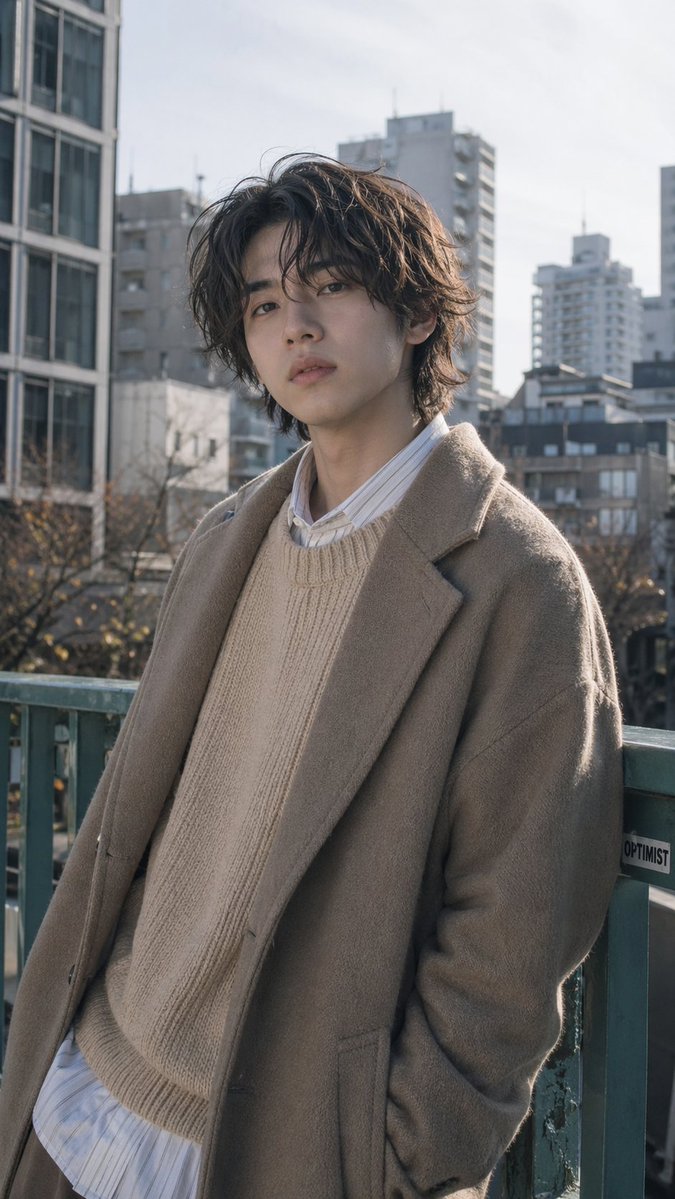
Urban Menswear Portrait op een viaduct
Deze prompt genereert een fotorealistisch verticaal modeportret van een stijlvolle jonge man in gelaagde, neutrale kleding tegen een zacht vervaagde Japanse stadsachtergrond, geschikt voor redactionele of lifestyle-fotografie.
Dit is een voorbeeld van een GPT Image 2 prompt voor Mode & Schoonheid . Gebruik de onderstaande kant-en-klare prompt om vergelijkbare afbeeldingen te genereren en controleer de Awesome GPT Image 2 Prompts en de rechten voor commercieel gebruik voordat u de afbeeldingen hergebruikt.
Free 1K preview
Generate one preview image instantly, no sign-up required.
Snel
Schrijfklare prompt
A natural-looking street fashion portrait of a {argument name="subject" default="young Japanese man"} standing on an urban pedestrian overpass in daylight, framed vertically from mid-thigh to head. He is leaning casually against a worn green metal railing with one hand in his coat pocket, body slightly angled, giving a relaxed but stylish candid pose rather than standing straight. He has medium-length wavy tousled hair in {argument name="hair color" default="dark brown"}, soft volume around the ears and forehead, and a slim build. Dress him in layered neutral-toned winter fashion: an oversized wool coat in {argument name="coat color" default="taupe beige"}, a chunky knit crewneck sweater in {argument name="sweater color" default="off-white"}, and a long striped button-up shirt peeking out at the collar and hem. The mood is calm, refined, and contemporary, like a Japanese men's fashion editorial. Use soft natural sunlight with realistic skin tones, subtle shadows, muted colors, and shallow depth of field. In the background, show out-of-focus mid- and high-rise city buildings, bare winter trees, and a pale bright sky, creating a realistic Tokyo-like urban atmosphere. Photorealistic, understated color grading, detailed fabric texture, editorial composition, no dramatic effects, no text overlays, no extra people.Vraagvariabelen
Bewerkbare argumentplaceholders in de prompt, met hun standaardwaarden.
Best for
- - Mode & Schoonheid visual exploration
- - Image generation and reference-image edits
- - Reusable briefs that keep source attribution visible
Change these parts
- - Subject, product, character, or scene
- - Aspect ratio, camera, lighting, and background
- - Brand, text, color, and output constraints
Recommended model and settings
- - Model: gpt-image-2
- - Input mode: Tekst naar afbeelding
- - Aspect ratio: source
- - Commercial status: review original source
How to use this prompt
- 1. Copy the prompt and preserve its structure for the first test.
- 2. Replace the subject, context, and publishing channel.
- 3. Change one camera, lighting, or style variable per iteration.
- 4. Inspect the output, source, text, and rights before reuse.
Limitations, source, and reuse cautions
- - Generated output is an editable draft, not factual, legal, or rights evidence.
- - Review the linked source, people, brands, logos, text, and third-party media before commercial use.
Meer gevallen in deze categorie
Geprioriteerd op basis van categorie, compatibiliteit met invoermodus, kwaliteit en lager risico.






Hergebruik en bronvermeldingen
Gebruik deze prompt veilig nadat u de casus hebt bekeken.
- 1.Kopieer de prompt of open deze direct in Dovoo met de knop 'Genereren'.
- 2.Pas de variabelen, beeldverhouding en referentieafbeeldingen aan uw eigen toepassing aan.
- 3.Controleer vóór publicatie of betaald gebruik de auteursrechten, de vereisten voor naamsvermelding en de risico's met betrekking tot merk of beeltenis.