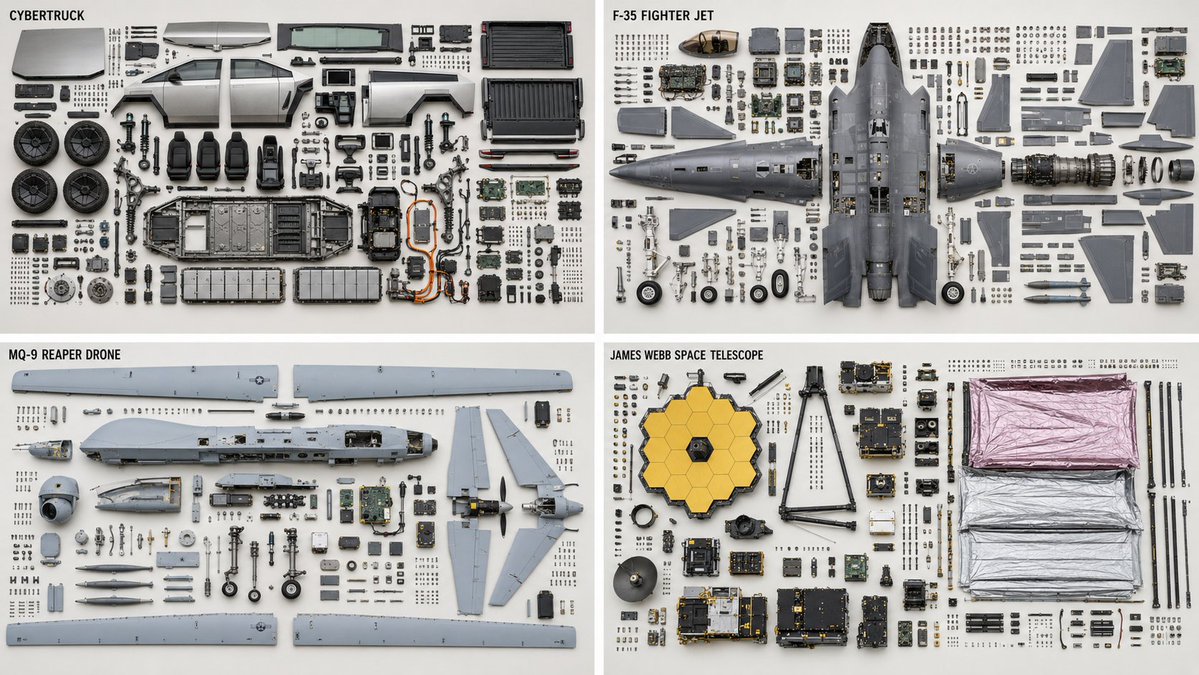
Technical Machine Knolling Teardown
A highly detailed technical prompt for generating clean, top-down orthographic teardowns of complex machinery with organized parts.
Dit is een voorbeeld van een GPT Image 2 prompt voor Illustratie & Kunst . Gebruik de onderstaande kant-en-klare prompt om vergelijkbare afbeeldingen te genereren en controleer de Awesome GPT Image 2 Prompts en de rechten voor commercieel gebruik voordat u de afbeeldingen hergebruikt.
Heb je de volledige set prompts nodig? Gebruik dan de Illustratie & Kunst Ga naar het themacentrum voor meer gerelateerde voorbeelden, of open de GPT Image 2 prompt catalogus Voor de volledige voorbeeldenindex, herbruikbare structuren en bronvermelding.
Free 1K preview
Generate one preview image instantly, no sign-up required.
1237/4000
Snel
Schrijfklare prompt
2x2 grid, 16:9, do this for {argument name="machines" default="4 complex machines, like CyberTruck, F35 plane, Reaper Drone, James Webb Telescope"} Knolling teardown — {argument name="subject" default="{SUBJECT}"} ({argument name="category" default="{SUBJECT_TYPE}"}), top-down orthographic. PARTS — complete bill of materials, show each exactly once: {argument name="parts" default="{PARTS — list every part with quantity}"} LAYOUT - clean rectilinear grid; every part aligned to horizontal and vertical axes - grouped by subassembly — a subassembly's parts stay adjacent as one cluster - each group anchored by its largest structural part; fasteners cluster beside the part they secure - even spacing, no overlapping parts, no diagonal scatter - consistent scale across every part DEPICTION — keep it truthful - every fastener sits near a matching mounting hole; screw count = hole count - every gasket or seal shown with the perimeter it seals against - no duplicated or phantom parts - preserve each part's true orientation and handedness; do not mirror chiral parts RENDER - orthographic projection, no perspective, all parts in sharp focus - flat, even, diffuse lighting; minimal soft shadow - neutral seamless backgroundVraagvariabelen
Bewerkbare argumentplaceholders in de prompt, met hun standaardwaarden.
Variabele
machines
Standaard
4 complex machines, like CyberTruck, F35 plane, Reaper Drone, James Webb Telescope
Variabele
subject
Standaard
{SUBJECT}
Variabele
category
Standaard
{SUBJECT_TYPE}
Variabele
parts
Standaard
{PARTS — list every part with quantity}
Best for
- - Illustratie & Kunst visual exploration
- - Image generation and reference-image edits
- - Reusable briefs that keep source attribution visible
Change these parts
- - Subject, product, character, or scene
- - Aspect ratio, camera, lighting, and background
- - Brand, text, color, and output constraints
Recommended model and settings
- - Model: gpt-image-2
- - Input mode: Tekst naar afbeelding
- - Aspect ratio: source
- - Commercial status: review original source
How to use this prompt
- 1. Copy the prompt and preserve its structure for the first test.
- 2. Replace the subject, context, and publishing channel.
- 3. Change one camera, lighting, or style variable per iteration.
- 4. Inspect the output, source, text, and rights before reuse.
Limitations, source, and reuse cautions
- - Generated output is an editable draft, not factual, legal, or rights evidence.
- - Review the linked source, people, brands, logos, text, and third-party media before commercial use.
Geïmporteerd van Awesome GPT Image 2 Prompts . Naamsvermelding is vereist. Commercieel gebruik is toegestaan volgens de status allowed ; controleer de rechten van de bron voordat u het tegen betaling gebruikt.
Meer gevallen in deze categorie
Geprioriteerd op basis van categorie, compatibiliteit met invoermodus, kwaliteit en lager risico.

Surreal 3D Chess Match Artwork
Tekst naar afbeelding
Celestial Moonlit Palace Scene
Tekst naar afbeelding

Greyscale Puzzle Portrait with Color Accent
Tekst naar afbeelding

Luxury Brand Campaign Prompt Template
Tekst naar afbeelding

Female Clown Cyborg Portrait
Tekst naar afbeelding

Android Quantum Lab Workstation
Tekst naar afbeelding
Hergebruik en bronvermeldingen
Gebruik deze prompt veilig nadat u de casus hebt bekeken.
- 1.Kopieer de prompt of open deze direct in Dovoo met de knop 'Genereren'.
- 2.Pas de variabelen, beeldverhouding en referentieafbeeldingen aan uw eigen toepassing aan.
- 3.Controleer vóór publicatie of betaald gebruik de auteursrechten, de vereisten voor naamsvermelding en de risico's met betrekking tot merk of beeltenis.