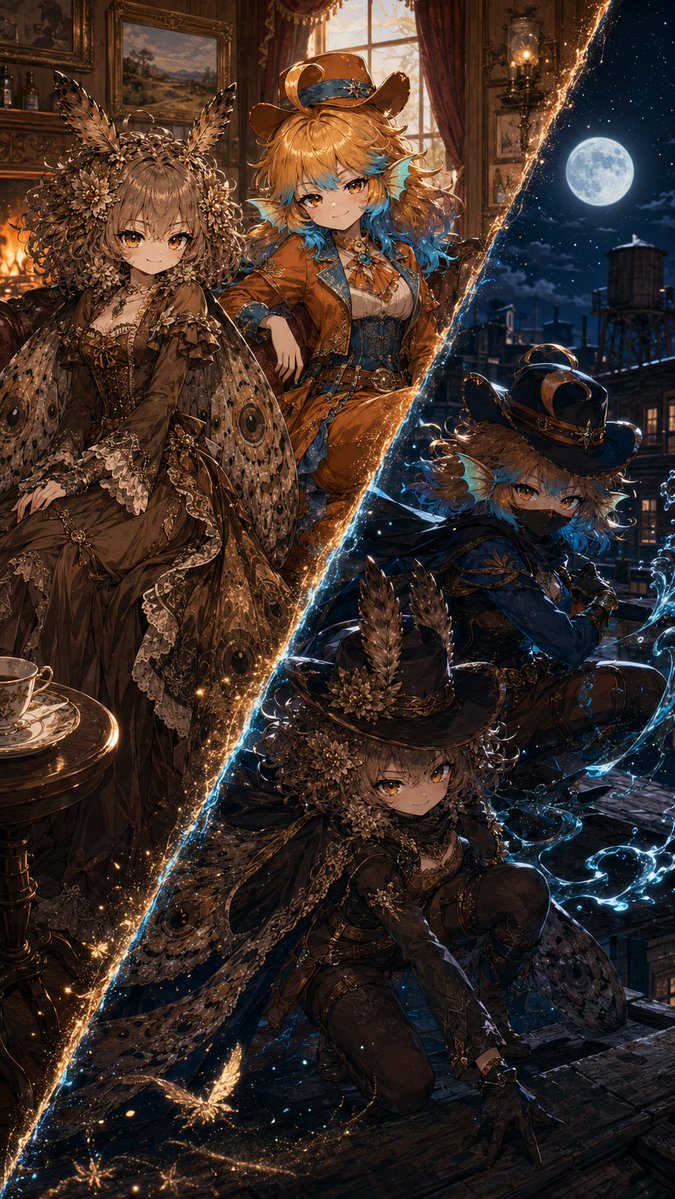
Superhero Era Transformation Split Portrait
A complex logic-based prompt that uses reference images to transform a character into two versions (normal and superhero) across different historical eras.
Dit is een voorbeeld van een GPT Image 2 prompt voor Portret & Karakter . Gebruik de onderstaande kant-en-klare prompt om vergelijkbare afbeeldingen te genereren en controleer de Awesome GPT Image 2 Prompts en de rechten voor commercieel gebruik voordat u de afbeeldingen hergebruikt.
Free 1K preview
Generate one preview image instantly, no sign-up required.
Free text preview doesn’t preserve reference-image consistency.
Snel
Schrijfklare prompt
Masterpiece quality 9:16 aspect ratio
@image1 = {argument name="reference character" default="primary character reference"}
Preserve the referenced characters’ face shape, hairstyle, hair color, eye color, correct number of limbs and fingers, personality, body language, signature color palette, outfit motifs, species traits, accessories, silhouette, body shape, body proportions, and overall character vibe. If the character has a mask, do not change it. If the character does not have a head, do not invent one. Do not lose character recognizability. Do not turn the character into a generic person or unrelated design. Do not overcrowd the composition. Do not introduce extra characters or duplicates. Do not break anatomy unless clearly justified by transformation concept. Do not make the scene visually confusing or unreadable. Do not explicitly list or name the hidden influences used. Do not let environment overpower the character.
Use your Python environment (Code Interpreter) to generate a pseudo-random number. Do not guess or rely on your language modeling weights to pick the number.
Please follow these exact constraints:
1. Range: Between [1] and [4], inclusive.
2. Type: [Integer]
3. Execution: Import the 'random' or 'secrets' library to compute the result.
4. Output: Do not provide the final random number(s) as the output. Do not include conversational filler. Use the number to select the setting from the list below.
1. Wild West
2. Edwardian England
3. 1920’s Jazz Era
4. Medieval
Draw two versions of @image1. Draw a diagonal line separating both versions. The line’s color, shape, and material effect will be determined by the visual personality of @image1. @image1 will be On the left, standing in a parlor fitting to the chosen setting and wearing a formal outfit, also fitting the chosen setting, by a fireplace. The outfit must adhere to the visual personality of @image1. The expression and posture will one of peaceful contentment. This setting will be midday.
The right side will have @image1 wearing a superhero costume fitting to the chosen setting. The costume must be intricate, elegant, designed for maximum stealth, adhere to the visual personality of @iamge1, and have a powerful aura. They will be outdoors at night, and they will be stalking potential criminals. @image1 will use weapons or magic fitting to their character and visual personality. If @image1 is a child, they will use magic and ensure their costume is appropriate and cute. The expression and posture will one of a stealthy assassin.
Vraagvariabelen
Bewerkbare argumentplaceholders in de prompt, met hun standaardwaarden.
Best for
- - Portret & Karakter visual exploration
- - Image generation and reference-image edits
- - Reusable briefs that keep source attribution visible
Change these parts
- - Subject, product, character, or scene
- - Aspect ratio, camera, lighting, and background
- - Brand, text, color, and output constraints
Recommended model and settings
- - Model: gpt-image-2
- - Input mode: Afbeelding naar afbeelding
- - Aspect ratio: source
- - Commercial status: review original source
How to use this prompt
- 1. Copy the prompt and preserve its structure for the first test.
- 2. Replace the subject, context, and publishing channel.
- 3. Change one camera, lighting, or style variable per iteration.
- 4. Inspect the output, source, text, and rights before reuse.
Limitations, source, and reuse cautions
- - Generated output is an editable draft, not factual, legal, or rights evidence.
- - Review the linked source, people, brands, logos, text, and third-party media before commercial use.
Meer gevallen in deze categorie
Geprioriteerd op basis van categorie, compatibiliteit met invoermodus, kwaliteit en lager risico.






Hergebruik en bronvermeldingen
Gebruik deze prompt veilig nadat u de casus hebt bekeken.
- 1.Kopieer de prompt of open deze direct in Dovoo met de knop 'Genereren'.
- 2.Pas de variabelen, beeldverhouding en referentieafbeeldingen aan uw eigen toepassing aan.
- 3.Controleer vóór publicatie of betaald gebruik de auteursrechten, de vereisten voor naamsvermelding en de risico's met betrekking tot merk of beeltenis.