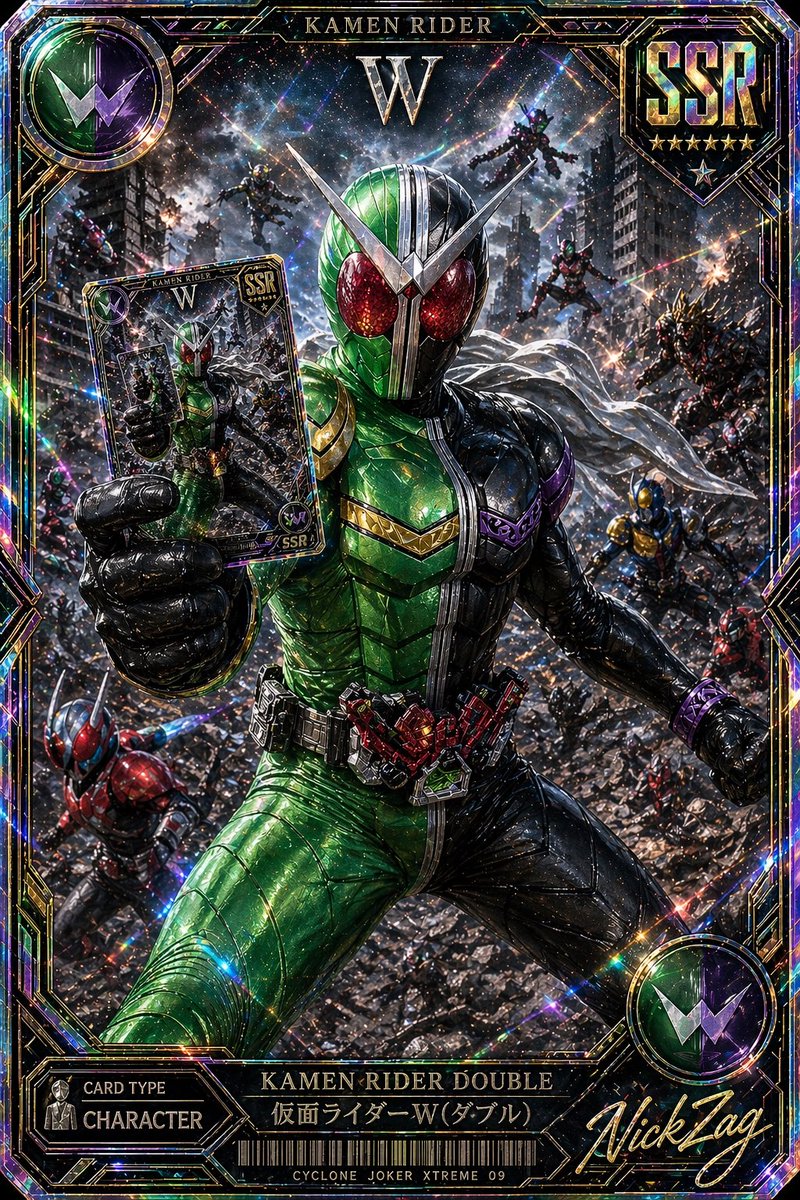
SSR Kamen Rider Dubbele Kaart
Een schitterende, uiterst zeldzame tokusatsu-ruilkaart met Kamen Rider Double in een filmische gevechtsscène, ideaal voor verzamelkaarten of hoogwaardige gamekaartontwerpen.
Dit is een voorbeeld van een GPT Image 2 prompt voor Anime & Game . Gebruik de onderstaande kant-en-klare prompt om vergelijkbare afbeeldingen te genereren en controleer de Awesome GPT Image 2 Prompts en de rechten voor commercieel gebruik voordat u de afbeeldingen hergebruikt.
Free 1K preview
Generate one preview image instantly, no sign-up required.
Free text preview doesn’t preserve reference-image consistency.
Snel
Schrijfklare prompt
A hyper-detailed premium Japanese trading card illustration in the style of an ultra-rare tokusatsu collectible, vertical composition with an ornate holographic foil border and explosive cinematic action. Center the armored hero {argument name="character name" default="Kamen Rider Double"} in a dramatic low-angle full-body pose, lunging forward through a ruined city battlefield while thrusting a trading card toward the viewer in his left hand. His suit is sharply split down the middle: vivid metallic green on the left half and glossy black on the right half, with large glittering red compound eyes, a silver V-shaped crest, segmented insect-like armor plating, a white scarf flowing behind him, and a highly detailed transformation belt with red mechanical components. The card he holds should show a smaller image of the same hero and match the premium collectible design. Surround him with exactly 8 background riders or enemies in dynamic combat positions across the destroyed urban warzone: 2 flying figures near the upper background, 3 mid-ground combatants on the right side, 1 blue-and-gold figure on the lower right, 1 red-and-blue rider on the lower left, and 1 additional partially visible fighter near the left edge. Fill the environment with shattered rubble, damaged skyscrapers, sparks, smoke, debris, and streaks of energy, creating a chaotic apocalyptic battle scene. Use intense prismatic holographic effects, rainbow diffraction, glitter, lens flares, starbursts, and reflective foil textures across the entire image. Frame the artwork like an SSR rarity game card with visible text elements: top center title "KAMEN RIDER", a large "W" beneath it, a top-right shield emblem reading {argument name="rarity label" default="SSR"} with 6 stars below, a top-left circular green-and-purple W insignia, a bottom-left panel reading "CARD TYPE" and "CHARACTER", a bottom center nameplate reading "KAMEN RIDER DOUBLE" and "仮面ライダーW(ダブル)", a barcode beneath, small bottom text "CYCLONE JOKER XTREME 09", and a large gold script signature at bottom right reading {argument name="signature text" default="NickTag"}. Make the whole card look like a luxurious, foil-stamped, ultra-rare, officially licensed tokusatsu collector card with razor-sharp detail, rich metallic highlights, dense particles, and maximal dramatic contrast.Vraagvariabelen
Bewerkbare argumentplaceholders in de prompt, met hun standaardwaarden.
Best for
- - Anime & Game visual exploration
- - Image generation and reference-image edits
- - Reusable briefs that keep source attribution visible
Change these parts
- - Subject, product, character, or scene
- - Aspect ratio, camera, lighting, and background
- - Brand, text, color, and output constraints
Recommended model and settings
- - Model: gpt-image-2
- - Input mode: Afbeelding naar afbeelding
- - Aspect ratio: source
- - Commercial status: review original source
How to use this prompt
- 1. Copy the prompt and preserve its structure for the first test.
- 2. Replace the subject, context, and publishing channel.
- 3. Change one camera, lighting, or style variable per iteration.
- 4. Inspect the output, source, text, and rights before reuse.
Limitations, source, and reuse cautions
- - Generated output is an editable draft, not factual, legal, or rights evidence.
- - Review the linked source, people, brands, logos, text, and third-party media before commercial use.
Meer gevallen in deze categorie
Geprioriteerd op basis van categorie, compatibiliteit met invoermodus, kwaliteit en lager risico.






Hergebruik en bronvermeldingen
Gebruik deze prompt veilig nadat u de casus hebt bekeken.
- 1.Kopieer de prompt of open deze direct in Dovoo met de knop 'Genereren'.
- 2.Pas de variabelen, beeldverhouding en referentieafbeeldingen aan uw eigen toepassing aan.
- 3.Controleer vóór publicatie of betaald gebruik de auteursrechten, de vereisten voor naamsvermelding en de risico's met betrekking tot merk of beeltenis.