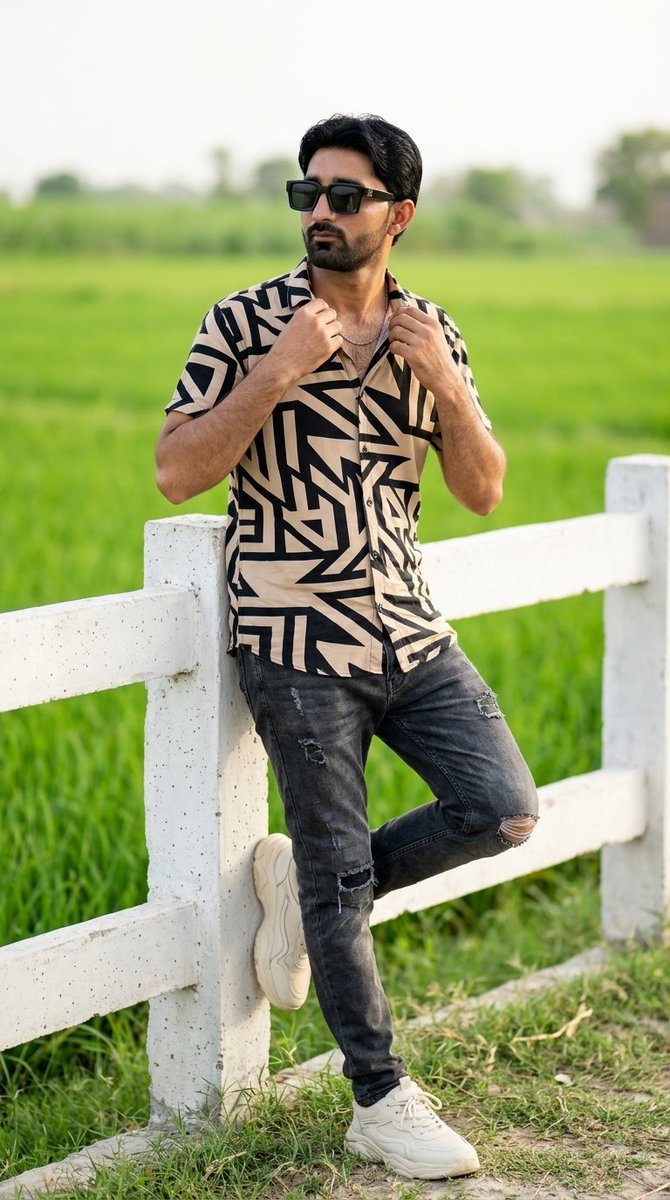
Fashion Portrait with Facial Reference
A prompt designed to preserve facial identity from an uploaded image while generating a photorealistic fashion portrait in a lush outdoor setting.
Dit is een voorbeeld van een GPT Image 2 prompt voor Mode & Schoonheid . Gebruik de onderstaande kant-en-klare prompt om vergelijkbare afbeeldingen te genereren en controleer de Awesome GPT Image 2 Prompts en de rechten voor commercieel gebruik voordat u de afbeeldingen hergebruikt.
Heb je de volledige set prompts nodig? Gebruik dan de Mode & Schoonheid Ga naar het themacentrum voor meer gerelateerde voorbeelden, of open de GPT Image 2 prompt catalogus Voor de volledige voorbeeldenindex, herbruikbare structuren en bronvermelding.
Free 1K preview
Generate one preview image instantly, no sign-up required.
Free text preview doesn’t preserve reference-image consistency.
999/4000
Snel
Schrijfklare prompt
Use the uploaded image as the only facial reference and preserve 100% facial identity, hairstyle, beard, skin tone, and natural skin texture.
A photorealistic fashion portrait of a stylish young South Asian man with a well-groomed short beard and voluminous, styled dark hair. He is wearing thick black square sunglasses, a short-sleeved button-down shirt featuring a bold geometric pattern in beige and black, a thin chain necklace, distressed dark grey jeans with ripped knees, and chunky off-white sneakers. He is posing confidently, leaning casually against a white concrete post-and-rail fence with one foot resting on the lower rail. His hands are lightly adjusting the collar of his shirt as he looks off-camera to the side. The background is a beautifully blurred, lush green agricultural field under bright, soft natural daylight. Shot on an 85mm lens, shallow depth of field, bokeh, cinematic lighting, ultra-detailed, 8k. Keep exactly original face and hairstyle 100% reference Ratio 9:16
Best for
- - Mode & Schoonheid visual exploration
- - Image generation and reference-image edits
- - Reusable briefs that keep source attribution visible
Change these parts
- - Subject, product, character, or scene
- - Aspect ratio, camera, lighting, and background
- - Brand, text, color, and output constraints
Recommended model and settings
- - Model: gpt-image-2
- - Input mode: Afbeelding naar afbeelding
- - Aspect ratio: source
- - Commercial status: review original source
How to use this prompt
- 1. Copy the prompt and preserve its structure for the first test.
- 2. Replace the subject, context, and publishing channel.
- 3. Change one camera, lighting, or style variable per iteration.
- 4. Inspect the output, source, text, and rights before reuse.
Limitations, source, and reuse cautions
- - Generated output is an editable draft, not factual, legal, or rights evidence.
- - Review the linked source, people, brands, logos, text, and third-party media before commercial use.
Geïmporteerd van Awesome GPT Image 2 Prompts . Naamsvermelding is vereist. Commercieel gebruik is toegestaan volgens de status allowed ; controleer de rechten van de bron voordat u het tegen betaling gebruikt.
Meer gevallen in deze categorie
Geprioriteerd op basis van categorie, compatibiliteit met invoermodus, kwaliteit en lager risico.

Luxury Travel Fashion Portrait Prompt
Tekst naar afbeelding

Gray Denim Lace-Up Top Prompt for GPT Image 2
Tekst naar afbeelding

Orange Rooftop Fashion Photo Prompt
Tekst naar afbeelding

Stylish Man Street Lamp Portrait
Afbeelding naar afbeelding

Sci-Fi Cyan Lighting Effect
Afbeelding naar afbeelding

Hiker in Red Jacket
Tekst naar afbeelding
Hergebruik en bronvermeldingen
Gebruik deze prompt veilig nadat u de casus hebt bekeken.
- 1.Kopieer de prompt of open deze direct in Dovoo met de knop 'Genereren'.
- 2.Pas de variabelen, beeldverhouding en referentieafbeeldingen aan uw eigen toepassing aan.
- 3.Controleer vóór publicatie of betaald gebruik de auteursrechten, de vereisten voor naamsvermelding en de risico's met betrekking tot merk of beeltenis.