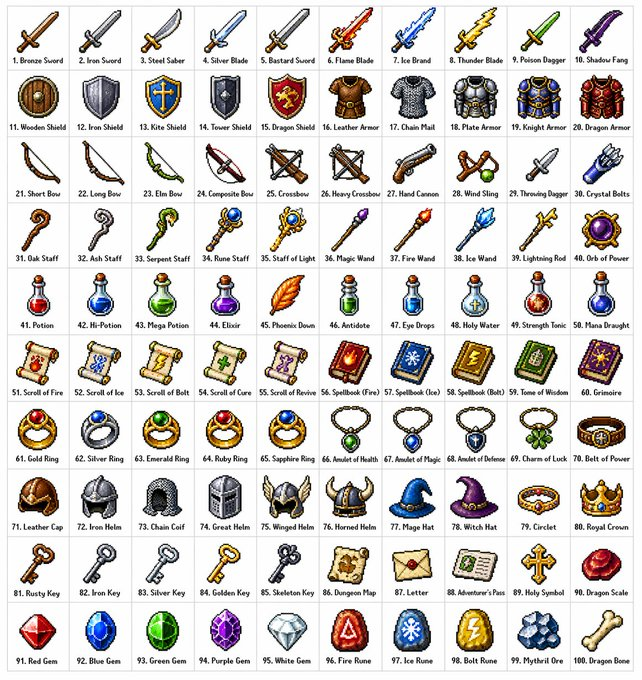
Retro RPG Item Grid Prompt
Een gedetailleerde opdracht voor het maken van een raster van 10x10 met 100 diverse fantasy-RPG-items in een klassieke 16-bits of 32-bits pixelart-stijl, georganiseerd per categorie.
Dit is een voorbeeld van een GPT Image 2 prompt voor Anime & Game . Gebruik de onderstaande kant-en-klare prompt om vergelijkbare afbeeldingen te genereren en controleer de Awesome GPT Image 2 Prompts en de rechten voor commercieel gebruik voordat u de afbeeldingen hergebruikt.
Heb je de volledige set prompts nodig? Gebruik dan de Anime & Game Ga naar het themacentrum voor meer gerelateerde voorbeelden, of open de GPT Image 2 prompt catalogus Voor de volledige voorbeeldenindex, herbruikbare structuren en bronvermelding.
Free 1K preview
Generate one preview image instantly, no sign-up required.
1363/4000
Snel
Schrijfklare prompt
Create a {argument name="grid size" default="10x10"} grid containing {argument name="item count" default="100"} different fantasy role-playing game (RPG) items in a {argument name="art style" default="classic pixel art style"} (16-bit or 32-bit sprite style, similar to Japanese RPGs from the SNES/GBA era). Each item should occupy a square tile individually with a short, clear label below. The grid should be neatly arranged on a white background. Ensure each item is visually unique and every label is spelled correctly. Use clean pixel edges, a limited palette for each sprite, and subtle dithering for shadows. Use the following row themes: Row 1: Swords and blades; Row 2: Shields and armor; Row 3: Bows, crossbows, and ranged weapons; Row 4: Staves, wands, and magical implements; Row 5: Potions, elixirs, and bottles; Row 6: Scrolls, grimoires, and spellbooks; Row 7: Rings, amulets, and enchanted accessories; Row 8: Helmets, crowns, and headgear; Row 9: Keys, relics, and quest items; Row 10: Gems, runes, and crafting materials. Display each tile as a centered item sprite on a clean background square, presented in the form of classic inventory icons—similar to what you'd see in a fantasy RPG menu. Maintain consistency and coherence in the overall style, reminiscent of beloved retro fantasy RPGs—charming and refined, yet clear even at small sizes.Vraagvariabelen
Bewerkbare argumentplaceholders in de prompt, met hun standaardwaarden.
Variabele
grid size
Standaard
10x10
Variabele
item count
Standaard
100
Variabele
art style
Standaard
classic pixel art style
Best for
- - Anime & Game visual exploration
- - Image generation and reference-image edits
- - Reusable briefs that keep source attribution visible
Change these parts
- - Subject, product, character, or scene
- - Aspect ratio, camera, lighting, and background
- - Brand, text, color, and output constraints
Recommended model and settings
- - Model: gpt-image-2
- - Input mode: Tekst naar afbeelding
- - Aspect ratio: source
- - Commercial status: review original source
How to use this prompt
- 1. Copy the prompt and preserve its structure for the first test.
- 2. Replace the subject, context, and publishing channel.
- 3. Change one camera, lighting, or style variable per iteration.
- 4. Inspect the output, source, text, and rights before reuse.
Limitations, source, and reuse cautions
- - Generated output is an editable draft, not factual, legal, or rights evidence.
- - Review the linked source, people, brands, logos, text, and third-party media before commercial use.
Geïmporteerd van Awesome GPT Image 2 Prompts . Naamsvermelding is vereist. Commercieel gebruik is toegestaan volgens de status allowed ; controleer de rechten van de bron voordat u het tegen betaling gebruikt.
Meer gevallen in deze categorie
Geprioriteerd op basis van categorie, compatibiliteit met invoermodus, kwaliteit en lager risico.

Manga Desert Radio Telescope Road Trip
Tekst naar afbeelding

Surreal 3D Chess Match Artwork
Tekst naar afbeelding

Female Clown Cyborg Portrait
Tekst naar afbeelding

Imperial Research Bunker on Volcanic Planet
Tekst naar afbeelding

Android Quantum Lab Workstation
Tekst naar afbeelding

Greyscale Puzzle Portrait with Color Accent
Tekst naar afbeelding
Hergebruik en bronvermeldingen
Gebruik deze prompt veilig nadat u de casus hebt bekeken.
- 1.Kopieer de prompt of open deze direct in Dovoo met de knop 'Genereren'.
- 2.Pas de variabelen, beeldverhouding en referentieafbeeldingen aan uw eigen toepassing aan.
- 3.Controleer vóór publicatie of betaald gebruik de auteursrechten, de vereisten voor naamsvermelding en de risico's met betrekking tot merk of beeltenis.