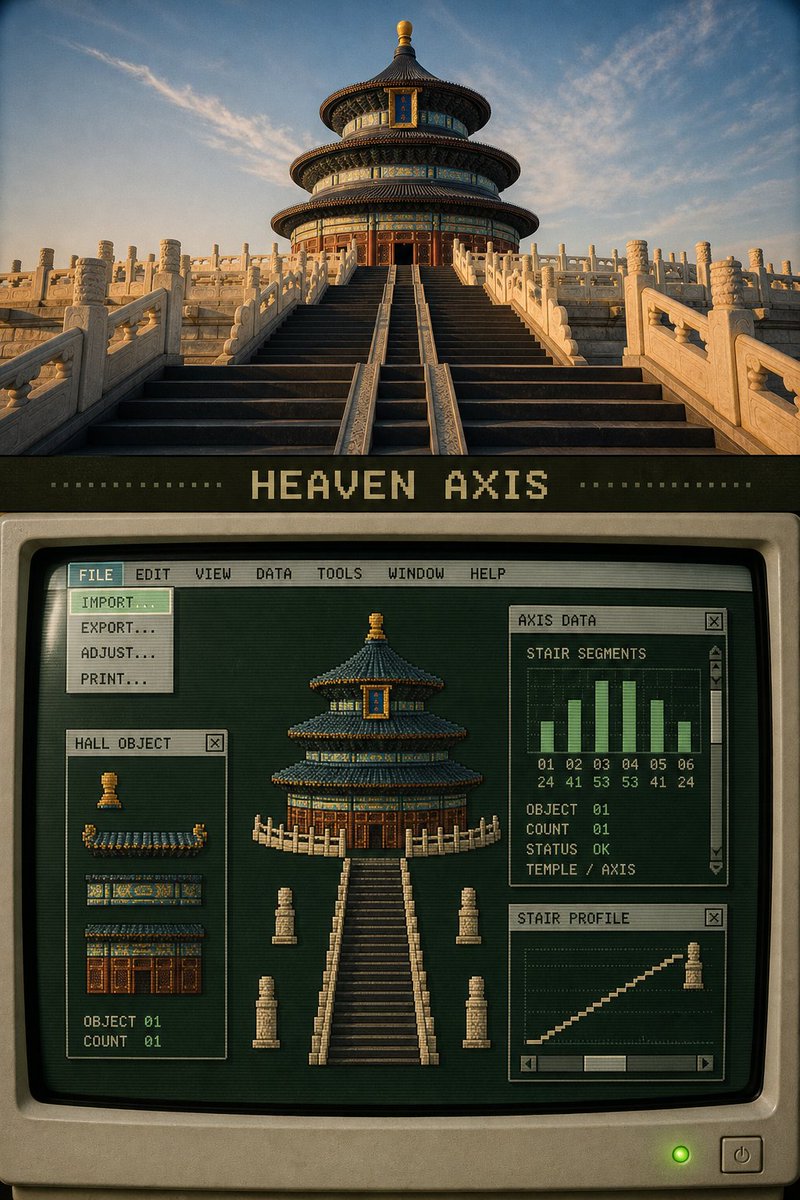
Retro Pixel Industrial Travel Archive
A creative prompt that deconstructs travel photos into pixel art sprites and data indices, presented within a 1980s-style computer software interface.
Dit is een voorbeeld van een GPT Image 2 prompt voor Grafisch ontwerp & poster . Gebruik de onderstaande kant-en-klare prompt om vergelijkbare afbeeldingen te genereren en controleer de Awesome GPT Image 2 Prompts en de rechten voor commercieel gebruik voordat u de afbeeldingen hergebruikt.
Heb je de volledige set prompts nodig? Gebruik dan de Grafisch ontwerp & poster Ga naar het themacentrum voor meer gerelateerde voorbeelden, of open de GPT Image 2 prompt catalogus Voor de volledige voorbeeldenindex, herbruikbare structuren en bronvermelding.
Free 1K preview
Generate one preview image instantly, no sign-up required.
Free text preview doesn’t preserve reference-image consistency.
3296/4000
Snel
Schrijfklare prompt
Please turn each uploaded travel photo into a separate 3:4 vertical "Retro Pixel Industrial Travel Archive" editorial poster. Each photo is output individually, without multi-photo collages.

This style is not about directly pixelating the entire photo, nor is it about putting a generic computer frame on the photo. You must first extract 3 to 7 real objects that define the scene's identity from the original photo, then transform them into pixel sprites, local previews, data indices, and structural slices, and reassemble them into a fully functioning old computer software interface.

The top portion, about 30% to 38% of the screen, retains the clearly recognizable original photo. Accurately maintain the identity of the subject, architectural structure, quantity, observation angle, spatial relationship, real texture, natural light and shadow, and local colors. Only apply slight artistic publication color grading and thin film grain treatment; do not illustrate, reconstruct, or change the original photo.

Below the photo, maintain a 7% to 10% charcoal black or dark olive "breathing zone", in which a readable pixel title of 1 to 4 English words is added. The title should come from the actual structure or theme of the photo, for example:

HEAVEN AXIS
ROOF SYSTEM
LAKE PAVILION
CANAL OBJECTS

The lower part, about 50% to 60% of the screen, constructs a complete late 1980s to early 1990s graphic workstation software interface. The primary background color must be a visible deep forest green, dark cyan-green, or faded olive green, not pure black.

The computer area must simultaneously feature:

1. A complete main application window occupying the primary area below;
2. A narrow frame in old ivory or tobacco gold;
3. A system menu bar spanning the top of the entire application;
4. Menu text used verbatim:
 FILE EDIT VIEW DATA TOOLS WINDOW HELP
5. At least one selected menu;
6. An expanded drop-down menu directly connected to the selected menu;
7. Drop-down menu options can include:
 IMPORT…
 EXPORT…
 LAYERS…
 FILTER…
 COLOR MAP
 STATISTICS…
 PRINT…
8. At least three overlapping functional sub-windows;
9. Each sub-window has a title bar, close button, and specific function;
10. At least one window has clear scroll bars, arrow buttons, and sliders;
11. At least one object index, color palette, histogram, or status window.

Analyze the photo first and list objects that can be separated. For example:

Traditional architecture photos:
Main roof, secondary roof, dougong color bands, gable walls, steps, railings, red walls.

Garden photos:
Pavilions, rocks, lake shores, cruise boats, branches, roof fragments.

Water town photos:
Stone bridges, wooden houses by the water, balconies, tiled roofs, water surface, reflections, shorelines.

People or transportation photos:
People, vehicles, roads, building facades, landmarks, and direction of action.

Convert these real elements into low-resolution pixel sprites or structural modules. Retain the silhouette, direction, quantity, and signature colors of the objects, but remove tiny textures. Re-adjust the size and position of the objects in the central workspace: the main object can be enlarged to become a visual anchor, and other objects are arranged around it like movable layers.

Do not follow the original...
Best for
- - Grafisch ontwerp & poster visual exploration
- - Image generation and reference-image edits
- - Reusable briefs that keep source attribution visible
Change these parts
- - Subject, product, character, or scene
- - Aspect ratio, camera, lighting, and background
- - Brand, text, color, and output constraints
Recommended model and settings
- - Model: gpt-image-2
- - Input mode: Afbeelding naar afbeelding
- - Aspect ratio: source
- - Commercial status: review original source
How to use this prompt
- 1. Copy the prompt and preserve its structure for the first test.
- 2. Replace the subject, context, and publishing channel.
- 3. Change one camera, lighting, or style variable per iteration.
- 4. Inspect the output, source, text, and rights before reuse.
Limitations, source, and reuse cautions
- - Generated output is an editable draft, not factual, legal, or rights evidence.
- - Review the linked source, people, brands, logos, text, and third-party media before commercial use.
Geïmporteerd van Awesome GPT Image 2 Prompts . Naamsvermelding is vereist. Commercieel gebruik is toegestaan volgens de status allowed ; controleer de rechten van de bron voordat u het tegen betaling gebruikt.
Meer gevallen in deze categorie
Geprioriteerd op basis van categorie, compatibiliteit met invoermodus, kwaliteit en lager risico.

Stylish Man Street Lamp Portrait
Afbeelding naar afbeelding

Sci-Fi Cyan Lighting Effect
Afbeelding naar afbeelding

Oversized Head Cartoon Caricature Prompt
Afbeelding naar afbeeldingGemiddeld risico

Boisterous Shrimpers Entering Pub
Tekst naar afbeelding

Luxury Travel Fashion Portrait Prompt
Tekst naar afbeelding

Cute Focus Desk Flat Lay and Kawaii Illustration
Tekst naar afbeelding
Hergebruik en bronvermeldingen
Gebruik deze prompt veilig nadat u de casus hebt bekeken.
- 1.Kopieer de prompt of open deze direct in Dovoo met de knop 'Genereren'.
- 2.Pas de variabelen, beeldverhouding en referentieafbeeldingen aan uw eigen toepassing aan.
- 3.Controleer vóór publicatie of betaald gebruik de auteursrechten, de vereisten voor naamsvermelding en de risico's met betrekking tot merk of beeltenis.