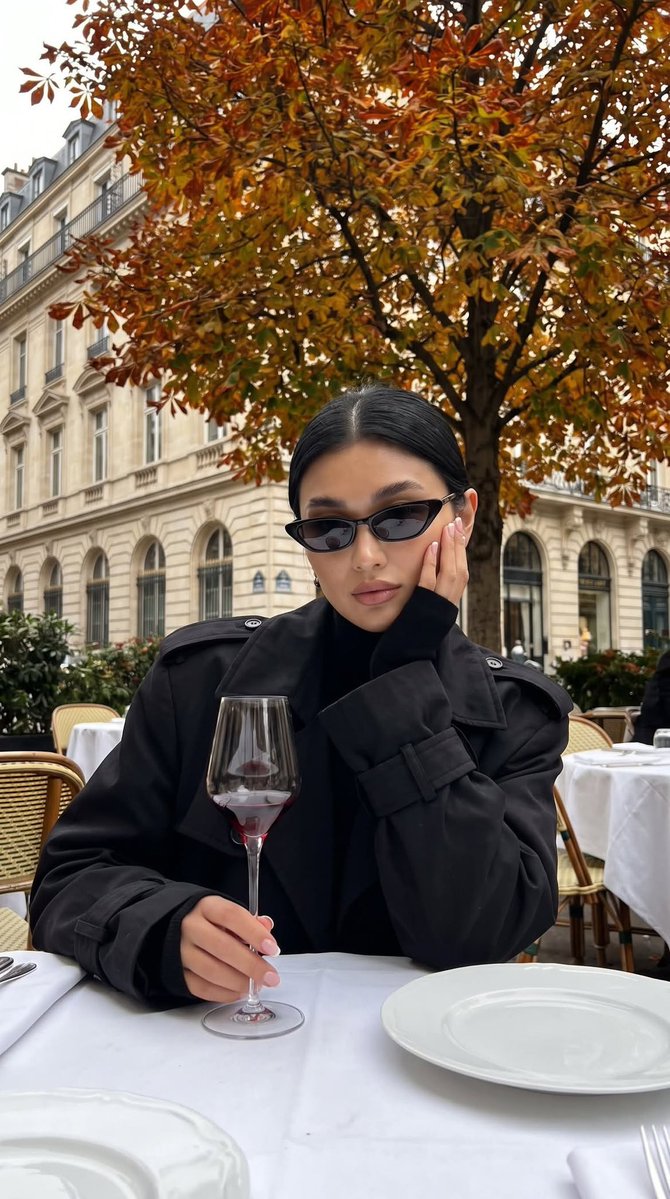
Realistic Cafe Portrait Prompt for GPT Image 2
A detailed prompt for generating a realistic iPhone-style photo of a woman in a cafe using GPT Image 2, focusing on faithful character reproduction from a reference image and specific lighting/composition details.
Dit is een voorbeeld van een GPT Image 2 prompt voor Portret & Karakter . Gebruik de onderstaande kant-en-klare prompt om vergelijkbare afbeeldingen te genereren en controleer de Awesome GPT Image 2 Prompts en de rechten voor commercieel gebruik voordat u de afbeeldingen hergebruikt.
Free 1K preview
Generate one preview image instantly, no sign-up required.
Free text preview doesn’t preserve reference-image consistency.
Snel
Schrijfklare prompt
Shot on an iPhone. The woman’s appearance should be 100% faithful to the uploaded reference photo, sitting at a café table outdoors under an autumn tree, centered in the frame. Her body is facing forward, her head slightly tilted, with one cheek gently resting on one hand while the other hand is relaxed on the table, holding the stem of a wide red-wine glass with a very thin, long, delicate stem and thin glass walls. Only a small amount of wine remains at the bottom.

She is wearing a voluminous black trench coat with structured shoulder pads and oversized long sleeves covering her fingers, with a black turtleneck underneath. Hair exactly matching the uploaded photo.

White tablecloth, elegant white plates, a classic European-style building façade in the background, with an autumn tree filling the upper part of the frame.

True-to-life iPhone realism, subtle natural film grain, authentic skin texture and lighting. Do not blur the background; maintain realistic environmental detail throughout the scene.

Short square French-tip manicure.

9:16 vertical format.

She is wearing narrow black rimless cat-eye sunglasses.

Overcast daytime with no direct sunlight. Slightly slower shutter speed for a subtle natural motion/film feel while keeping the subject realistic and recognizable.
Best for
- - Portret & Karakter visual exploration
- - Image generation and reference-image edits
- - Reusable briefs that keep source attribution visible
Change these parts
- - Subject, product, character, or scene
- - Aspect ratio, camera, lighting, and background
- - Brand, text, color, and output constraints
Recommended model and settings
- - Model: gpt-image-2
- - Input mode: Afbeelding naar afbeelding
- - Aspect ratio: source
- - Commercial status: review original source
How to use this prompt
- 1. Copy the prompt and preserve its structure for the first test.
- 2. Replace the subject, context, and publishing channel.
- 3. Change one camera, lighting, or style variable per iteration.
- 4. Inspect the output, source, text, and rights before reuse.
Limitations, source, and reuse cautions
- - Generated output is an editable draft, not factual, legal, or rights evidence.
- - Review the linked source, people, brands, logos, text, and third-party media before commercial use.
Meer gevallen in deze categorie
Geprioriteerd op basis van categorie, compatibiliteit met invoermodus, kwaliteit en lager risico.

Hergebruik en bronvermeldingen
Gebruik deze prompt veilig nadat u de casus hebt bekeken.
- 1.Kopieer de prompt of open deze direct in Dovoo met de knop 'Genereren'.
- 2.Pas de variabelen, beeldverhouding en referentieafbeeldingen aan uw eigen toepassing aan.
- 3.Controleer vóór publicatie of betaald gebruik de auteursrechten, de vereisten voor naamsvermelding en de risico's met betrekking tot merk of beeltenis.