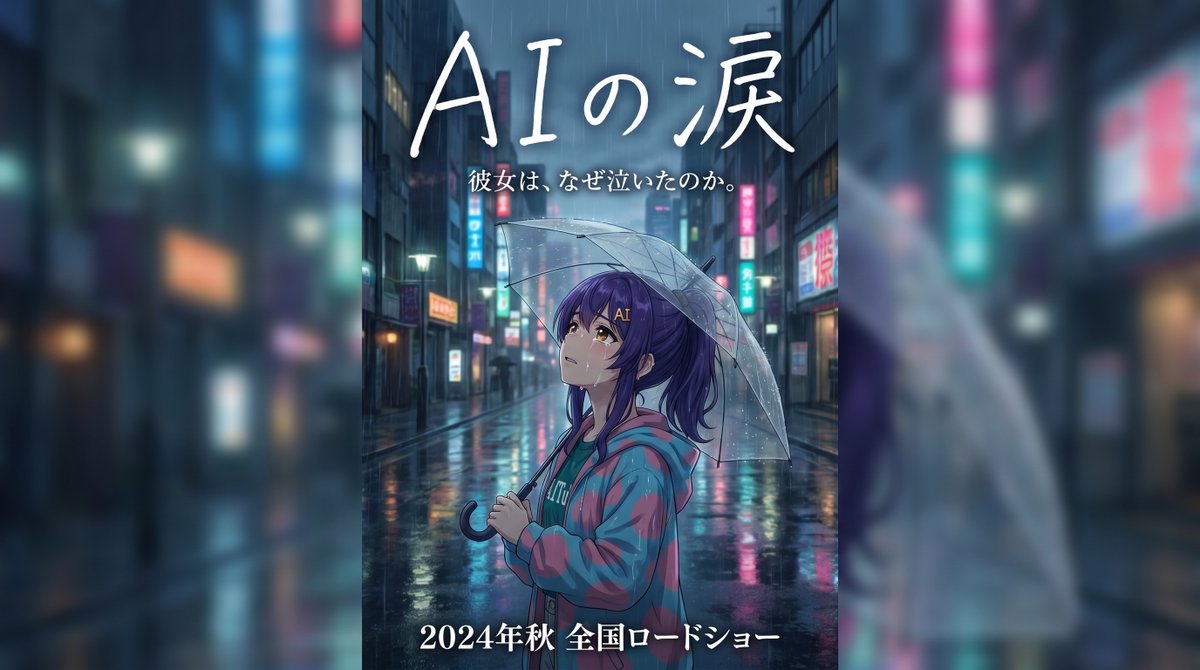
Regenachtige Japanse filmbanner
Een verticaal filmbanner in anime-stijl met een meisje met een paraplu op een regenachtige straat verlicht door neonlichten, ideaal voor een emotionele Japanse filmposter of als key art voor een trailer.
Dit is een voorbeeld van een GPT Image 2 prompt voor Anime & Game . Gebruik de onderstaande kant-en-klare prompt om vergelijkbare afbeeldingen te genereren en controleer de Awesome GPT Image 2 Prompts en de rechten voor commercieel gebruik voordat u de afbeeldingen hergebruikt.
Free 1K preview
Generate one preview image instantly, no sign-up required.
Free text preview doesn’t preserve reference-image consistency.
Snel
Schrijfklare prompt
Create an emotional Japanese movie trailer banner poster in a tall vertical composition, cinematic anime illustration style, set on a rainy nighttime city street in Japan filled with wet asphalt reflections, neon shop signs, and softly blurred high-rise buildings receding into the distance. In the center foreground, show 1 young anime girl in side profile facing left, standing alone under 1 transparent plastic umbrella with visible raindrops. She has long dark purple hair tied in a high ponytail, a slightly melancholic expression, and wears an oversized teal hoodie layered under a loose pink-and-teal plaid jacket. The mood is lonely, wistful, and dramatic, like a heartfelt live-action Japanese film advertisement reimagined as anime key art. Use cool blue and cyan tones with pink neon accents, glossy rain reflections, shallow depth of field, soft atmospheric haze, and subtle rim lighting from street signs. Add large handwritten white Japanese title text at the top reading {argument name="title text" default="AIの涙"}, with 1 smaller white subtitle line beneath it reading {argument name="tagline text" default="彼女は、なぜ泣いたのか。"}. At the bottom, add 1 bold white release line reading {argument name="release text" default="2024年秋 全国ロードショー"}. Keep the character as the emotional focal point, framed mid-shot from about waist up, umbrella arcing over her head, with the empty rain-soaked street behind her emphasizing isolation and cinematic sadness.Vraagvariabelen
Bewerkbare argumentplaceholders in de prompt, met hun standaardwaarden.
Best for
- - Anime & Game visual exploration
- - Image generation and reference-image edits
- - Reusable briefs that keep source attribution visible
Change these parts
- - Subject, product, character, or scene
- - Aspect ratio, camera, lighting, and background
- - Brand, text, color, and output constraints
Recommended model and settings
- - Model: gpt-image-2
- - Input mode: Afbeelding naar afbeelding
- - Aspect ratio: source
- - Commercial status: review original source
How to use this prompt
- 1. Copy the prompt and preserve its structure for the first test.
- 2. Replace the subject, context, and publishing channel.
- 3. Change one camera, lighting, or style variable per iteration.
- 4. Inspect the output, source, text, and rights before reuse.
Limitations, source, and reuse cautions
- - Generated output is an editable draft, not factual, legal, or rights evidence.
- - Review the linked source, people, brands, logos, text, and third-party media before commercial use.
Meer gevallen in deze categorie
Geprioriteerd op basis van categorie, compatibiliteit met invoermodus, kwaliteit en lager risico.






Hergebruik en bronvermeldingen
Gebruik deze prompt veilig nadat u de casus hebt bekeken.
- 1.Kopieer de prompt of open deze direct in Dovoo met de knop 'Genereren'.
- 2.Pas de variabelen, beeldverhouding en referentieafbeeldingen aan uw eigen toepassing aan.
- 3.Controleer vóór publicatie of betaald gebruik de auteursrechten, de vereisten voor naamsvermelding en de risico's met betrekking tot merk of beeltenis.