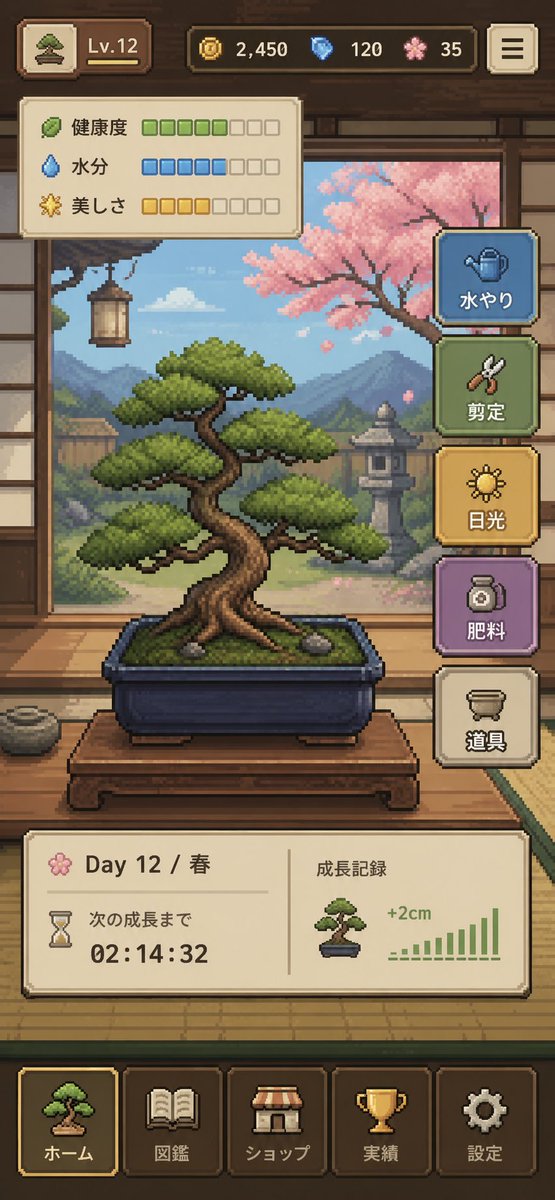
Pixel Art Bonsai Game UI
Een stijlvolle verticale mobiele game-interface met een gezellige pixel-art bonsai-verzorgingssimulator, ideaal voor UI-concepten, mockups voor indie-games en presentatiemateriaal voor app stores.
Dit is een voorbeeld van een GPT Image 2 prompt voor Anime & Game . Gebruik de onderstaande kant-en-klare prompt om vergelijkbare afbeeldingen te genereren en controleer de Awesome GPT Image 2 Prompts en de rechten voor commercieel gebruik voordat u de afbeeldingen hergebruikt.
Heb je de volledige set prompts nodig? Gebruik dan de Anime & Game Ga naar het themacentrum voor meer gerelateerde voorbeelden, of open de GPT Image 2 prompt catalogus Voor de volledige voorbeeldenindex, herbruikbare structuren en bronvermelding.
Free 1K preview
Generate one preview image instantly, no sign-up required.
4000/4000
Snel
Schrijfklare prompt
{
  "type": "pixel art mobile game UI mockup",
  "theme": "cozy Japanese bonsai cultivation simulator",
  "style": {
    "rendering": "detailed 2D pixel art, polished retro game aesthetic, crisp sprites, warm lighting, soft atmospheric background",
    "aspect_ratio": "9:16 portrait",
    "camera": "straight-on view of a traditional Japanese room interior framing the bonsai in the center"
  },
  "subject": {
    "main_object": "bonsai tree in a rectangular dark blue ceramic pot",
    "bonsai": {
      "species_look": "pine-like bonsai with layered rounded foliage pads",
      "trunk": "thick twisted brown trunk with exposed roots",
      "placement": "on a low wooden display table",
      "soil": "mossy green surface with 2 small visible stones"
    }
  },
  "environment": {
    "setting": "traditional Japanese tatami room with open shoji view to a garden",
    "background_elements": [
      "wooden beams and wall trim",
      "hanging lantern on the left",
      "mountains in the distance",
      "stone lantern in the garden",
      "pink cherry blossom tree on the right",
      "soft blue sky with clouds"
    ],
    "mood": "calm, handcrafted, meditative"
  },
  "ui": {
    "top_bar": {
      "count": 5,
      "elements": [
        "small bonsai icon button at top left",
        "level badge showing \"Lv.12\"",
        "coin counter showing \"2,450\"",
        "blue gem counter showing \"120\"",
        "pink blossom currency counter showing \"35\""
      ],
      "top_right": "menu button with 3 horizontal lines"
    },
    "status_panel": {
      "position": "upper left below top bar",
      "count": 3,
      "rows": [
        {
          "label": "Health",
          "icon": "leaf",
          "filled": 5,
          "total": 8,
          "color": "green"
        },
        {
          "label": "Moisture",
          "icon": "water droplet",
          "filled": 5,
          "total": 8,
          "color": "blue"
        },
        {
          "label": "美しさ",
          "icon": "sparkle flower",
          "filled": 4,
          "total": 8,
          "color": "gold"
        }
      ]
    },
    "action_buttons": {
      "position": "right side vertical stack",
      "count": 5,
      "buttons": [
        {
          "label": "水やり",
          "icon": "watering can",
          "color": "blue"
        },
        {
          "label": "Pruning",
          "icon": "shears",
          "color": "green"
        },
        {
          "label": "Light",
          "icon": "sun",
          "color": "gold"
        },
        {
          "label": "Fertilizing",
          "icon": "fertilizer jar",
          "color": "purple"
        },
        {
          "label": "Tools",
          "icon": "pot or tools container",
          "color": "cream"
        }
      ]
    },
    "info_panel": {
      "position": "lower middle above navigation",
      "count": 2,
      "sections": [
        {
          "label": "Day 12 / Spring",
          "subitems": [
            "flower icon",
            "hourglass icon",
            "text \"次の成長まで\"",
            "countdown timer \"02:14:32\""
          ]
        },
        {
          "label": "Growth Record",
          "subitems": [
            "small bonsai thumbnail",
            "text \"+2cm\"",
            "green bar chart with 10 ascending bars"
          ]
        }
      ]
    },
    "bottom_navigation": {
      "position": "bottom",
      "count": 5,
      "tabs": [
        "ホーム",
        "Pokedex",
        "ショップ",
        "Achievements",
        "Settings"
      ],
      "icons": [
        "bonsai",
        "book",
        "shop awning",
        "trophy",
        "gear"
      ],
      "active_tab": "ホーム"
    }
  },
  "composition": "central bonsai hero object, UI panels framing the scene without covering the tree, game-ready mockup that looks like a screenshot from a finished mobile app",
  "color_palette": {
    "dominant": [
      "warm wood brown",
      "tatami beige",
      "moss green",
      "sky blue",
      "cherry blossom pink",
      "muted gold"
    ],
    "accent_buttons": [
      "dusty blue",
      "sage green",
      "mustard gold",
      "soft purple",
      "cream"
    ]
  },
  "quality": "clean, legible interface, professional indie game prototype, charming and highly cohesive"
}
Best for
- - Anime & Game visual exploration
- - Image generation and reference-image edits
- - Reusable briefs that keep source attribution visible
Change these parts
- - Subject, product, character, or scene
- - Aspect ratio, camera, lighting, and background
- - Brand, text, color, and output constraints
Recommended model and settings
- - Model: gpt-image-2
- - Input mode: Tekst naar afbeelding
- - Aspect ratio: source
- - Commercial status: review original source
How to use this prompt
- 1. Copy the prompt and preserve its structure for the first test.
- 2. Replace the subject, context, and publishing channel.
- 3. Change one camera, lighting, or style variable per iteration.
- 4. Inspect the output, source, text, and rights before reuse.
Limitations, source, and reuse cautions
- - Generated output is an editable draft, not factual, legal, or rights evidence.
- - Review the linked source, people, brands, logos, text, and third-party media before commercial use.
Geïmporteerd van Awesome GPT Image 2 Prompts . Naamsvermelding is vereist. Commercieel gebruik is toegestaan volgens de status allowed ; controleer de rechten van de bron voordat u het tegen betaling gebruikt.
Meer gevallen in deze categorie
Geprioriteerd op basis van categorie, compatibiliteit met invoermodus, kwaliteit en lager risico.

Manga Desert Radio Telescope Road Trip
Tekst naar afbeelding

Grumpy Rhino Storybook Illustration
Tekst naar afbeelding

Female Clown Cyborg Portrait
Tekst naar afbeelding

Imperial Research Bunker on Volcanic Planet
Tekst naar afbeelding

Surreal 3D Chess Match Artwork
Tekst naar afbeelding

Pink Hijab Mirror Selfie Portrait
Tekst naar afbeelding
Hergebruik en bronvermeldingen
Gebruik deze prompt veilig nadat u de casus hebt bekeken.
- 1.Kopieer de prompt of open deze direct in Dovoo met de knop 'Genereren'.
- 2.Pas de variabelen, beeldverhouding en referentieafbeeldingen aan uw eigen toepassing aan.
- 3.Controleer vóór publicatie of betaald gebruik de auteursrechten, de vereisten voor naamsvermelding en de risico's met betrekking tot merk of beeltenis.