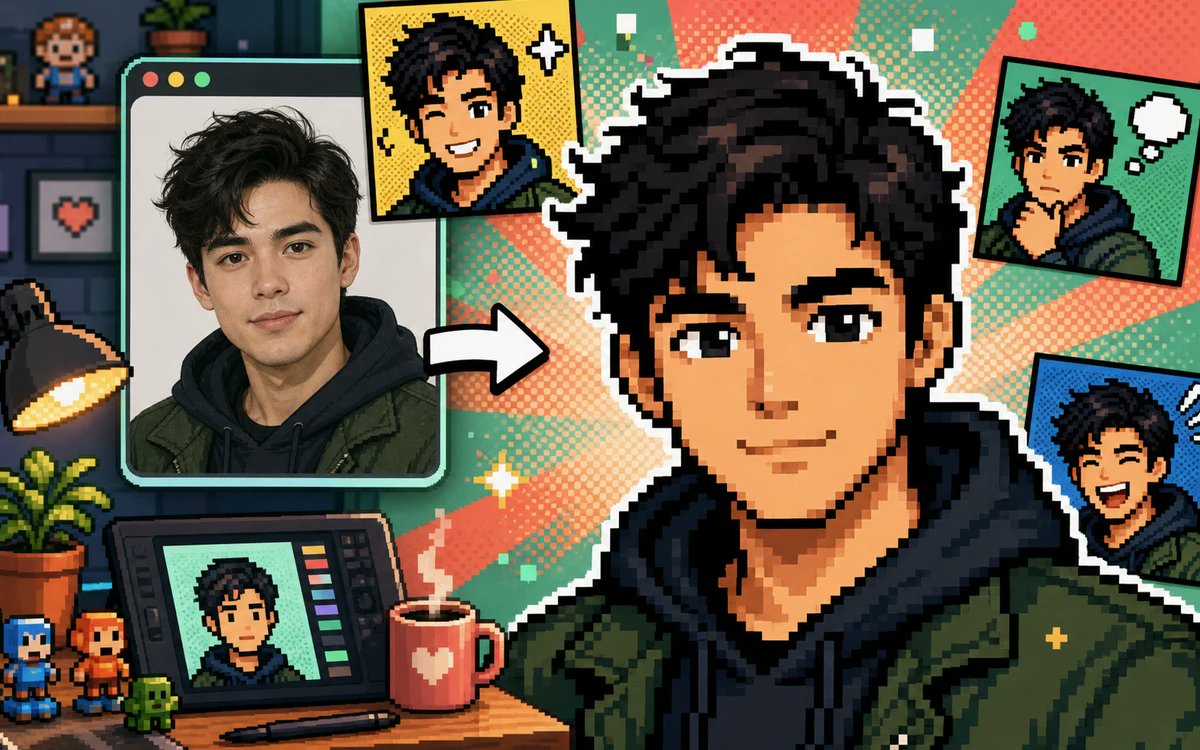
Foto naar pixel avatar collage
Een kleurrijke banner van een 16-bits creator-studio, waarop een portret is omgezet in meerdere pixelavatars in stripstijl voor een foto-naar-avatar-generator.
Dit is een voorbeeld van een GPT Image 2 prompt voor Product & Commercieel . Gebruik de onderstaande kant-en-klare prompt om vergelijkbare afbeeldingen te genereren en controleer de Awesome GPT Image 2 Prompts en de rechten voor commercieel gebruik voordat u de afbeeldingen hergebruikt.
Free 1K preview
Generate one preview image instantly, no sign-up required.
Free text preview doesn’t preserve reference-image consistency.
Snel
Schrijfklare prompt
Create a vibrant pixel-art promotional collage showing a real portrait being transformed into a gaming-style pixel avatar. Canvas: wide 16:9 landscape banner, approximately 1200×675. Visual style: crisp retro 16-bit pixel art mixed with one realistic photo panel, thick black outlines, white sticker borders, halftone comic dots, teal and coral radial burst background, playful creator-studio atmosphere. Main subject: a large central pixel-art bust of {argument name="character name" default="a young man"} with {argument name="hair color" default="messy black hair"}, wearing a dark navy hoodie under an olive green jacket, facing forward; Show every face clearly with natural, detailed facial features, not a detailed identity. Left side: one large rounded-corner computer/photo window with three small circular window buttons at the top left, containing a realistic portrait of the same person in the same hoodie and jacket, with a thick mint-green frame. Between the photo window and the central avatar, place one bold white arrow pointing right to show transformation. Count the visible generated avatar outputs exactly: 5 total — 1 large central pixel avatar, 1 yellow comic-style square portrait near the top center-left with sparkle icons, 1 green comic-style square portrait at the top right with a white thought bubble, 1 blue comic-style square portrait at the right middle with expressive motion marks, and 1 small portrait displayed on a drawing tablet at the bottom left. Desk and studio details: include exactly 10 notable props — 1 black desk lamp glowing warm yellow on the far left, 1 potted leafy plant on the desk, 1 drawing tablet with colored tool bars, 1 stylus lying in front of it, 1 red mug with a white heart and steam, 2 small pixel figurines at the bottom left, 1 tiny green pixel creature, 1 wall shelf with a small pixel character figure, and 1 framed pixel heart picture on the wall. Background: dark cozy room on the far left with shelves and brick wall, transitioning into bright comic halftone rays behind the central avatar. Palette: saturated teal, mint, coral, yellow, navy, olive green, and black. Composition: dynamic, busy but readable, with the central avatar dominating the right half and the source photo dominating the left. Constraints: no readable text or logos, no watermark, no extra panels beyond the five counted avatar outputs, maintain a cheerful before-and-after transformation theme suitable for a free photo-to-pixel-avatar generator ad.Vraagvariabelen
Bewerkbare argumentplaceholders in de prompt, met hun standaardwaarden.
Best for
- - Product & Commercieel visual exploration
- - Image generation and reference-image edits
- - Reusable briefs that keep source attribution visible
Change these parts
- - Subject, product, character, or scene
- - Aspect ratio, camera, lighting, and background
- - Brand, text, color, and output constraints
Recommended model and settings
- - Model: gpt-image-2
- - Input mode: Afbeelding naar afbeelding
- - Aspect ratio: source
- - Commercial status: review original source
How to use this prompt
- 1. Copy the prompt and preserve its structure for the first test.
- 2. Replace the subject, context, and publishing channel.
- 3. Change one camera, lighting, or style variable per iteration.
- 4. Inspect the output, source, text, and rights before reuse.
Limitations, source, and reuse cautions
- - Generated output is an editable draft, not factual, legal, or rights evidence.
- - Review the linked source, people, brands, logos, text, and third-party media before commercial use.
Meer gevallen in deze categorie
Geprioriteerd op basis van categorie, compatibiliteit met invoermodus, kwaliteit en lager risico.






Hergebruik en bronvermeldingen
Gebruik deze prompt veilig nadat u de casus hebt bekeken.
- 1.Kopieer de prompt of open deze direct in Dovoo met de knop 'Genereren'.
- 2.Pas de variabelen, beeldverhouding en referentieafbeeldingen aan uw eigen toepassing aan.
- 3.Controleer vóór publicatie of betaald gebruik de auteursrechten, de vereisten voor naamsvermelding en de risico's met betrekking tot merk of beeltenis.