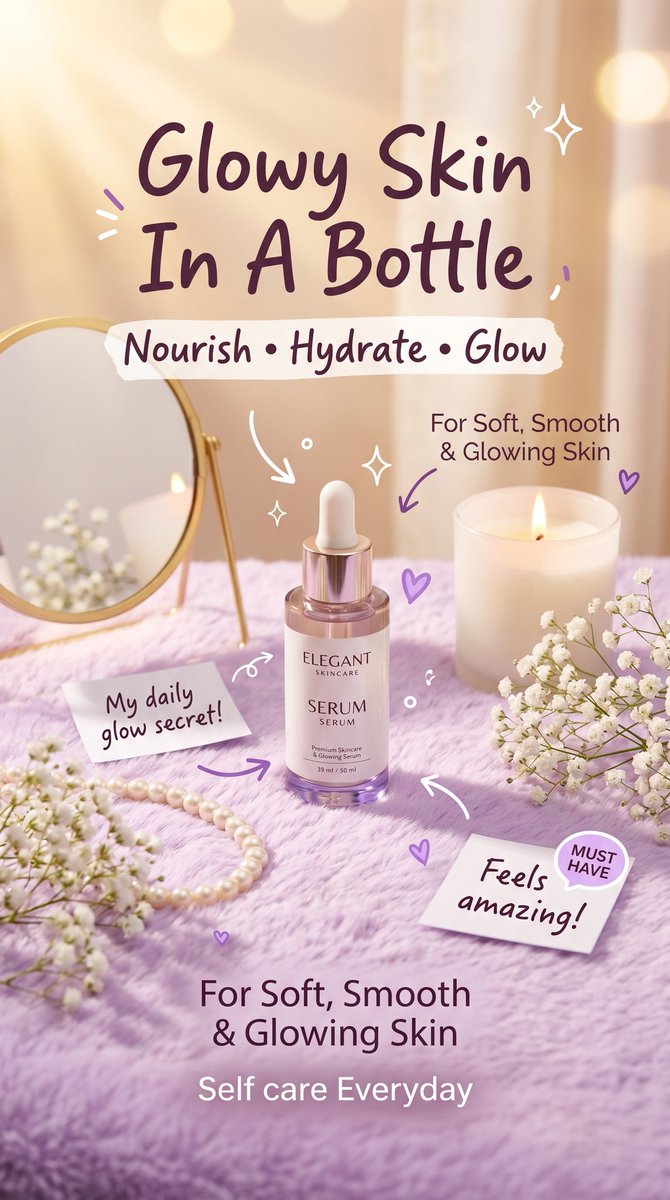
Pastel Luxury Skincare-advertentie
Een verticale reclame voor schoonheidsproducten in zachte pastelkleuren, met een stralend serumflesje in een vrouwelijke make-upomgeving, ideaal voor huidverzorgingsmerken en promotionele uitingen op sociale media.
Dit is een voorbeeld van een GPT Image 2 prompt voor Product & Commercieel . Gebruik de onderstaande kant-en-klare prompt om vergelijkbare afbeeldingen te genereren en controleer de Awesome GPT Image 2 Prompts en de rechten voor commercieel gebruik voordat u de afbeeldingen hergebruikt.
Free 1K preview
Generate one preview image instantly, no sign-up required.
Snel
Schrijfklare prompt
Create a vertical luxury skincare advertisement in a soft feminine pastel aesthetic, styled like a viral Instagram or TikTok beauty promo with no app UI. Show a single glass dropper serum bottle centered on a fluffy lavender-purple surface, photographed in ultra-realistic studio lighting with warm golden sunlight streaming from the upper left, soft shadows, glossy reflections, dreamy haze, and creamy bokeh in the background. The bottle label should read {argument name="brand name" default="ELEGANT SKINCARE"} and {argument name="product name" default="SERUM"}, with a pale pink-lilac translucent bottle and shiny rose-gold dropper cap. Surround the product with an elegant feminine vanity setup: 1 gold-framed round tabletop mirror on the left, 1 lit white candle in a glass jar on the right, 1 pearl necklace draped across the lower left foreground, and 4 clusters of white baby's breath flowers placed in the left foreground, left midground near the mirror, right foreground, and far right edge. Add cute hand-drawn doodle decorations in white and purple: curved arrows pointing toward the serum, sparkles, tiny hearts, short accent strokes, and small loops scattered around the composition. Include 2 paper note cards: one left of the bottle saying {argument name="left note text" default="My daily glow secret!"}, and one lower right saying {argument name="right note text" default="Feels amazing!"}; add 1 small round lavender sticker attached to the right note that says "MUST HAVE". Use large handwritten dark-purple headline text at the top reading {argument name="headline text" default="Glowy Skin In A Bottle"}, with a torn white tape-style strip underneath containing {argument name="tagline text" default="Nourish • Hydrate • Glow"}. Add smaller dark-purple copy to the upper right of the bottle reading "For Soft, Smooth & Glowing Skin", and at the bottom center repeat "For Soft, Smooth & Glowing Skin" with "Self care Everyday" beneath it in a lighter soft white tone. Keep the composition clean, premium, cozy, glossy, and highly aesthetic, with the serum as the clear focal point.Vraagvariabelen
Bewerkbare argumentplaceholders in de prompt, met hun standaardwaarden.
Best for
- - Product & Commercieel visual exploration
- - Image generation and reference-image edits
- - Reusable briefs that keep source attribution visible
Change these parts
- - Subject, product, character, or scene
- - Aspect ratio, camera, lighting, and background
- - Brand, text, color, and output constraints
Recommended model and settings
- - Model: gpt-image-2
- - Input mode: Tekst naar afbeelding
- - Aspect ratio: source
- - Commercial status: review original source
How to use this prompt
- 1. Copy the prompt and preserve its structure for the first test.
- 2. Replace the subject, context, and publishing channel.
- 3. Change one camera, lighting, or style variable per iteration.
- 4. Inspect the output, source, text, and rights before reuse.
Limitations, source, and reuse cautions
- - Generated output is an editable draft, not factual, legal, or rights evidence.
- - Review the linked source, people, brands, logos, text, and third-party media before commercial use.
Meer gevallen in deze categorie
Geprioriteerd op basis van categorie, compatibiliteit met invoermodus, kwaliteit en lager risico.






Hergebruik en bronvermeldingen
Gebruik deze prompt veilig nadat u de casus hebt bekeken.
- 1.Kopieer de prompt of open deze direct in Dovoo met de knop 'Genereren'.
- 2.Pas de variabelen, beeldverhouding en referentieafbeeldingen aan uw eigen toepassing aan.
- 3.Controleer vóór publicatie of betaald gebruik de auteursrechten, de vereisten voor naamsvermelding en de risico's met betrekking tot merk of beeltenis.