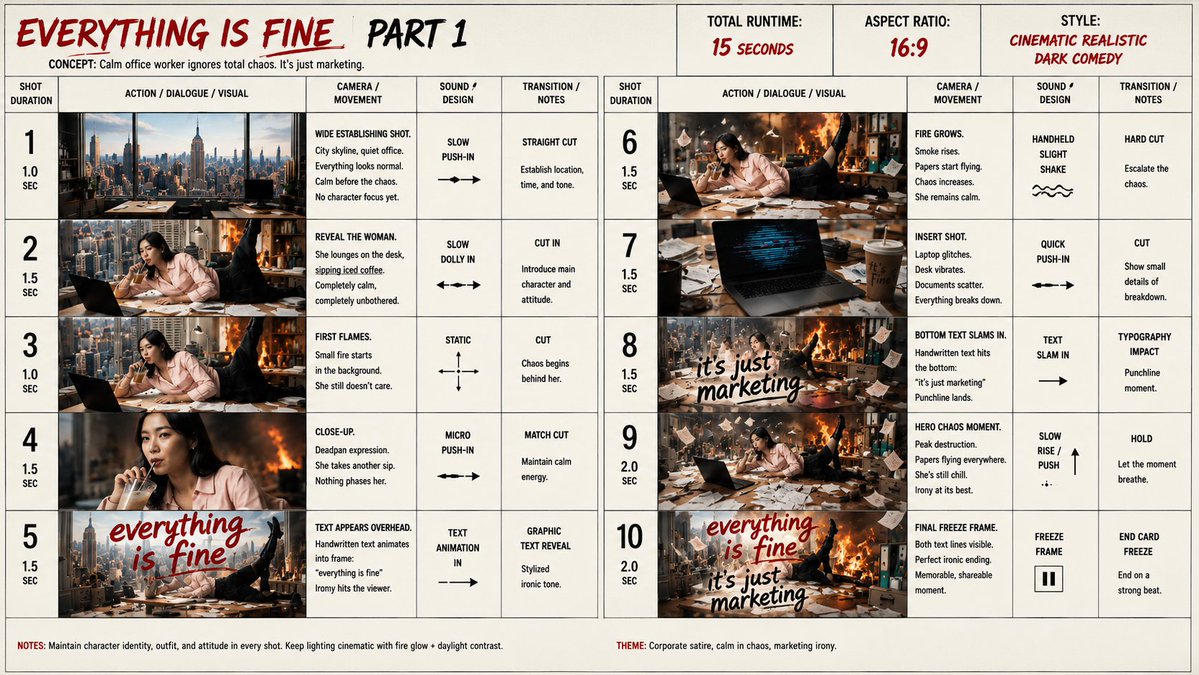
Everything Is Fine Storyboard Sheet
Creates a detailed 10-shot cinematic storyboard sheet for a dark comedy office chaos marketing video concept.
Dit is een voorbeeld van een GPT Image 2 prompt voor Grafisch ontwerp & poster . Gebruik de onderstaande kant-en-klare prompt om vergelijkbare afbeeldingen te genereren en controleer de Awesome GPT Image 2 Prompts en de rechten voor commercieel gebruik voordat u de afbeeldingen hergebruikt.
Heb je de volledige set prompts nodig? Gebruik dan de Grafisch ontwerp & poster Ga naar het themacentrum voor meer gerelateerde voorbeelden, of open de GPT Image 2 prompt catalogus Voor de volledige voorbeeldenindex, herbruikbare structuren en bronvermelding.
Free 1K preview
Generate one preview image instantly, no sign-up required.
Free text preview doesn’t preserve reference-image consistency.
4000/4000
Snel
Schrijfklare prompt
Goal: Create a cinematic storyboard sheet for a short video concept titled {argument name="story title" default="EVERYTHING IS FINE, PART 1"}, presenting a darkly comic corporate satire where a calm office worker ignores total chaos because it is “just marketing.”

Canvas: Wide 16:9 storyboard board, off-white paper background with thin black grid lines, hand-drawn production-planning aesthetic, slightly gritty print texture. Use a red-and-black marker style for key headings and handwritten overlay text.

Header: Large top-left title in red brush lettering: “EVERYTHING IS FINE”, followed by “PART 1” in black brush lettering. Under it, small concept line: “CONCEPT: Calm office worker ignores total chaos. It’s just marketing.” Top-center and top-right production boxes: “TOTAL RUNTIME: 15 SECONDS”, “ASPECT RATIO: 16:9”, and “STYLE: CINEMATIC REALISTIC DARK COMEDY”.

Layout: A two-page-style storyboard grid spanning the canvas, divided into 10 numbered shots. Shots 1–5 are on the left half and shots 6–10 on the right half. Each shot row contains exactly five columns: shot duration, action / dialogue / visual image panel, camera / movement notes, sound / design notes, and transition / notes. Use bold black column labels and large shot numbers.

Main character and environment: The main character is {argument name="main character" default="a calm young woman office worker in a pale pink button-up blouse"}, seated or reclining at a cluttered office desk with a laptop, coffee cup, paperwork, pens, and office supplies. She remains deadpan and completely unbothered in every shot. The office is high above a city skyline with large windows, daylight outside, and escalating fire, smoke, flying papers, broken desk items, and collapse-like chaos behind her. Keep the same character identity, outfit, hairstyle, and attitude throughout.

Storyboard panels: Include exactly 10 image panels with these visible beats:
1. 1.0 sec, wide establishing shot of a clean city skyline office; everything looks normal, calm before chaos, no character focus yet.
2. 1.5 sec, reveal the woman lounging at the desk, sipping iced coffee, laptop open, completely calm while city and office hints appear around her.
3. 1.0 sec, first small flames start in the background while she still does not care.
4. 1.5 sec, close-up of her deadpan face taking another sip; warm fire glow behind her.
5. 1.5 sec, text appears overhead in red handwritten script: {argument name="first overlay text" default="everything is fine"}; the phrase sits over the chaotic office scene.
6. 1.5 sec, fire grows, smoke rises, papers fly, chaos increases, she remains calm at the desk.
7. 1.5 sec, insert shot of her laptop on the messy desk; the laptop display shows distorted blue glitch-like lines and the desk vibrates, with coffee and documents nearby.
8. 1.5 sec, bottom handwritten text slams in: {argument name="second overlay text" default="it’s just marketing"}; punchline text over the scene with fire and flying papers.
9. 2.0 sec, hero chaos moment: peak destruction, fire roaring, papers everywhere, desk buried in mess, she is still chill and composed.
10. 2.0 sec, final freeze-frame composition with both text lines visible: “everything is fine” in red and “it’s just marketing” in black, memorable shareable ending.

Production notes in cells: Add compact legible notes like “wide establishing shot,” “slow push-in,” “straight cut,” “slow dolly in,” “cut in,” “static,” “match cut,” “micro push-in,” “graphic text reveal,” “handheld slight shake,” “quick push-in,” “typography impact,” “slow rise / push,” “freeze frame,” and “end card freeze.” Include simple black arrows and small motion symbols in the camera/sound columns.

Footer: Add a bottom notes strip. Left note: “NOTES: Maintain character identity, outfit, and attitude in every shot. Keep lighting cinematic with fire glow + daylight contrast.” Right note: “THEME: Corporate satire, calm in chaos, marketing irony.”

Visual style: Realistic cinematic thumbnails inside the storyboard panels, high-contrast daylight mixed with orange fire glow, dark comedy tone, messy office detail, smoke, sparks, loose paper sheets. The surrounding storyboard board should feel like a professional pitch sheet with hand-rendered typography and crisp grid structure.

Constraints: Use exactly 10 shots, exactly two main handwritten overlay phrases, no extra characters, no logos, no watermark, no raw UI mockup look. Keep all text in English and make the storyboard notes readable but compact.
Vraagvariabelen
Bewerkbare argumentplaceholders in de prompt, met hun standaardwaarden.
Variabele
story title
Standaard
EVERYTHING IS FINE, PART 1
Variabele
main character
Standaard
a calm young woman office worker in a pale pink button-up blouse
Variabele
first overlay text
Standaard
everything is fine
Variabele
second overlay text
Standaard
it’s just marketing
Best for
- - Grafisch ontwerp & poster visual exploration
- - Image generation and reference-image edits
- - Reusable briefs that keep source attribution visible
Change these parts
- - Subject, product, character, or scene
- - Aspect ratio, camera, lighting, and background
- - Brand, text, color, and output constraints
Recommended model and settings
- - Model: gpt-image-2
- - Input mode: Afbeelding naar afbeelding
- - Aspect ratio: source
- - Commercial status: review original source
How to use this prompt
- 1. Copy the prompt and preserve its structure for the first test.
- 2. Replace the subject, context, and publishing channel.
- 3. Change one camera, lighting, or style variable per iteration.
- 4. Inspect the output, source, text, and rights before reuse.
Limitations, source, and reuse cautions
- - Generated output is an editable draft, not factual, legal, or rights evidence.
- - Review the linked source, people, brands, logos, text, and third-party media before commercial use.
Geïmporteerd van Awesome GPT Image 2 Prompts . Naamsvermelding is vereist. Commercieel gebruik is toegestaan volgens de status allowed ; controleer de rechten van de bron voordat u het tegen betaling gebruikt.
Meer gevallen in deze categorie
Geprioriteerd op basis van categorie, compatibiliteit met invoermodus, kwaliteit en lager risico.

Sci-Fi Cyan Lighting Effect
Afbeelding naar afbeelding

Oversized Head Cartoon Caricature Prompt
Afbeelding naar afbeeldingGemiddeld risico

Stylish Man Street Lamp Portrait
Afbeelding naar afbeelding

Luxury Travel Fashion Portrait Prompt
Tekst naar afbeelding

Anime Girl Heterochromia Portrait
Tekst naar afbeelding

Hell Hound Character Sheet Infographic
Tekst naar afbeelding
Hergebruik en bronvermeldingen
Gebruik deze prompt veilig nadat u de casus hebt bekeken.
- 1.Kopieer de prompt of open deze direct in Dovoo met de knop 'Genereren'.
- 2.Pas de variabelen, beeldverhouding en referentieafbeeldingen aan uw eigen toepassing aan.
- 3.Controleer vóór publicatie of betaald gebruik de auteursrechten, de vereisten voor naamsvermelding en de risico's met betrekking tot merk of beeltenis.