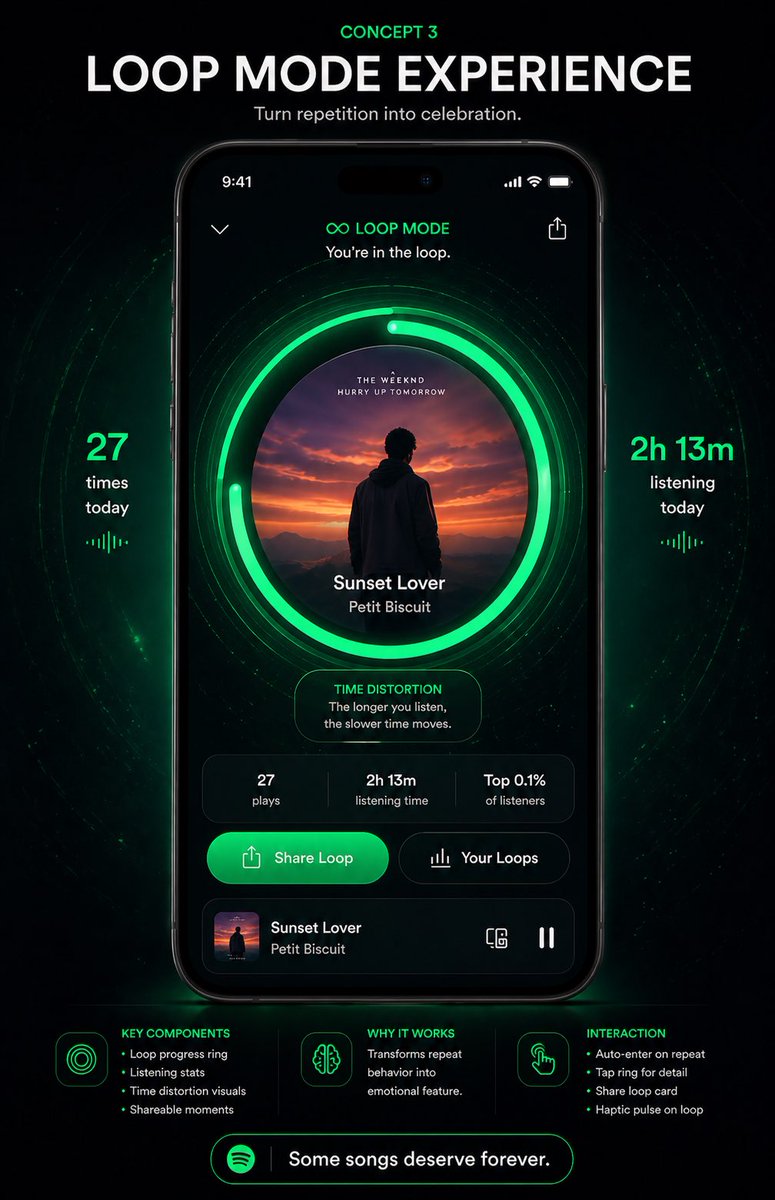
Neon Loop Mode Muziek App Poster
Een futuristische conceptposter voor een mobiele app in Spotify-stijl, met een gebruikersinterface die een luisterervaring in een loop laat zien. Geschikt voor presentaties over herontwerp, productconcepten en casestudy's voor sociale media.
Dit is een voorbeeld van een GPT Image 2 prompt voor Product & Commercieel . Gebruik de onderstaande kant-en-klare prompt om vergelijkbare afbeeldingen te genereren en controleer de Awesome GPT Image 2 Prompts en de rechten voor commercieel gebruik voordat u de afbeeldingen hergebruikt.
Free 1K preview
Generate one preview image instantly, no sign-up required.
Snel
Schrijfklare prompt
{
  "type": "music app concept poster",
  "brand": "Spotify-inspired premium UI concept",
  "theme": "futuristic neon green on black, immersive repetition as celebration",
  "poster": {
    "background": "deep black with subtle cosmic texture, faint particles, and concentric glowing green wave rings radiating behind the phone",
    "aspect_ratio": "portrait 9:16",
    "style": "high-end product presentation, sleek app redesign mockup, dramatic glow, crisp typography, polished UI, premium tech advertising"
  },
  "headline": {
    "kicker": "{argument name=\"concept label\" default=\"CONCEPT 3\"}",
    "title": "{argument name=\"headline text\" default=\"LOOP MODE EXPERIENCE\"}",
    "subtitle": "{argument name=\"tagline\" default=\"Turn repetition into celebration.\"}"
  },
  "centerpiece": {
    "device": "front-facing modern smartphone centered vertically",
    "screen": {
      "status_bar": "9:41 time, signal, wifi, battery",
      "top_controls": [
        "back chevron left",
        "share icon right"
      ],
      "mode_header": {
        "icon": "infinity symbol",
        "title": "LOOP MODE",
        "subtitle": "You're in the loop."
      },
      "main_visual": {
        "artwork_shape": "large centered circle",
        "artwork": "sunset scene with a silhouetted person facing distant mountains and orange-purple sky",
        "ring_system": {
          "count": 3,
          "description": "1 album-art circle plus 2 bright segmented neon-green loop progress rings around it, with additional faint concentric halo lines"
        },
        "track_info": {
          "title": "{argument name=\"song title\" default=\"Sunset Lover\"}",
          "artist": "{argument name=\"artist name\" default=\"Petit Biscuit\"}"
        }
      },
      "insight_card": {
        "title": "TIME DISTORTION",
        "text": "The longer you listen, the slower time moves."
      },
      "stats_row": {
        "count": 3,
        "items": [
          "27 plays",
          "2h 13m listening time",
          "Top 0.1% of listeners"
        ]
      },
      "action_buttons": {
        "count": 2,
        "items": [
          "Share Loop",
          "Your Loops"
        ]
      },
      "mini_player": {
        "thumbnail": "same sunset album art",
        "title": "Sunset Lover",
        "artist": "Petit Biscuit",
        "right_icons": [
          "device/connect icon",
          "pause icon"
        ]
      }
    }
  },
  "side_metrics": {
    "count": 2,
    "left": {
      "value": "27",
      "label": "times today",
      "decoration": "small vertical equalizer glyph below"
    },
    "right": {
      "value": "2h 13m",
      "label": "listening today",
      "decoration": "small vertical equalizer glyph below"
    }
  },
  "bottom_info": {
    "sections": [
      {
        "title": "KEY COMPONENTS",
        "position": "bottom left",
        "count": 4,
        "labels": [
          "Loop progress ring",
          "Listening stats",
          "Time distortion visuals",
          "Shareable moments"
        ]
      },
      {
        "title": "WHY IT WORKS",
        "position": "bottom center",
        "count": 1,
        "labels": [
          "Transforms repeat behavior into emotional feature."
        ]
      },
      {
        "title": "INTERACTION",
        "position": "bottom right",
        "count": 4,
        "labels": [
          "Auto-enter on repeat",
          "Tap ring for detail",
          "Share loop card",
          "Haptic pulse on loop"
        ]
      }
    ],
    "footer_pill": {
      "icon": "Spotify-like circular logo",
      "text": "Some songs deserve forever."
    }
  },
  "colors": {
    "primary": "electric Spotify green glow",
    "secondary": "black, charcoal, dark gray",
    "accent": "white typography and subtle emerald highlights"
  },
  "lighting": "strong green bloom around progress rings and beneath the phone, with soft vignette edges"
}
Vraagvariabelen
Bewerkbare argumentplaceholders in de prompt, met hun standaardwaarden.
Best for
- - Product & Commercieel visual exploration
- - Image generation and reference-image edits
- - Reusable briefs that keep source attribution visible
Change these parts
- - Subject, product, character, or scene
- - Aspect ratio, camera, lighting, and background
- - Brand, text, color, and output constraints
Recommended model and settings
- - Model: gpt-image-2
- - Input mode: Tekst naar afbeelding
- - Aspect ratio: source
- - Commercial status: review original source
How to use this prompt
- 1. Copy the prompt and preserve its structure for the first test.
- 2. Replace the subject, context, and publishing channel.
- 3. Change one camera, lighting, or style variable per iteration.
- 4. Inspect the output, source, text, and rights before reuse.
Limitations, source, and reuse cautions
- - Generated output is an editable draft, not factual, legal, or rights evidence.
- - Review the linked source, people, brands, logos, text, and third-party media before commercial use.
Meer gevallen in deze categorie
Geprioriteerd op basis van categorie, compatibiliteit met invoermodus, kwaliteit en lager risico.






Hergebruik en bronvermeldingen
Gebruik deze prompt veilig nadat u de casus hebt bekeken.
- 1.Kopieer de prompt of open deze direct in Dovoo met de knop 'Genereren'.
- 2.Pas de variabelen, beeldverhouding en referentieafbeeldingen aan uw eigen toepassing aan.
- 3.Controleer vóór publicatie of betaald gebruik de auteursrechten, de vereisten voor naamsvermelding en de risico's met betrekking tot merk of beeltenis.