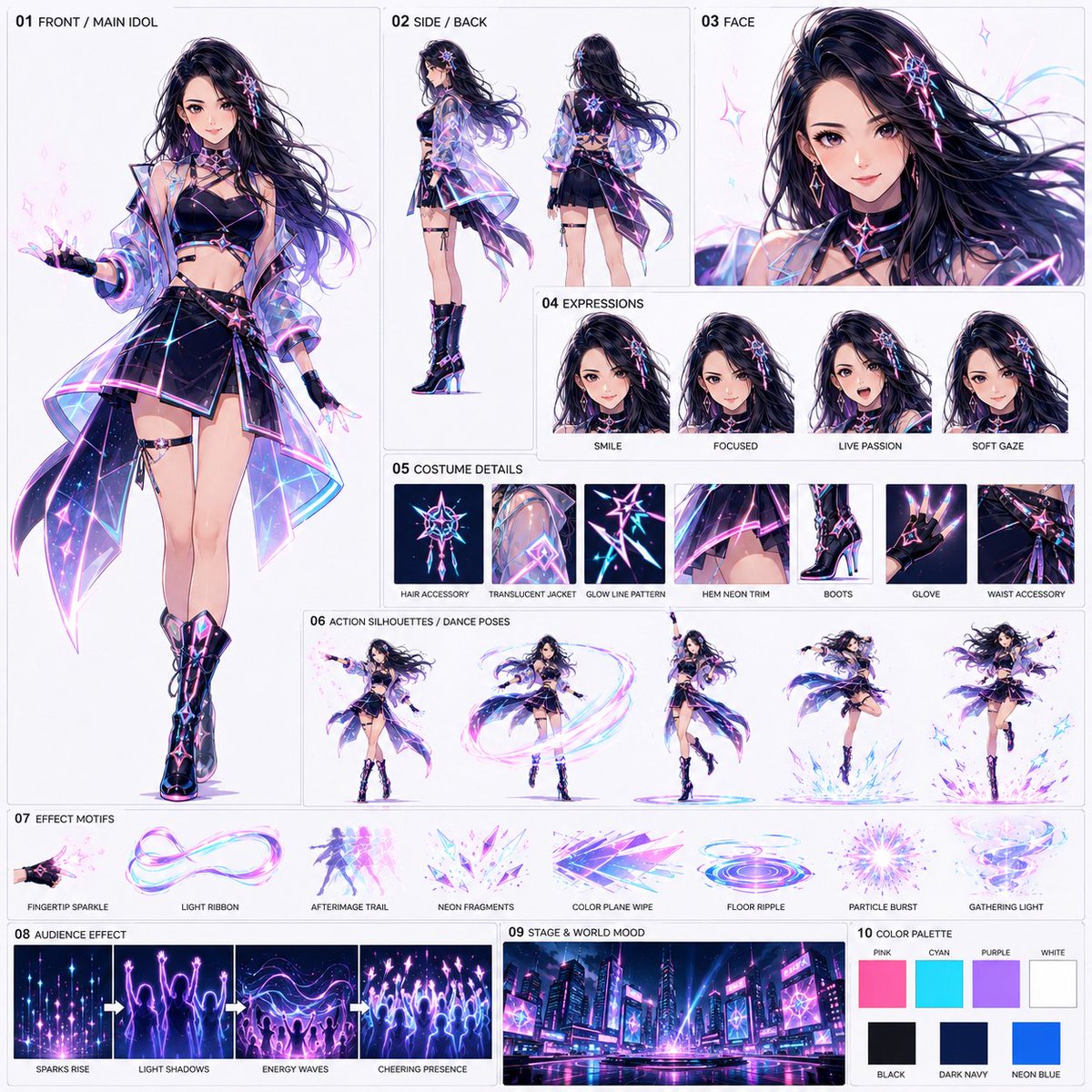
Neon Idol Style Sheet Generator
A comprehensive prompt for generating a structured anime character style sheet for a neon-themed idol performance, featuring multiple views, expressions, and costume details.
Dit is een voorbeeld van een GPT Image 2 prompt voor Anime & Game . Gebruik de onderstaande kant-en-klare prompt om vergelijkbare afbeeldingen te genereren en controleer de Awesome GPT Image 2 Prompts en de rechten voor commercieel gebruik voordat u de afbeeldingen hergebruikt.
Free 1K preview
Generate one preview image instantly, no sign-up required.
Free text preview doesn’t preserve reference-image consistency.
Snel
Schrijfklare prompt
Reference @image1 Personal portrait image
*The reference image is used for facial features, hairstyle, age perception, and atmosphere only; clothing, background, pose, and art style are not referenced.

Create a structured style sheet for a 1:1 square sharing format. The objective is to create a reference sheet for {argument name="theme" default="a 15-second anime video titled 'Solo Idol Effect Live in Neon City'"}. Using the same logic as the previous sharing style sheet, organize character, costume, expression, movement, effects, audience representation, background world-view, and color design into a single sheet. Do not re-output or replicate the layout of previous neon idol sheets. Design from scratch.

{argument name="style" default="High-quality anime style, theatrical anime grade"}. The background should be a bright off-white or light gray. Thin borders and short English labels are permitted. No long descriptions, logos, or watermarks.

Composition:
01 FRONT / MAIN IDOL
Place a large full-body front view of the main idol. Reflect the facial features and hairstyle impression from the reference image, and design a new idol costume for the neon city live performance. {argument name="costume colors" default="Black or dark navy base with pink, cyan, purple, and white luminous lines"}. Includes a translucent short jacket, dynamic skirt or stage outfit, and performance boots. Design to easily emit light particles from fingertips, sleeves, hair ends, and hems.

02 SIDE / BACK
Include smaller side and back views to show the costume structure, hair length, back design, and luminous lines.

03 FACE
Include a large facial close-up. Emphasize clarity, eye power, stage presence, and a confident expression.

04 EXPRESSIONS
3-4 expression variations. E.g., SMILE, FOCUSED, LIVE PASSION, SOFT GAZE.

05 COSTUME DETAILS
Organize and include impressive details easily identifiable in the video, such as hair accessories, translucent jacket material, luminous lines, neon decorations on the hem, boots, gloves, and waist decorations.

06 ACTION SILHOUETTES / DANCE POSES
3-5 poses during dance. E.g., emitting light particles from fingertips, creating light ribbons while spinning, a finishing pose with one arm raised, steps spreading luminous ripples at the feet, jumps with hair and costume billowing greatly. Present these as movement samples of the same person.

07 EFFECT MOTIFS
Organize and include samples of main effects. E.g., FINGERTIP SPARKLE, LIGHT RIBBON, AFTERIMAGE TRAIL, NEON FRAGMENTS, COLOR PLANE WIPE, FLOOR RIPPLE, PARTICLE BURST, GATHERING LIGHT. Colors mainly pink, cyan, purple, and white.

08 AUDIENCE EFFECT
Include expressions where effects transform into an audience. Do not over-draw normal human crowds; represent them as clusters of light particles, luminous silhouettes, light shadows raising hands, and waves of cheering particles.

09 STAGE & WORLD MOOD
Include a background sample merging the neon city and live stage. Skyscrapers, LEDs, neon signs, wet reflective floors, stage lighting, and luminous lines in the sky. A night view where the entire city looks like a live venue.

10 COLOR PALETTE
Include color samples. Primary colors: PINK, CYAN, PURPLE, WHITE. Secondary colors: BLACK, DARK NAVY, NEON BLUE.

General Policy:
- Maintain the sharing style sheet format.
- One solo idol is the protagonist.
- Effects are born from fingertips and body trajectories every time she dances.
- Those effects multiply into audience-like entities.
- Emphasize lighting, afterimages, particles, and color plane expressions unique to anime.
- Do not lean towards magical girls, wands, weapons, or large magic circles.
- Do not use the same composition or placement as existing neon idol sheets.

Prohibited Items:
- Reproduction of existing sheets.
- Single-image anchoring.
- Long descriptions, logos, watermarks.
- Real-life style, cheap TV anime style.
- Over-drawing normal human audiences.
- Compositions that look like multiple different characters exist.
- Weaponized action.

Finally, complete as a high-quality anime sharing style sheet with a new design, following the same format as the previous style sheet operation, organizing character, costume structure, expression, details, dance moves, effects, audience representation, neon city stage, and color design into one image.
Vraagvariabelen
Bewerkbare argumentplaceholders in de prompt, met hun standaardwaarden.
Best for
- - Anime & Game visual exploration
- - Image generation and reference-image edits
- - Reusable briefs that keep source attribution visible
Change these parts
- - Subject, product, character, or scene
- - Aspect ratio, camera, lighting, and background
- - Brand, text, color, and output constraints
Recommended model and settings
- - Model: gpt-image-2
- - Input mode: Afbeelding naar afbeelding
- - Aspect ratio: source
- - Commercial status: review original source
How to use this prompt
- 1. Copy the prompt and preserve its structure for the first test.
- 2. Replace the subject, context, and publishing channel.
- 3. Change one camera, lighting, or style variable per iteration.
- 4. Inspect the output, source, text, and rights before reuse.
Limitations, source, and reuse cautions
- - Generated output is an editable draft, not factual, legal, or rights evidence.
- - Review the linked source, people, brands, logos, text, and third-party media before commercial use.
Meer gevallen in deze categorie
Geprioriteerd op basis van categorie, compatibiliteit met invoermodus, kwaliteit en lager risico.






Hergebruik en bronvermeldingen
Gebruik deze prompt veilig nadat u de casus hebt bekeken.
- 1.Kopieer de prompt of open deze direct in Dovoo met de knop 'Genereren'.
- 2.Pas de variabelen, beeldverhouding en referentieafbeeldingen aan uw eigen toepassing aan.
- 3.Controleer vóór publicatie of betaald gebruik de auteursrechten, de vereisten voor naamsvermelding en de risico's met betrekking tot merk of beeltenis.