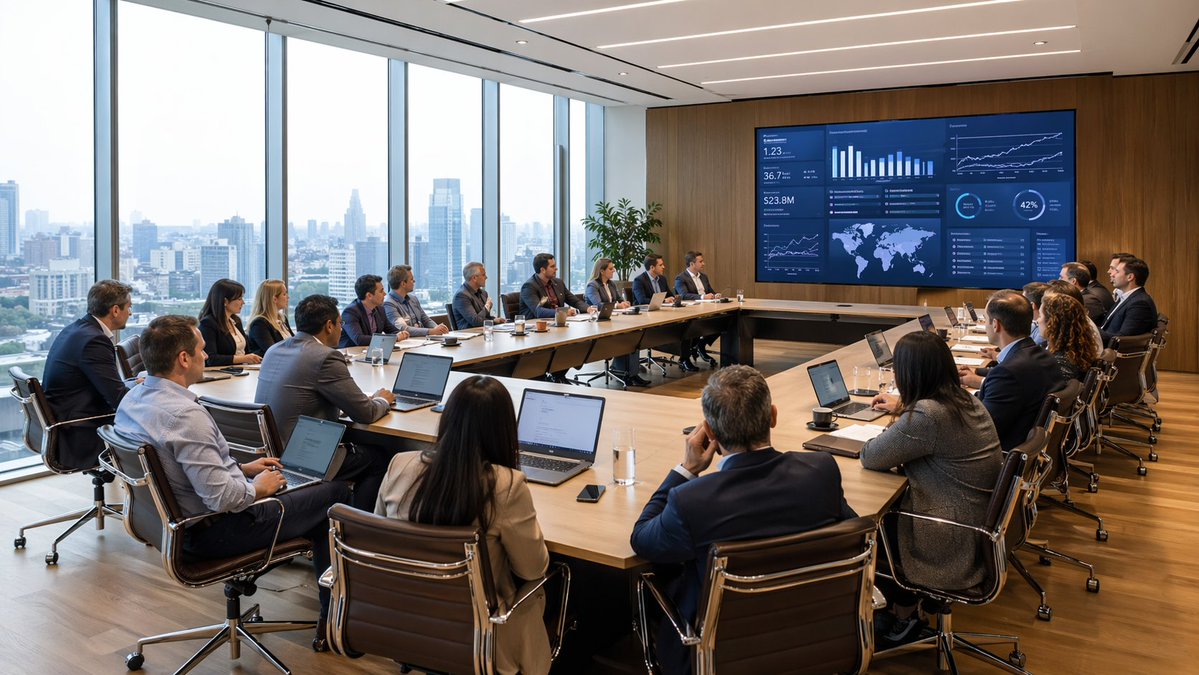
Moderne vergadering met analyses voor de vergaderzaal
Een fotorealistische scène van een directievergadering met een groot team dat een data-dashboard bekijkt, ideaal voor visualisaties in de zakelijke, consultancy-, financiële en bedrijfsstrategiesector.
Dit is een voorbeeld van een GPT Image 2 prompt voor Interieur & Architectuur . Gebruik de onderstaande kant-en-klare prompt om vergelijkbare afbeeldingen te genereren en controleer de Awesome GPT Image 2 Prompts en de rechten voor commercieel gebruik voordat u de afbeeldingen hergebruikt.
Free 1K preview
Generate one preview image instantly, no sign-up required.
Snel
Schrijfklare prompt
A wide-angle photorealistic corporate boardroom scene during a high-level business meeting, viewed from the back corner of the room. Around {argument name="number of attendees" default="18"} professionals in business attire sit around a large U-shaped light wood conference table, most with open laptops, notebooks, coffee cups, glasses of water, and smartphones in front of them. The group includes men and women of varied ethnicities, all focused toward a huge wall-mounted digital presentation screen on a warm wood-paneled wall. The screen shows a dark blue analytics dashboard with multiple charts and data panels, including bar charts, line graphs, KPI tiles, a world map, percentage circles, and trend visuals, suggesting finance, operations, or executive reporting. A presenter sits near the center-right side facing the screen, while the rest of the team watches attentively in a formal strategy session. The office is a modern executive meeting room with floor-to-ceiling windows along the entire left side, revealing a hazy urban skyline of high-rise buildings in daylight. Include sleek black leather office chairs with chrome frames, a polished wood floor, recessed linear ceiling lights, and a tall green potted plant near the display wall. Natural daylight fills the room, balanced with clean architectural interior lighting. Emphasize realism, professional atmosphere, sharp detail, subtle reflections, believable skin tones, and premium corporate interior design. Shot in a cinematic architectural photography style, ultra-detailed, high resolution, wide composition.Vraagvariabelen
Bewerkbare argumentplaceholders in de prompt, met hun standaardwaarden.
Best for
- - Interieur & Architectuur visual exploration
- - Image generation and reference-image edits
- - Reusable briefs that keep source attribution visible
Change these parts
- - Subject, product, character, or scene
- - Aspect ratio, camera, lighting, and background
- - Brand, text, color, and output constraints
Recommended model and settings
- - Model: gpt-image-2
- - Input mode: Tekst naar afbeelding
- - Aspect ratio: source
- - Commercial status: review original source
How to use this prompt
- 1. Copy the prompt and preserve its structure for the first test.
- 2. Replace the subject, context, and publishing channel.
- 3. Change one camera, lighting, or style variable per iteration.
- 4. Inspect the output, source, text, and rights before reuse.
Limitations, source, and reuse cautions
- - Generated output is an editable draft, not factual, legal, or rights evidence.
- - Review the linked source, people, brands, logos, text, and third-party media before commercial use.
Meer gevallen in deze categorie
Geprioriteerd op basis van categorie, compatibiliteit met invoermodus, kwaliteit en lager risico.






Hergebruik en bronvermeldingen
Gebruik deze prompt veilig nadat u de casus hebt bekeken.
- 1.Kopieer de prompt of open deze direct in Dovoo met de knop 'Genereren'.
- 2.Pas de variabelen, beeldverhouding en referentieafbeeldingen aan uw eigen toepassing aan.
- 3.Controleer vóór publicatie of betaald gebruik de auteursrechten, de vereisten voor naamsvermelding en de risico's met betrekking tot merk of beeltenis.