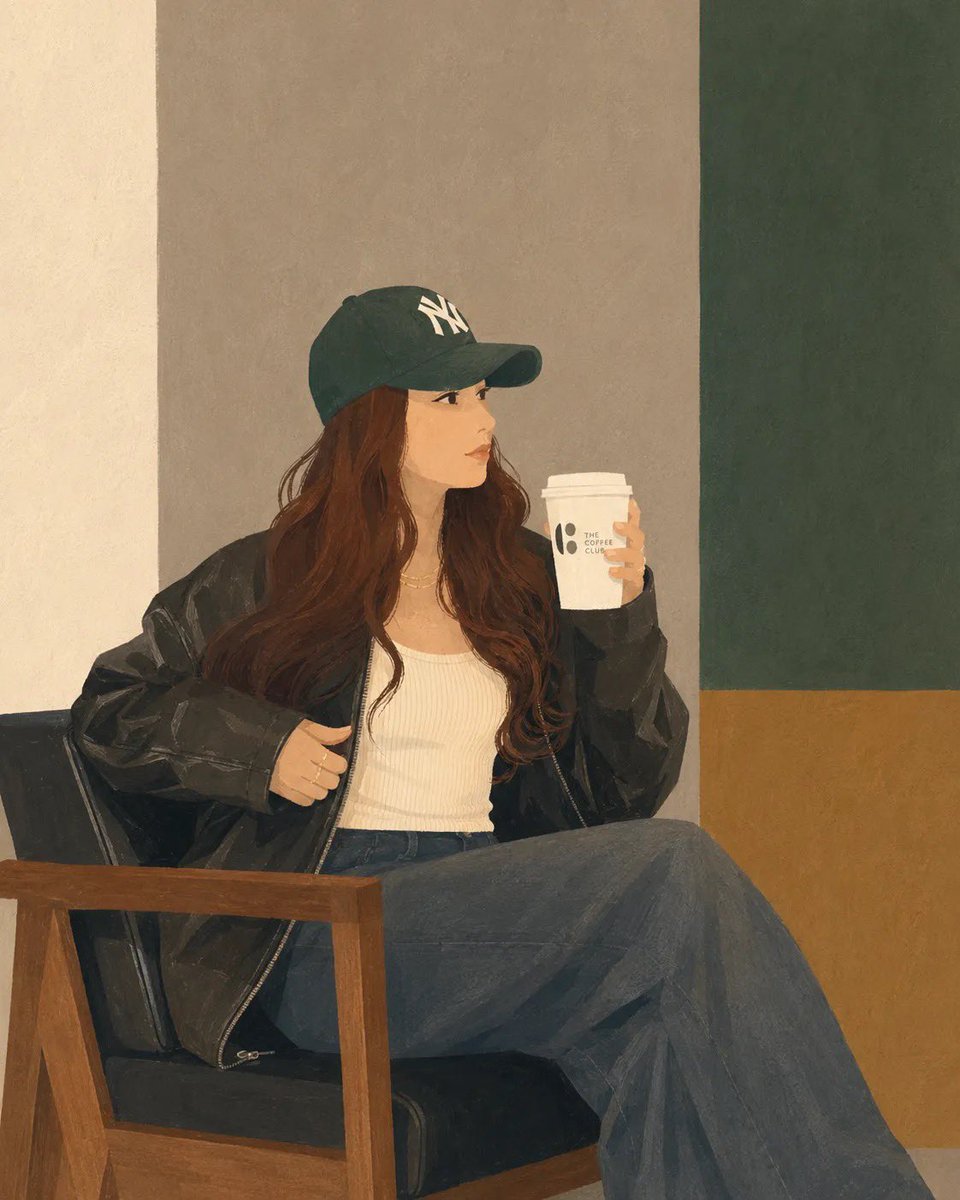
Minimalist Digital Illustration Transformation
A transformation prompt for GPT Image 2 that converts uploaded photos into clean, semi-realistic digital illustrations while maintaining the original composition and styling.
Dit is een voorbeeld van een GPT Image 2 prompt voor Illustratie & Kunst . Gebruik de onderstaande kant-en-klare prompt om vergelijkbare afbeeldingen te genereren en controleer de Awesome GPT Image 2 Prompts en de rechten voor commercieel gebruik voordat u de afbeeldingen hergebruikt.
Free 1K preview
Generate one preview image instantly, no sign-up required.
Free text preview doesn’t preserve reference-image consistency.
Snel
Schrijfklare prompt
Transform the uploaded photo into a clean, minimalist semi-realistic digital illustration while preserving the original composition, pose, outfit, chair, coffee cup, and overall framing. Simplify facial features with smooth vector-like shapes, soft painterly shading, and subtle linework. Use {argument name="color palette" default="muted earthy tones, warm beige, olive green, charcoal black, and soft brown"}. Replace the detailed café background with simple geometric color-blocked walls and minimal interior elements. Maintain {argument name="clothing and accessories" default="natural long wavy hair, oversized black leather jacket, white ribbed tank top, dark wide-leg jeans, and green baseball cap"}. Create a calm, cozy coffeehouse atmosphere with soft ambient lighting, smooth textures, flat-color rendering, elegant minimalism, modern editorial illustration style, high detail, clean edges, balanced composition, premium lifestyle artwork, 4K quality.Vraagvariabelen
Bewerkbare argumentplaceholders in de prompt, met hun standaardwaarden.
Best for
- - Illustratie & Kunst visual exploration
- - Image generation and reference-image edits
- - Reusable briefs that keep source attribution visible
Change these parts
- - Subject, product, character, or scene
- - Aspect ratio, camera, lighting, and background
- - Brand, text, color, and output constraints
Recommended model and settings
- - Model: gpt-image-2
- - Input mode: Afbeelding naar afbeelding
- - Aspect ratio: source
- - Commercial status: review original source
How to use this prompt
- 1. Copy the prompt and preserve its structure for the first test.
- 2. Replace the subject, context, and publishing channel.
- 3. Change one camera, lighting, or style variable per iteration.
- 4. Inspect the output, source, text, and rights before reuse.
Limitations, source, and reuse cautions
- - Generated output is an editable draft, not factual, legal, or rights evidence.
- - Review the linked source, people, brands, logos, text, and third-party media before commercial use.
Meer gevallen in deze categorie
Geprioriteerd op basis van categorie, compatibiliteit met invoermodus, kwaliteit en lager risico.




Hergebruik en bronvermeldingen
Gebruik deze prompt veilig nadat u de casus hebt bekeken.
- 1.Kopieer de prompt of open deze direct in Dovoo met de knop 'Genereren'.
- 2.Pas de variabelen, beeldverhouding en referentieafbeeldingen aan uw eigen toepassing aan.
- 3.Controleer vóór publicatie of betaald gebruik de auteursrechten, de vereisten voor naamsvermelding en de risico's met betrekking tot merk of beeltenis.