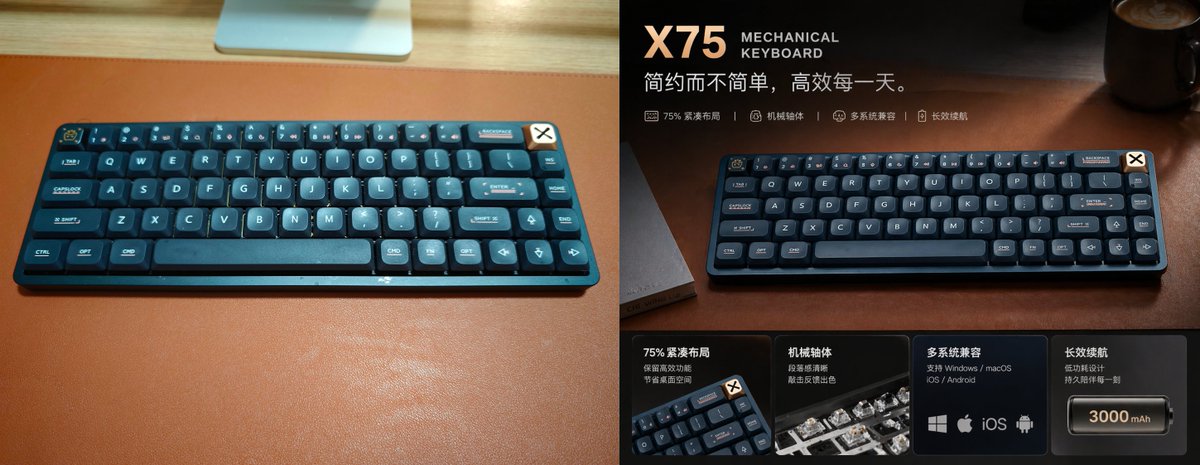
Premium mechanisch toetsenbord reclameposter
Een stijlvolle promotieafbeelding met gesplitst scherm, waarop een compact mechanisch toetsenbord is getransformeerd van een alledaagse bureaufoto naar een hoogwaardige advertentie in Chinese e-commercestijl.
Dit is een voorbeeld van een GPT Image 2 prompt voor Product & Commercieel . Gebruik de onderstaande kant-en-klare prompt om vergelijkbare afbeeldingen te genereren en controleer de Awesome GPT Image 2 Prompts en de rechten voor commercieel gebruik voordat u de afbeeldingen hergebruikt.
Free 1K preview
Generate one preview image instantly, no sign-up required.
Snel
Schrijfklare prompt
{
  "type": "premium product advertisement poster",
  "subject": {
    "product": "{argument name=\"product name\" default=\"X75\"} mechanical keyboard",
    "category": "75% compact wireless mechanical keyboard",
    "color": "deep navy blue with dark teal accents",
    "material": "matte plastic case with rounded keycaps",
    "branding": "small badge in the top-right corner of the keyboard",
    "layout badge": "cream square badge with a black X symbol attached near the keyboard's top-right edge"
  },
  "scene": {
    "setting": "warm moody desktop setup",
    "surface": "rich brown leather desk mat on a light wood desk",
    "lighting": "cinematic warm directional light from upper right, soft reflections, luxury tech advertisement mood",
    "background": "dark blurred office or desk environment with a coffee mug in the upper-right corner and faint desk objects"
  },
  "composition": {
    "format": "split-screen before-and-after promotional comparison",
    "panels": [
      {
        "position": "left half",
        "style": "plain casual snapshot",
        "description": "top-down angled photo of the keyboard centered on a large brown desk mat, bright ambient room light, visible light wood desk edge at top, part of a monitor stand or silver device at the top center, realistic unstyled product photo"
      },
      {
        "position": "right half",
        "style": "upgraded premium ad design",
        "description": "the same keyboard presented dramatically on the brown leather desk mat with darker exposure, richer contrast, warm highlights, shallow depth of field, and polished commercial retouching"
      }
    ]
  },
  "text elements": {
    "headline": "{argument name=\"headline text\" default=\"X75\"}",
    "subheadline": "MECHANICAL KEYBOARD",
    "tagline": "{argument name=\"tagline\" default=\"Simple but not simplistic, efficient every day.\"}",
    "feature line count": 4,
    "feature line items": [
      "75% compact layout",
      "Mechanical axis",
      "Multi-system compatibility",
      "Long-lasting battery life"
    ]
  },
  "bottom feature cards": {
    "count": 4,
    "cards": [
      {
        "title": "75% compact layout",
        "description": "Retain efficient area, save desktop space",
        "visual": "small angled keyboard corner close-up"
      },
      {
        "title": "Mechanical axis",
        "description": "Clear paragraphing and excellent typing feedback",
        "visual": "close-up of mechanical switches with translucent housings"
      },
      {
        "title": "Multi-system compatibility",
        "description": "Supports Windows / macOS / iOS / Android",
        "visual": "4 platform icons: Windows, Apple, iOS, Android"
      },
      {
        "title": "Long-lasting battery life",
        "description": "Low-power design, lasting companionship every moment",
        "visual": "battery icon labeled {argument name=\"battery capacity\" default=\"3000 mAh\"}"
      }
    ]
  },
  "style": {
    "design language": "high-end Chinese e-commerce hero banner",
    "color palette": "dark navy, charcoal, copper brown, warm amber highlights, cream typography",
    "typography": "bold modern sans-serif for product name, smaller uppercase English subtitle, clean Chinese body text",
    "finish": "sleek commercial retouching, subtle vignetting, glossy highlights, premium atmosphere"
  }
}
Vraagvariabelen
Bewerkbare argumentplaceholders in de prompt, met hun standaardwaarden.
Best for
- - Product & Commercieel visual exploration
- - Image generation and reference-image edits
- - Reusable briefs that keep source attribution visible
Change these parts
- - Subject, product, character, or scene
- - Aspect ratio, camera, lighting, and background
- - Brand, text, color, and output constraints
Recommended model and settings
- - Model: gpt-image-2
- - Input mode: Tekst naar afbeelding
- - Aspect ratio: source
- - Commercial status: review original source
How to use this prompt
- 1. Copy the prompt and preserve its structure for the first test.
- 2. Replace the subject, context, and publishing channel.
- 3. Change one camera, lighting, or style variable per iteration.
- 4. Inspect the output, source, text, and rights before reuse.
Limitations, source, and reuse cautions
- - Generated output is an editable draft, not factual, legal, or rights evidence.
- - Review the linked source, people, brands, logos, text, and third-party media before commercial use.
Meer gevallen in deze categorie
Geprioriteerd op basis van categorie, compatibiliteit met invoermodus, kwaliteit en lager risico.






Hergebruik en bronvermeldingen
Gebruik deze prompt veilig nadat u de casus hebt bekeken.
- 1.Kopieer de prompt of open deze direct in Dovoo met de knop 'Genereren'.
- 2.Pas de variabelen, beeldverhouding en referentieafbeeldingen aan uw eigen toepassing aan.
- 3.Controleer vóór publicatie of betaald gebruik de auteursrechten, de vereisten voor naamsvermelding en de risico's met betrekking tot merk of beeltenis.