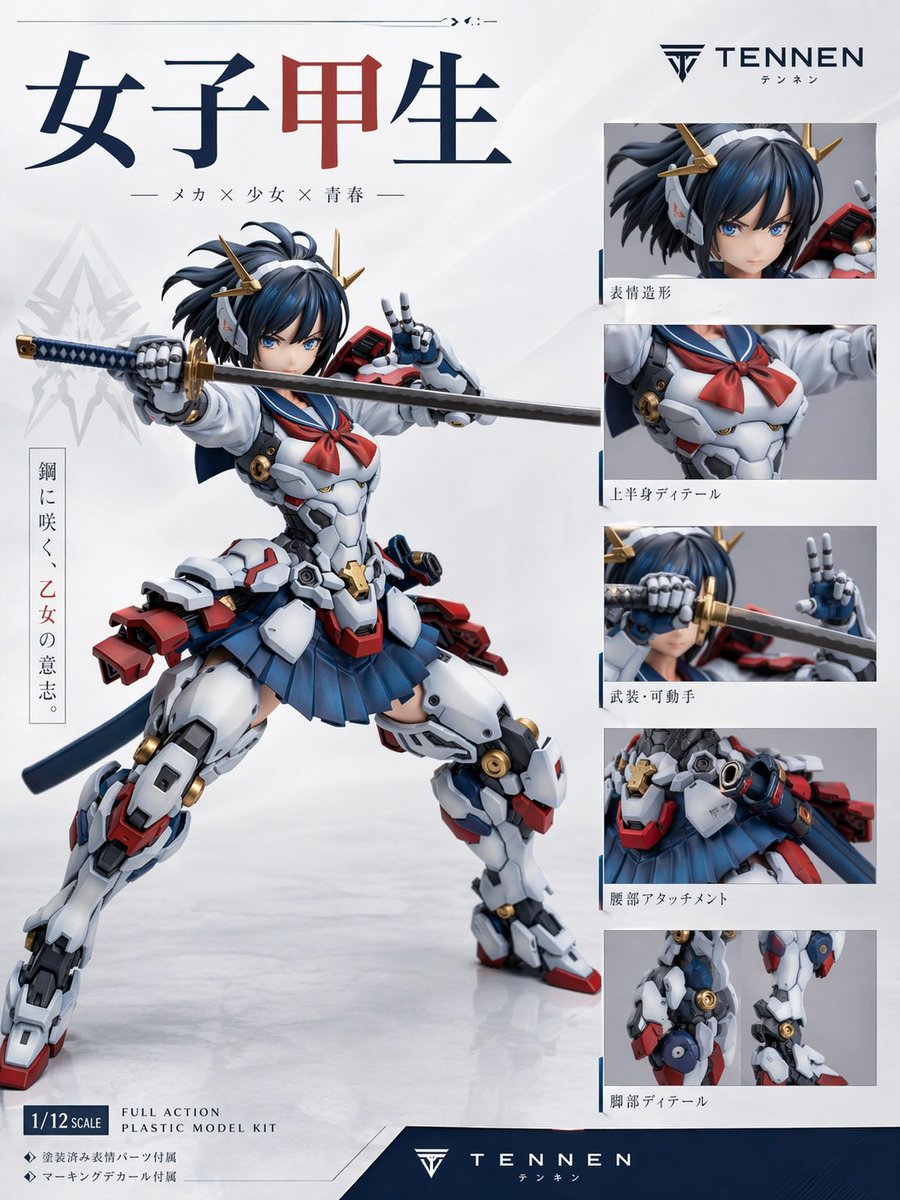
Japanse Mecha Girl figuur reclameposter
Een professionele productposter-sjabloon voor een reclamecampagne voor een fictieve anime-mecha-schoolmeisjesmodelbouwset van plastic, met een heldenfiguur en vijf detailpanelen met labels.
Dit is een voorbeeld van een GPT Image 2 prompt voor Product & Commercieel . Gebruik de onderstaande kant-en-klare prompt om vergelijkbare afbeeldingen te genereren en controleer de Awesome GPT Image 2 Prompts en de rechten voor commercieel gebruik voordat u de afbeeldingen hergebruikt.
Heb je de volledige set prompts nodig? Gebruik dan de Product & Commercieel Ga naar het themacentrum voor meer gerelateerde voorbeelden, of open de GPT Image 2 prompt catalogus Voor de volledige voorbeeldenindex, herbruikbare structuren en bronvermelding.
Free 1K preview
Generate one preview image instantly, no sign-up required.
3223/4000
Snel
Schrijfklare prompt
Create a premium Japanese plastic model kit product-poster layout on a clean white studio background with subtle gray gradients and a glossy floor reflection. The main subject is a highly detailed anime mecha schoolgirl figure posed dynamically in the center-left, in a wide combat stance, holding a katana horizontally across the frame with one robotic hand gripping the hilt and the other making a peace sign near her face. Show every face clearly with natural, detailed facial features, short dark navy-blue hair in a tousled bob with small side strands, and gold horn-like mechanical hair ornaments. Her outfit is a fusion of a Japanese high school sailor uniform and hard-surface sci-fi armor: white armored torso with mechanical panel lines, a red sailor neckerchief, a pleated navy skirt, bulky white armored thighs and shins, red and blue accent parts, gold circular joint details, a dark blue waist ribbon or back cloth, and red mechanical backpack-like attachments at the hips and lower back. The katana has a dark blade and a blue-and-gold wrapped handle. Render the figure like a professionally photographed collectible model or action plastic kit, with sharp material definition, realistic molded plastic surfaces, slight satin sheen, and commercial product-shot lighting.

Design the page as a figure advertisement/spec sheet with exactly 1 large hero image and 5 smaller detail panels stacked vertically on the right. The 5 right-side panels must show: 1) close-up of the head and hair ornaments, 2) upper-body torso detail with sailor scarf and chest armor, 3) weapon and articulated hand close-up with the sword near the face, 4) waist attachment and skirt/hip armor detail, 5) leg detail close-up showing joints and armor construction. Include thin blue divider accents around the right-side panel area.

At the top left, place a large Japanese title in bold serif-like characters reading "女子甲生", with the middle character in dark red and the others in dark navy. Beneath it, add a smaller Japanese subtitle line: "— メカ × 少女 × 青春 —". On the upper right, place a sleek logo and brand name reading "{argument name="brand name" default="TENNEN"}" with small Japanese text beneath it. Add a vertical Japanese slogan block on the left side of the hero figure reading "鋼に咲く、乙女の意志。" with the middle phrase in red. Add Japanese captions beneath each of the 5 right-side detail panels: "表情造形", "上半身ディテール", "武装・可動手", "腰部アタッチメント", "脚部ディテール". In the lower left, include a boxed scale label reading "{argument name="scale label" default="1/12 SCALE"}" and nearby English product text reading "FULL ACTION PLASTIC MODEL KIT". Add two small bullet lines in Japanese beneath that: "◆ 塗装済み髪パーツ付属" and "◆ マーキングデカール付属". Across the bottom, add a dark navy footer band with the brand logo and "{argument name="footer brand" default="TENNEN"}" centered, plus small Japanese text below.

Use a polished modern hobby-brand aesthetic, Japanese mecha-girl collectible packaging design, minimal white negative space, crisp typography, balanced editorial layout, and realistic studio-photo rendering of a non-existent original figure. Color palette: white, navy blue, dark blue, red, gray, black, and metallic gold. Aspect ratio 3:4.
Vraagvariabelen
Bewerkbare argumentplaceholders in de prompt, met hun standaardwaarden.
Variabele
brand name
Standaard
TENNEN
Variabele
scale label
Standaard
1/12 SCALE
Variabele
footer brand
Standaard
TENNEN
Best for
- - Product & Commercieel visual exploration
- - Image generation and reference-image edits
- - Reusable briefs that keep source attribution visible
Change these parts
- - Subject, product, character, or scene
- - Aspect ratio, camera, lighting, and background
- - Brand, text, color, and output constraints
Recommended model and settings
- - Model: gpt-image-2
- - Input mode: Tekst naar afbeelding
- - Aspect ratio: source
- - Commercial status: review original source
How to use this prompt
- 1. Copy the prompt and preserve its structure for the first test.
- 2. Replace the subject, context, and publishing channel.
- 3. Change one camera, lighting, or style variable per iteration.
- 4. Inspect the output, source, text, and rights before reuse.
Limitations, source, and reuse cautions
- - Generated output is an editable draft, not factual, legal, or rights evidence.
- - Review the linked source, people, brands, logos, text, and third-party media before commercial use.
Geïmporteerd van Awesome GPT Image 2 Prompts . Naamsvermelding is vereist. Commercieel gebruik is toegestaan volgens de status allowed ; controleer de rechten van de bron voordat u het tegen betaling gebruikt.
Meer gevallen in deze categorie
Geprioriteerd op basis van categorie, compatibiliteit met invoermodus, kwaliteit en lager risico.

Transparent Earbuds on Stone Pedestal
Tekst naar afbeelding

Wet Transparent Earbud Macro
Tekst naar afbeelding

Overhead Pepperoni Pizza Photo
Tekst naar afbeelding

Android Quantum Lab Workstation
Tekst naar afbeelding

Fashion Studio Portrait with Blue Rim Lighting
Tekst naar afbeelding

Greyscale Puzzle Portrait with Color Accent
Tekst naar afbeelding
Hergebruik en bronvermeldingen
Gebruik deze prompt veilig nadat u de casus hebt bekeken.
- 1.Kopieer de prompt of open deze direct in Dovoo met de knop 'Genereren'.
- 2.Pas de variabelen, beeldverhouding en referentieafbeeldingen aan uw eigen toepassing aan.
- 3.Controleer vóór publicatie of betaald gebruik de auteursrechten, de vereisten voor naamsvermelding en de risico's met betrekking tot merk of beeltenis.