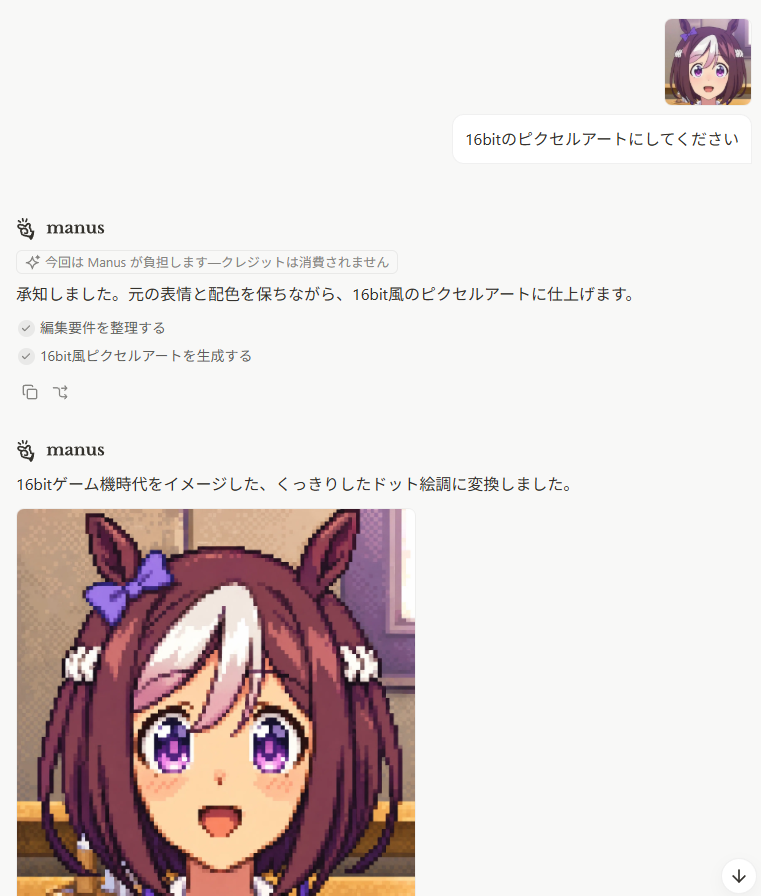
Japanese Manus Chat Pixel Art Screenshot
Generates a clean Japanese AI chat screenshot featuring Manus producing a 16-bit pixel-art anime horse-girl portrait.
Dit is een voorbeeld van een GPT Image 2 prompt voor Andere inspiratie . Gebruik de onderstaande kant-en-klare prompt om vergelijkbare afbeeldingen te genereren en controleer de Awesome GPT Image 2 Prompts en de rechten voor commercieel gebruik voordat u de afbeeldingen hergebruikt.
Heb je de volledige set prompts nodig? Gebruik dan de Andere inspiratie Ga naar het themacentrum voor meer gerelateerde voorbeelden, of open de GPT Image 2 prompt catalogus Voor de volledige voorbeeldenindex, herbruikbare structuren en bronvermelding.
Free 1K preview
Generate one preview image instantly, no sign-up required.
3076/4000
Snel
Schrijfklare prompt
Goal: Create a realistic screenshot of a minimalist AI chat interface showing a Japanese conversation where a user asks for a 16-bit pixel-art conversion and the assistant responds with a generated image.

Canvas: Portrait screenshot, 768 x 896 px, white background, clean web-app UI with lots of empty space. No browser chrome, no visible sidebars. Use soft gray dividers, rounded cards, and small interface icons.

Layout: Top-right user area contains exactly 2 discrete elements: 1 small square anime avatar, and 1 rounded white chat bubble. The avatar is an anime horse-girl face with brown hair, white forelock, purple eyes, horse ears, and a purple ribbon. The user bubble text is {argument name="user request" default="16bitのピクセルアートにしてください"}.

Assistant message block 1: Place the Manus logo and the bold name “manus” on the left. Below it, show exactly 1 small rounded notice pill containing a sparkle icon and Japanese text {argument name="notice text" default="今回は Manus が負担します—クレジットは消費されません"}. Then show the assistant reply line: {argument name="first assistant reply" default="承知しました。元の表情と配色を保ちながら、16bit風のピクセルアートに仕上げます。"}. Under that, show exactly 2 checked task rows with gray circular check icons: 1) “編集要件を整理する” and 2) “16bit風ピクセルアートを生成する”. Beneath the tasks, show exactly 2 small action icons: a copy icon and a curved-arrow/regenerate-style icon.

Assistant message block 2: Lower on the page, repeat the Manus logo and bold name “manus”. Under it, show a single Japanese sentence: {argument name="second assistant reply" default="16bitゲーム機時代をイメージした、くっきりしたドット絵調に変換しました。"}. Below this sentence, align a large generated image preview to the left.

Generated image preview: The preview is a square-ish pixel-art portrait cropped by the screenshot bottom edge. It shows a cheerful anime horse-girl character in crisp 16-bit game style: brown bob-length hair with a large white forelock, tall horse ears, a purple bow on the left ear, purple sparkling eyes, small blush marks, open smiling mouth, and white hair ties near both sides. Use chunky pixel edges, visible dithering, limited retro palette, and dark outline pixels. Background inside the pixel-art image is a warm indoor room with beige wall, window light, and horizontal furniture/trim, all rendered in pixel art. The visible generated preview should occupy the lower-left portion and be cut off at the bottom of the screenshot.

Additional UI details: Add a small floating circular down-arrow button at the bottom-right corner. Keep the overall look like a Japanese Manus chat page, with generous margins, black body text, subtle gray UI accents, and no true transparency checkerboard. Count of visible repeated UI/content elements: 1 user avatar, 1 user message bubble, 2 Manus headers, 1 notice pill, 2 checked task rows, 2 small action icons, 1 generated image preview, and 1 floating down-arrow button.

Constraints: Preserve the Japanese text exactly where given in the default parameter values. Do not add extra messages, extra avatars, extra buttons, watermarks, browser tabs, or side navigation.
Vraagvariabelen
Bewerkbare argumentplaceholders in de prompt, met hun standaardwaarden.
Variabele
user request
Standaard
16bitのピクセルアートにしてください
Variabele
notice text
Standaard
今回は Manus が負担します—クレジットは消費されません
Variabele
first assistant reply
Standaard
承知しました。元の表情と配色を保ちながら、16bit風のピクセルアートに仕上げます。
Variabele
second assistant reply
Standaard
16bitゲーム機時代をイメージした、くっきりしたドット絵調に変換しました。
Best for
- - Andere inspiratie visual exploration
- - Image generation and reference-image edits
- - Reusable briefs that keep source attribution visible
Change these parts
- - Subject, product, character, or scene
- - Aspect ratio, camera, lighting, and background
- - Brand, text, color, and output constraints
Recommended model and settings
- - Model: gpt-image-2
- - Input mode: Tekst naar afbeelding
- - Aspect ratio: source
- - Commercial status: review original source
How to use this prompt
- 1. Copy the prompt and preserve its structure for the first test.
- 2. Replace the subject, context, and publishing channel.
- 3. Change one camera, lighting, or style variable per iteration.
- 4. Inspect the output, source, text, and rights before reuse.
Limitations, source, and reuse cautions
- - Generated output is an editable draft, not factual, legal, or rights evidence.
- - Review the linked source, people, brands, logos, text, and third-party media before commercial use.
Geïmporteerd van Awesome GPT Image 2 Prompts . Naamsvermelding is vereist. Commercieel gebruik is toegestaan volgens de status allowed ; controleer de rechten van de bron voordat u het tegen betaling gebruikt.
Meer gevallen in deze categorie
Geprioriteerd op basis van categorie, compatibiliteit met invoermodus, kwaliteit en lager risico.

Android Quantum Lab Workstation
Tekst naar afbeelding

Surreal 3D Chess Match Artwork
Tekst naar afbeelding

Pink Hijab Mirror Selfie Portrait
Tekst naar afbeelding

Manga Desert Radio Telescope Road Trip
Tekst naar afbeelding

Natural Face Realism Modifier
Tekst naar afbeelding

Spring Editorial Fashion Collage
Tekst naar afbeelding
Hergebruik en bronvermeldingen
Gebruik deze prompt veilig nadat u de casus hebt bekeken.
- 1.Kopieer de prompt of open deze direct in Dovoo met de knop 'Genereren'.
- 2.Pas de variabelen, beeldverhouding en referentieafbeeldingen aan uw eigen toepassing aan.
- 3.Controleer vóór publicatie of betaald gebruik de auteursrechten, de vereisten voor naamsvermelding en de risico's met betrekking tot merk of beeltenis.