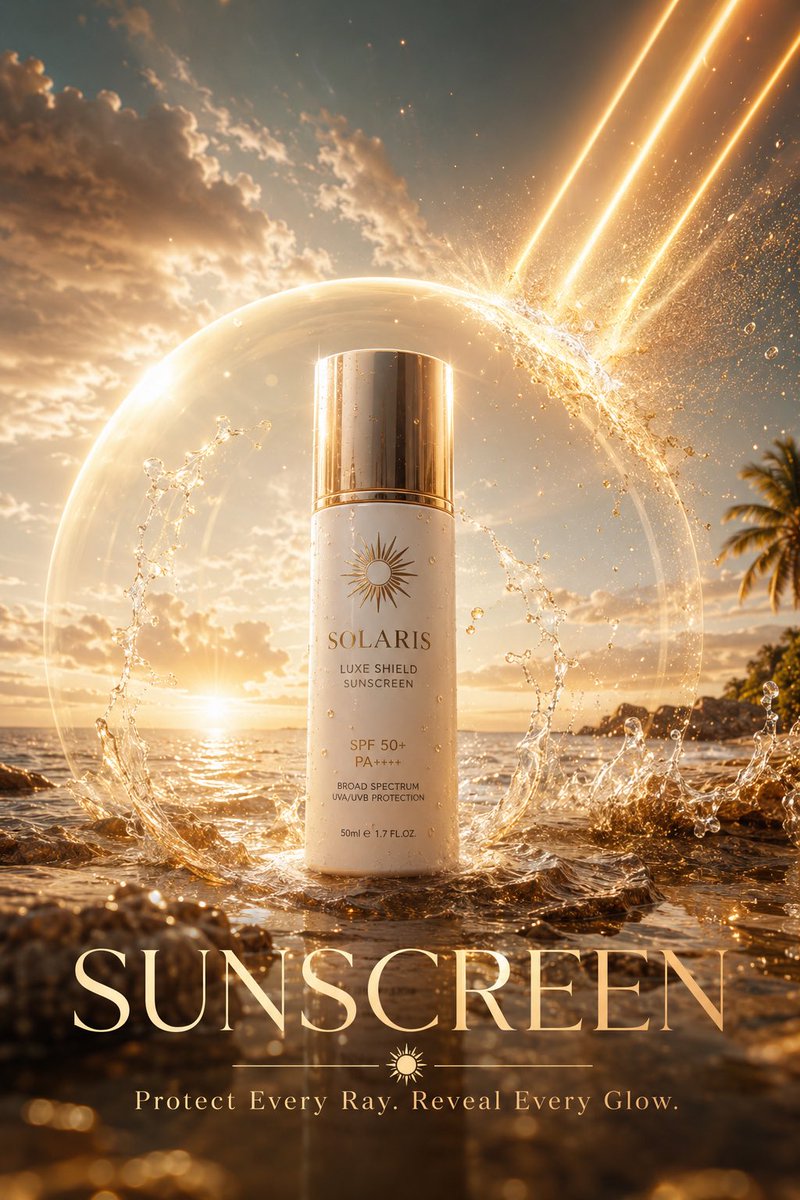
Luxury Skincare Sunscreen Ad Campaign
A professional-grade advertising prompt for a luxury sunscreen product, featuring cinematic tropical lighting and protective energy effects.
Dit is een voorbeeld van een GPT Image 2 prompt voor Product & Commercieel . Gebruik de onderstaande kant-en-klare prompt om vergelijkbare afbeeldingen te genereren en controleer de Awesome GPT Image 2 Prompts en de rechten voor commercieel gebruik voordat u de afbeeldingen hergebruikt.
Heb je de volledige set prompts nodig? Gebruik dan de Product & Commercieel Ga naar het themacentrum voor meer gerelateerde voorbeelden, of open de GPT Image 2 prompt catalogus Voor de volledige voorbeeldenindex, herbruikbare structuren en bronvermelding.
Free 1K preview
Generate one preview image instantly, no sign-up required.
1218/4000
Snel
Schrijfklare prompt
SUNSCREEN AD, “{argument name="headline" default="THE INVISIBLE SHIELD"}”

Luxury skincare advertising masterpiece, a colossal premium sunscreen bottle standing on a pristine tropical shoreline at golden hour, powerful beams of sunlight crashing down from the sky and splitting apart upon contact with a transparent protective energy dome radiating from the sunscreen, millions of sparkling UV particles dissolving into golden dust before reaching flawless skin, crystal clear ocean reflections, flowing water suspended in mid air around the product, microscopic droplets catching cinematic sunlight, ultra realistic textures revealing every detail of the bottle surface, luxury beauty campaign aesthetics, dramatic volumetric lighting, glowing atmospheric haze, premium {argument name="color palette" default="white and gold"} color palette, futuristic protection technology visualized as elegant light waves, hyper detailed environment, commercial photography perfection, award winning advertising design, photorealistic rendering, 16K ultra resolution, global skincare brand campaign, masterpiece quality.

Text Overlay:
{argument name="product" default="SUNSCREEN"}

Tagline:
“Protect Every Ray. Reveal Every Glow.
Vraagvariabelen
Bewerkbare argumentplaceholders in de prompt, met hun standaardwaarden.
Variabele
headline
Standaard
THE INVISIBLE SHIELD
Variabele
color palette
Standaard
white and gold
Variabele
product
Standaard
SUNSCREEN
Best for
- - Product & Commercieel visual exploration
- - Image generation and reference-image edits
- - Reusable briefs that keep source attribution visible
Change these parts
- - Subject, product, character, or scene
- - Aspect ratio, camera, lighting, and background
- - Brand, text, color, and output constraints
Recommended model and settings
- - Model: gpt-image-2
- - Input mode: Tekst naar afbeelding
- - Aspect ratio: source
- - Commercial status: review original source
How to use this prompt
- 1. Copy the prompt and preserve its structure for the first test.
- 2. Replace the subject, context, and publishing channel.
- 3. Change one camera, lighting, or style variable per iteration.
- 4. Inspect the output, source, text, and rights before reuse.
Limitations, source, and reuse cautions
- - Generated output is an editable draft, not factual, legal, or rights evidence.
- - Review the linked source, people, brands, logos, text, and third-party media before commercial use.
Geïmporteerd van Awesome GPT Image 2 Prompts . Naamsvermelding is vereist. Commercieel gebruik is toegestaan volgens de status allowed ; controleer de rechten van de bron voordat u het tegen betaling gebruikt.
Meer gevallen in deze categorie
Geprioriteerd op basis van categorie, compatibiliteit met invoermodus, kwaliteit en lager risico.
Luxury Product Ad Campaign Template
Tekst naar afbeelding

Luxury Brand Campaign Prompt Template
Tekst naar afbeelding

Overhead Pepperoni Pizza Photo
Tekst naar afbeelding

Fashion Studio Portrait with Blue Rim Lighting
Tekst naar afbeelding

Cross-armed toast interaction prompt
Tekst naar afbeelding

Pink Hijab Mirror Selfie Portrait
Tekst naar afbeelding
Hergebruik en bronvermeldingen
Gebruik deze prompt veilig nadat u de casus hebt bekeken.
- 1.Kopieer de prompt of open deze direct in Dovoo met de knop 'Genereren'.
- 2.Pas de variabelen, beeldverhouding en referentieafbeeldingen aan uw eigen toepassing aan.
- 3.Controleer vóór publicatie of betaald gebruik de auteursrechten, de vereisten voor naamsvermelding en de risico's met betrekking tot merk of beeltenis.