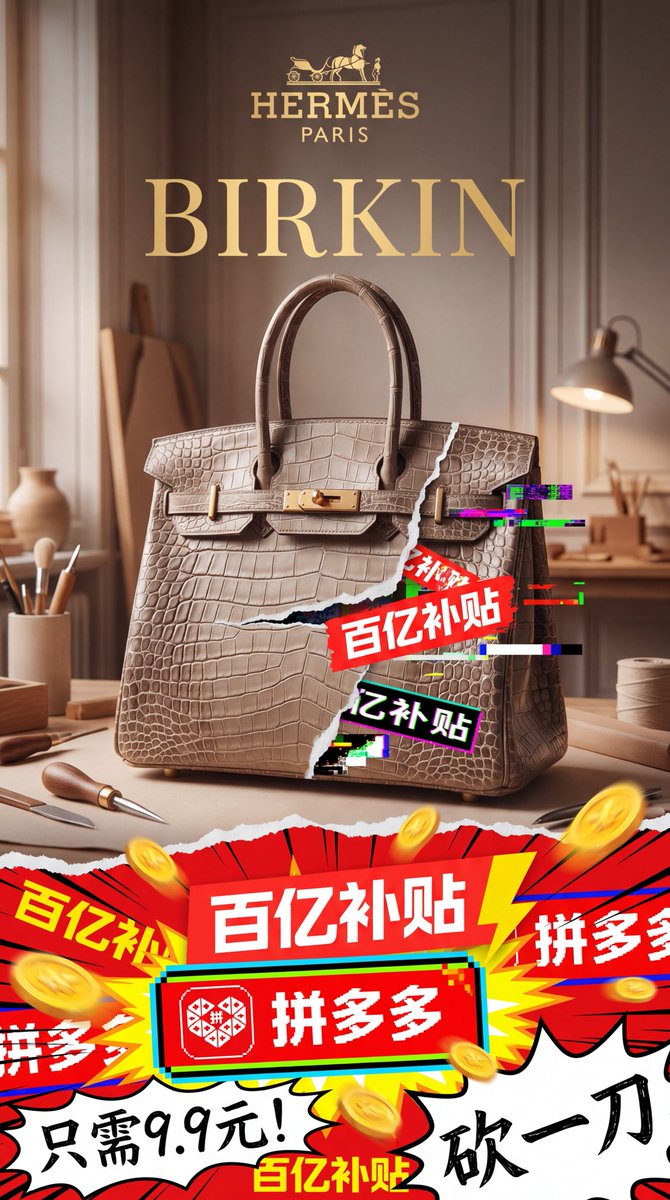
Poster met een luxe tas en chaotische kortingsactie
Deze opdracht genereert een verticaal gecomponeerde mode-advertentieposter die een verfijnde productfoto van een Birkin-tas in Hermès-stijl contrasteert met explosieve, Pinduoduo-achtige promotieafbeeldingen voor satirische beelden van een luxe samenwerking.
Dit is een voorbeeld van een GPT Image 2 prompt voor Product & Commercieel . Gebruik de onderstaande kant-en-klare prompt om vergelijkbare afbeeldingen te genereren en controleer de Awesome GPT Image 2 Prompts en de rechten voor commercieel gebruik voordat u de afbeeldingen hergebruikt.
Free 1K preview
Generate one preview image instantly, no sign-up required.
Snel
Schrijfklare prompt
A 9:16 vertical luxury fashion parody advertisement poster, with a centered handbag as the core product, aiming to showcase the clash between the ultra-high-end brand image and the chaotic Chinese e-commerce discount graphics. The upper part should present the elegant Hermès-style advertising texture: a warm beige and brown studio background, soft morning light streaming in from the window, a shallow depth of field, exquisite wall decorations, a wooden workbench, and 6 artisan tool elements clearly visible around the bag: a pen holder with several brushes on the left, a small ceramic vase on the far left, a leather awl or polishing tool in front of the table on the left, a leather knife on the front edge of the table, an adjustable table lamp on the right, and a roll of thread on the right. Place a golden luxury logo in the center at the top, with a carriage icon above and the words HERMÈS and PARIS below, followed by a huge serif font title: BIRKIN (gold). Display a large, textured crocodile skin platinum bag in the center, colored {argument name="bag color" default="warm greige taupe"}, facing forward, with rich leather texture details and polished gold hardware. The handle should be upright and placed on the table, using high-end product photography techniques. Add a torn paper effect to the right side of the bag, revealing the aggressive discount advertisement below; add 5 neon pink, green, teal, black, and white digital glitch effects around the tear. Overlap 3 clearly visible Chinese promotional stickers in the torn area, diagonally: a small red sticker with “Welfare Price”, a large red sticker with “Ten Billion Subsidy”, and a black sticker with a bright outline that reads “Ten Billion Subsidy”. The lower third of the poster should present a noisy comic and livestreaming-style visual explosion, separated from the upper luxury area by the torn paper effect. Use high saturation reds, yellows, whites, blacks, and teals, combined with sharp starburst shapes, speed lines, thick outlines, and flying gold coins. Include 7 promotional text blocks at the bottom: 1 large red banner in the center reading “Ten Billion Subsidy”, 1 red rounded rectangle with the Pinduoduo logo and the text “Pinduoduo” below it, 2 partially cropped “Pinduoduo” side banners, 1 additional yellow-red alternating “Ten Billion Subsidy” explosion sticker in the lower left and lower center, and 1 handwritten black calligraphy slogan “Cut One More Yuan” in the lower right. Add an extra handwritten black phrase “Only 9.9 Yuan!” in the lower left corner. The overall composition should present a feeling of elite fashion advertising being violently invaded by cheap viral marketing, with cinematic lighting, strong visual hierarchy, realistic product rendering, high-end typography above, and explosive discount chaos below, as well as a deliberate aesthetic contrast between refinement and low-cost internet commerce. Make it look like a main visual poster for a {argument name="collaboration brand text" default="Pinduoduo × Hermès"} high-end brand collaboration, used to promote {argument name="promo text" default="Ten Billion Subsidy Platinum Bag"}.Vraagvariabelen
Bewerkbare argumentplaceholders in de prompt, met hun standaardwaarden.
Best for
- - Product & Commercieel visual exploration
- - Image generation and reference-image edits
- - Reusable briefs that keep source attribution visible
Change these parts
- - Subject, product, character, or scene
- - Aspect ratio, camera, lighting, and background
- - Brand, text, color, and output constraints
Recommended model and settings
- - Model: gpt-image-2
- - Input mode: Tekst naar afbeelding
- - Aspect ratio: source
- - Commercial status: review original source
How to use this prompt
- 1. Copy the prompt and preserve its structure for the first test.
- 2. Replace the subject, context, and publishing channel.
- 3. Change one camera, lighting, or style variable per iteration.
- 4. Inspect the output, source, text, and rights before reuse.
Limitations, source, and reuse cautions
- - Generated output is an editable draft, not factual, legal, or rights evidence.
- - Review the linked source, people, brands, logos, text, and third-party media before commercial use.
Meer gevallen in deze categorie
Geprioriteerd op basis van categorie, compatibiliteit met invoermodus, kwaliteit en lager risico.






Hergebruik en bronvermeldingen
Gebruik deze prompt veilig nadat u de casus hebt bekeken.
- 1.Kopieer de prompt of open deze direct in Dovoo met de knop 'Genereren'.
- 2.Pas de variabelen, beeldverhouding en referentieafbeeldingen aan uw eigen toepassing aan.
- 3.Controleer vóór publicatie of betaald gebruik de auteursrechten, de vereisten voor naamsvermelding en de risico's met betrekking tot merk of beeltenis.