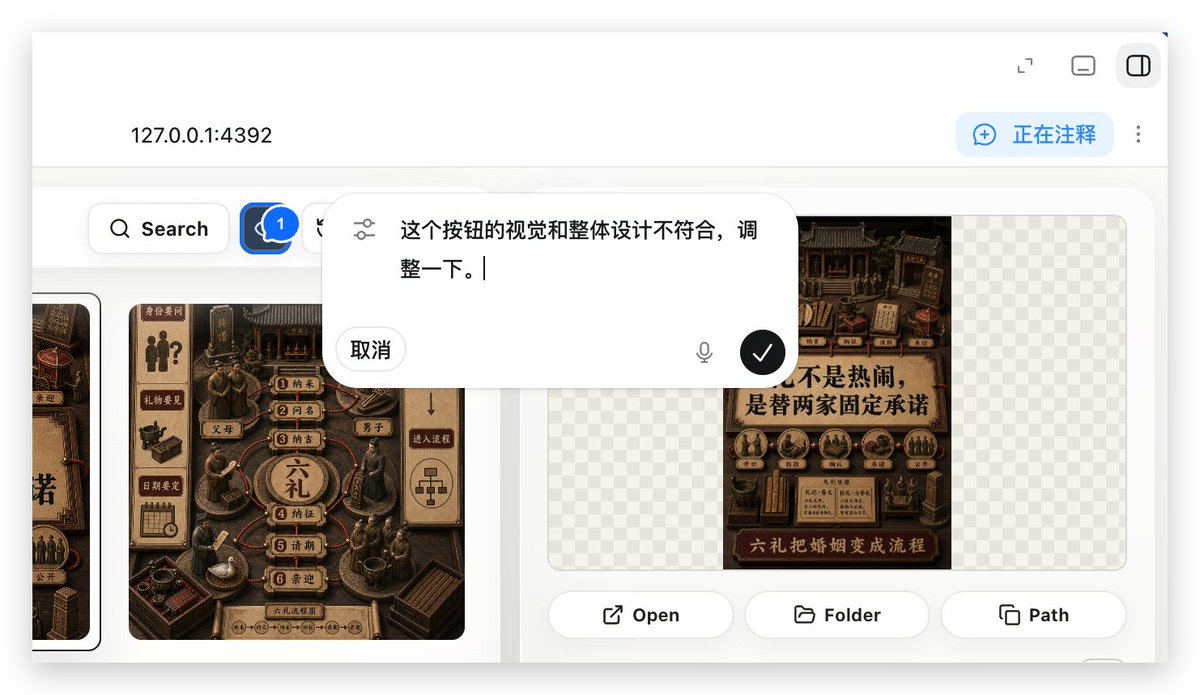
Demonstratie van lokale webapp-annotatie
Genereert een realistische preview van een webapplicatie op localhost met een annotatie-overlay die gebruikt kan worden om UI-aanpassingen aan te vragen in een workflow voor het bouwen van webapplicaties.
Dit is een voorbeeld van een GPT Image 2 prompt voor Andere inspiratie . Gebruik de onderstaande kant-en-klare prompt om vergelijkbare afbeeldingen te genereren en controleer de Awesome GPT Image 2 Prompts en de rechten voor commercieel gebruik voordat u de afbeeldingen hergebruikt.
Heb je de volledige set prompts nodig? Gebruik dan de Andere inspiratie Ga naar het themacentrum voor meer gerelateerde voorbeelden, of open de GPT Image 2 prompt catalogus Voor de volledige voorbeeldenindex, herbruikbare structuren en bronvermelding.
Free 1K preview
Generate one preview image instantly, no sign-up required.
1900/4000
Snel
Schrijfklare prompt
With REFERENCE_0 as context, create a follow-up screenshot demonstrating the “Build Web Apps” tool running as a local web app preview. Replace the plugin list view with a browser-style localhost workspace for {argument name="local address" default="127.0.0.1:4392"}, employing a clean white UI, soft shadows, and rounded corner panels.

Key Changes: Showcase an app building/annotation interface instead of the original plugin directory. Add a top bar with the local address displayed on the left and 3 small window/control icons on the right. Include a blue annotation status capsule in the upper right corner with the text {argument name="annotation status" default="Commenting"}, accompanied by a vertical three-dot menu.

Content Area: Create a gallery-style UI showcasing Chinese poster/card designs within rounded white panels. Include a left-side toolbar row with a search button and a blue comment/annotation button marked with “1”. Display at least two visible poster/card thumbnails in a dark brown, traditional Chinese visual style, while maintaining some grid-pattern transparent placeholder areas on the right panel.

Overlay: Position a large, floating, rounded corner annotation input bubble centered in the upper-middle of the content area. It should resemble an embedded AI comment editor, with slider/settings icons on the left, containing Chinese instruction text {argument name="comment text" default="The visual and overall design of this button doesn't align, please adjust it."}, a “Cancel” button, a microphone icon, and a black circular confirmation button with a white checkmark.

Bottom of the right preview panel: Add 3 operation buttons labeled “Open”, “Folder”, and “Path”, each accompanied by a simple line icon. Maintain the realism of the screenshot, as if it were a product demo requesting UI optimization using Build Web Apps combined with built-in HTML annotation.
Vraagvariabelen
Bewerkbare argumentplaceholders in de prompt, met hun standaardwaarden.
Variabele
local address
Standaard
127.0.0.1:4392
Variabele
annotation status
Standaard
Commenting
Variabele
comment text
Standaard
The visual and overall design of this button doesn't align, please adjust it.
Best for
- - Andere inspiratie visual exploration
- - Image generation and reference-image edits
- - Reusable briefs that keep source attribution visible
Change these parts
- - Subject, product, character, or scene
- - Aspect ratio, camera, lighting, and background
- - Brand, text, color, and output constraints
Recommended model and settings
- - Model: gpt-image-2
- - Input mode: Tekst naar afbeelding
- - Aspect ratio: source
- - Commercial status: review original source
How to use this prompt
- 1. Copy the prompt and preserve its structure for the first test.
- 2. Replace the subject, context, and publishing channel.
- 3. Change one camera, lighting, or style variable per iteration.
- 4. Inspect the output, source, text, and rights before reuse.
Limitations, source, and reuse cautions
- - Generated output is an editable draft, not factual, legal, or rights evidence.
- - Review the linked source, people, brands, logos, text, and third-party media before commercial use.
Geïmporteerd van Awesome GPT Image 2 Prompts . Naamsvermelding is vereist. Commercieel gebruik is toegestaan volgens de status allowed ; controleer de rechten van de bron voordat u het tegen betaling gebruikt.
Related prompt packs
Meer gevallen in deze categorie
Geprioriteerd op basis van categorie, compatibiliteit met invoermodus, kwaliteit en lager risico.

MotoGP POV Cornering Shot
Tekst naar afbeelding

Autumn Cozy Casual Outfit Prompt
Tekst naar afbeelding

Matte Black B.AI Keyboard Keycap
Tekst naar afbeelding

Cute Speech Bubble Mascot Profile Icon
Tekst naar afbeelding

Tuxedo Cat Photo and Line Art Diptych
Tekst naar afbeelding

Luxury Travel Fashion Portrait Prompt
Tekst naar afbeelding
Hergebruik en bronvermeldingen
Gebruik deze prompt veilig nadat u de casus hebt bekeken.
- 1.Kopieer de prompt of open deze direct in Dovoo met de knop 'Genereren'.
- 2.Pas de variabelen, beeldverhouding en referentieafbeeldingen aan uw eigen toepassing aan.
- 3.Controleer vóór publicatie of betaald gebruik de auteursrechten, de vereisten voor naamsvermelding en de risico's met betrekking tot merk of beeltenis.