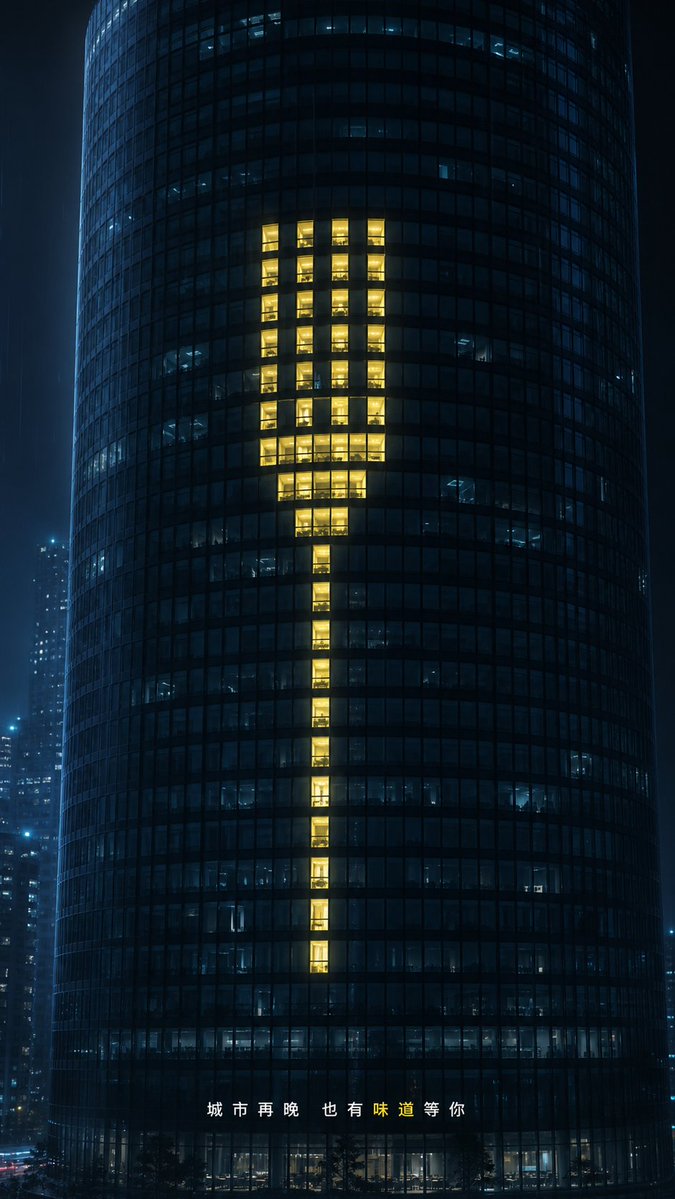
Glowing Exclamation Skyscraper
A cinematic night city ad visual where lit office windows form a warm exclamation mark on a dark glass tower.
Dit is een voorbeeld van een GPT Image 2 prompt voor Interieur & Architectuur . Gebruik de onderstaande kant-en-klare prompt om vergelijkbare afbeeldingen te genereren en controleer de Awesome GPT Image 2 Prompts en de rechten voor commercieel gebruik voordat u de afbeeldingen hergebruikt.
Heb je de volledige set prompts nodig? Gebruik dan de Interieur & Architectuur Ga naar het themacentrum voor meer gerelateerde voorbeelden, of open de GPT Image 2 prompt catalogus Voor de volledige voorbeeldenindex, herbruikbare structuren en bronvermelding.
Free 1K preview
Generate one preview image instantly, no sign-up required.
1620/4000
Snel
Schrijfklare prompt
Create a cinematic nighttime commercial visual, with the background being a dark cylindrical glass office skyscraper located in a blue-black city in the rain. The tower fills the vertical frame, shot from the front with a slight telephoto compression, its curved facade composed of dense square small windows. Most windows are closed or dimly lit in a cold blue hue, with glimpses of the interior office scenes. In the center of the tower, create 60 warm golden yellow glowing windows arranged in the shape of a giant minimalist fork: with 4 slender parallel tines at the top, a compact wider neck below, and a narrow elongated handle extending downwards. The glowing windows should present a realistic sense of people working inside, rather than a flat graphic overlay, requiring warm interior lighting, reflections, and subtle highlights and shadows. Add out-of-focus distant skyscrapers on either side to create a slight rainy mist, a moist city atmosphere, and a restrained luxury advertising aesthetic. At the bottom center, place spaced Chinese text {argument name="bottom caption" default="The city, no matter how late, always has a flavor waiting for you."}, with the character “味” highlighted in warm yellow and the rest of the text in white. Use {argument name="building type" default="9:16"}, {argument name="window symbol" default="Fork"}, {argument name="accent light color" default="Warm golden yellow"}, and {argument name="city mood" default="Quiet rainy night at midnight"}. 9:16 vertical composition, photorealistic, high contrast, elegant, minimalist, no Logo, no extra text, no one in the foreground.Vraagvariabelen
Bewerkbare argumentplaceholders in de prompt, met hun standaardwaarden.
Variabele
bottom caption
Standaard
The city, no matter how late, always has a flavor waiting for you.
Variabele
building type
Standaard
9:16
Variabele
window symbol
Standaard
Fork
Variabele
accent light color
Standaard
Warm golden yellow
Variabele
city mood
Standaard
Quiet rainy night at midnight
Best for
- - Interieur & Architectuur visual exploration
- - Image generation and reference-image edits
- - Reusable briefs that keep source attribution visible
Change these parts
- - Subject, product, character, or scene
- - Aspect ratio, camera, lighting, and background
- - Brand, text, color, and output constraints
Recommended model and settings
- - Model: gpt-image-2
- - Input mode: Tekst naar afbeelding
- - Aspect ratio: source
- - Commercial status: review original source
How to use this prompt
- 1. Copy the prompt and preserve its structure for the first test.
- 2. Replace the subject, context, and publishing channel.
- 3. Change one camera, lighting, or style variable per iteration.
- 4. Inspect the output, source, text, and rights before reuse.
Limitations, source, and reuse cautions
- - Generated output is an editable draft, not factual, legal, or rights evidence.
- - Review the linked source, people, brands, logos, text, and third-party media before commercial use.
Geïmporteerd van Awesome GPT Image 2 Prompts . Naamsvermelding is vereist. Commercieel gebruik is toegestaan volgens de status allowed ; controleer de rechten van de bron voordat u het tegen betaling gebruikt.
Meer gevallen in deze categorie
Geprioriteerd op basis van categorie, compatibiliteit met invoermodus, kwaliteit en lager risico.

Female Clown Cyborg Portrait
Tekst naar afbeelding

Fashion Studio Portrait with Blue Rim Lighting
Tekst naar afbeelding

Transparent Earbuds on Stone Pedestal
Tekst naar afbeelding

Imperial Research Bunker on Volcanic Planet
Tekst naar afbeelding

Greyscale Puzzle Portrait with Color Accent
Tekst naar afbeelding

Spring Editorial Fashion Collage
Tekst naar afbeelding
Hergebruik en bronvermeldingen
Gebruik deze prompt veilig nadat u de casus hebt bekeken.
- 1.Kopieer de prompt of open deze direct in Dovoo met de knop 'Genereren'.
- 2.Pas de variabelen, beeldverhouding en referentieafbeeldingen aan uw eigen toepassing aan.
- 3.Controleer vóór publicatie of betaald gebruik de auteursrechten, de vereisten voor naamsvermelding en de risico's met betrekking tot merk of beeltenis.