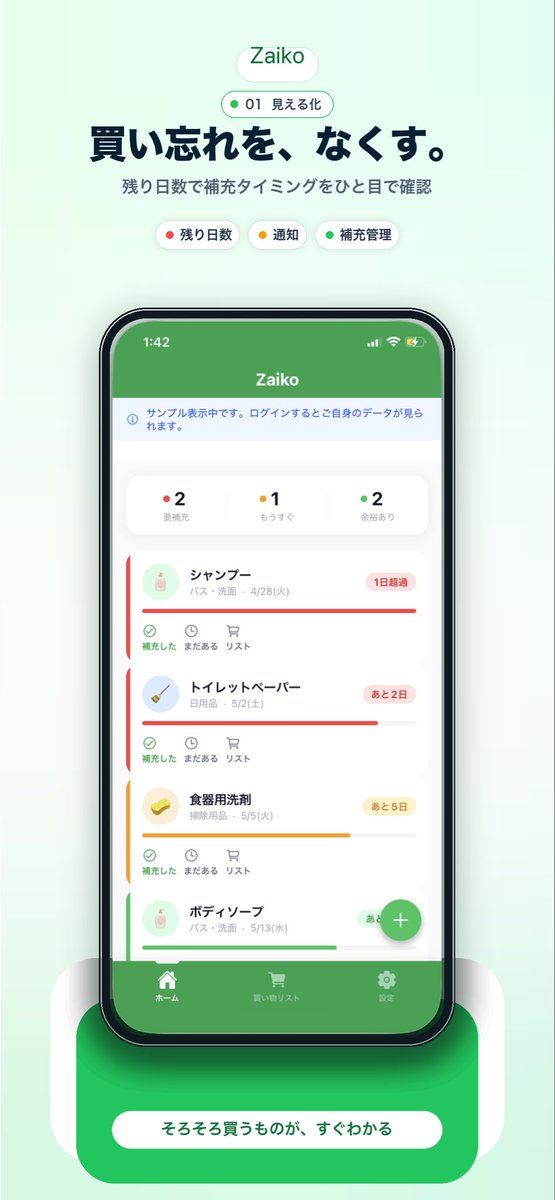
Promotieposter voor de Japanse inventaris-app
Een stijlvolle Japanse marketingvisual voor een mobiele app, met een smartphone-interface voor het bijhouden van huishoudelijke inventaris. Ideaal voor landingspagina's, screenshots in de app store en promotie via sociale media.
Dit is een voorbeeld van een GPT Image 2 prompt voor Product & Commercieel . Gebruik de onderstaande kant-en-klare prompt om vergelijkbare afbeeldingen te genereren en controleer de Awesome GPT Image 2 Prompts en de rechten voor commercieel gebruik voordat u de afbeeldingen hergebruikt.
Free 1K preview
Generate one preview image instantly, no sign-up required.
Snel
Schrijfklare prompt
A clean mobile app promotional poster on a soft mint-green background, centered and vertically composed, advertising an inventory management app called {argument name="app name" default="Zaiko"}. At the top, place a rounded white pill logo with the app name in green, then a smaller outlined pill beneath it containing a green dot, the number 01, and the Japanese text 見える化. Below that, add a large bold Japanese headline in dark navy: {argument name="headline text" default="買い忘れを、なくす。"}, followed by a smaller gray Japanese subheading: 残り日数で補充タイミングをひと目で確認. Under the subheading, show exactly 3 rounded category chips in one row: a white chip with a red dot and the label 残り日数, a white chip with a yellow dot and the label 通知, and a white chip with a green dot and the label 補充管理. In the center, display a realistic black-bezel smartphone mockup in front view with a grocery and household stock tracking app screen. The phone screen should have a solid green top bar with the app name, a pale information strip below it, then a summary card row with exactly 3 status counters: red-dot 2 要補充, yellow-dot 1 もうすぐ, and green-dot 2 余裕あり. Beneath that, show a vertically scrolling list of exactly 4 inventory item cards with soft rounded corners, subtle shadows, and colored urgency bars: 1) シャンプー with a red status bar and a red badge reading 1日超過, 2) トイレットペーパー with a red status bar and a red badge reading あと2日, 3) 食器用洗剤 with a yellow status bar and a yellow badge reading あと5日, 4) ボディーソープ with a green status bar and a green badge reading あと10日. Each card includes a small circular product icon on the left, Japanese item name and category/date text, and a lower action row with 3 small controls labeled 補充した, まだある, and リスト. Add a floating green circular plus button near the lower right of the phone screen. At the bottom of the app UI, include a green tab bar with exactly 3 navigation items and icons: ホーム, 買い物リスト, and 設定. Place the phone on a glossy rounded green pedestal with soft white side supports and a strong soft shadow, then add a large rounded white call-to-action pill on the pedestal with the Japanese text {argument name="button text" default="そろそろ買うものが、すぐわかる"}. Overall style: polished startup landing-page mockup, iOS app screenshot aesthetic, soft gradients, minimal Japanese UI design, crisp typography, centered composition, gentle ambient shadows, premium app store marketing visual.Vraagvariabelen
Bewerkbare argumentplaceholders in de prompt, met hun standaardwaarden.
Best for
- - Product & Commercieel visual exploration
- - Image generation and reference-image edits
- - Reusable briefs that keep source attribution visible
Change these parts
- - Subject, product, character, or scene
- - Aspect ratio, camera, lighting, and background
- - Brand, text, color, and output constraints
Recommended model and settings
- - Model: gpt-image-2
- - Input mode: Tekst naar afbeelding
- - Aspect ratio: source
- - Commercial status: review original source
How to use this prompt
- 1. Copy the prompt and preserve its structure for the first test.
- 2. Replace the subject, context, and publishing channel.
- 3. Change one camera, lighting, or style variable per iteration.
- 4. Inspect the output, source, text, and rights before reuse.
Limitations, source, and reuse cautions
- - Generated output is an editable draft, not factual, legal, or rights evidence.
- - Review the linked source, people, brands, logos, text, and third-party media before commercial use.
Meer gevallen in deze categorie
Geprioriteerd op basis van categorie, compatibiliteit met invoermodus, kwaliteit en lager risico.






Hergebruik en bronvermeldingen
Gebruik deze prompt veilig nadat u de casus hebt bekeken.
- 1.Kopieer de prompt of open deze direct in Dovoo met de knop 'Genereren'.
- 2.Pas de variabelen, beeldverhouding en referentieafbeeldingen aan uw eigen toepassing aan.
- 3.Controleer vóór publicatie of betaald gebruik de auteursrechten, de vereisten voor naamsvermelding en de risico's met betrekking tot merk of beeltenis.