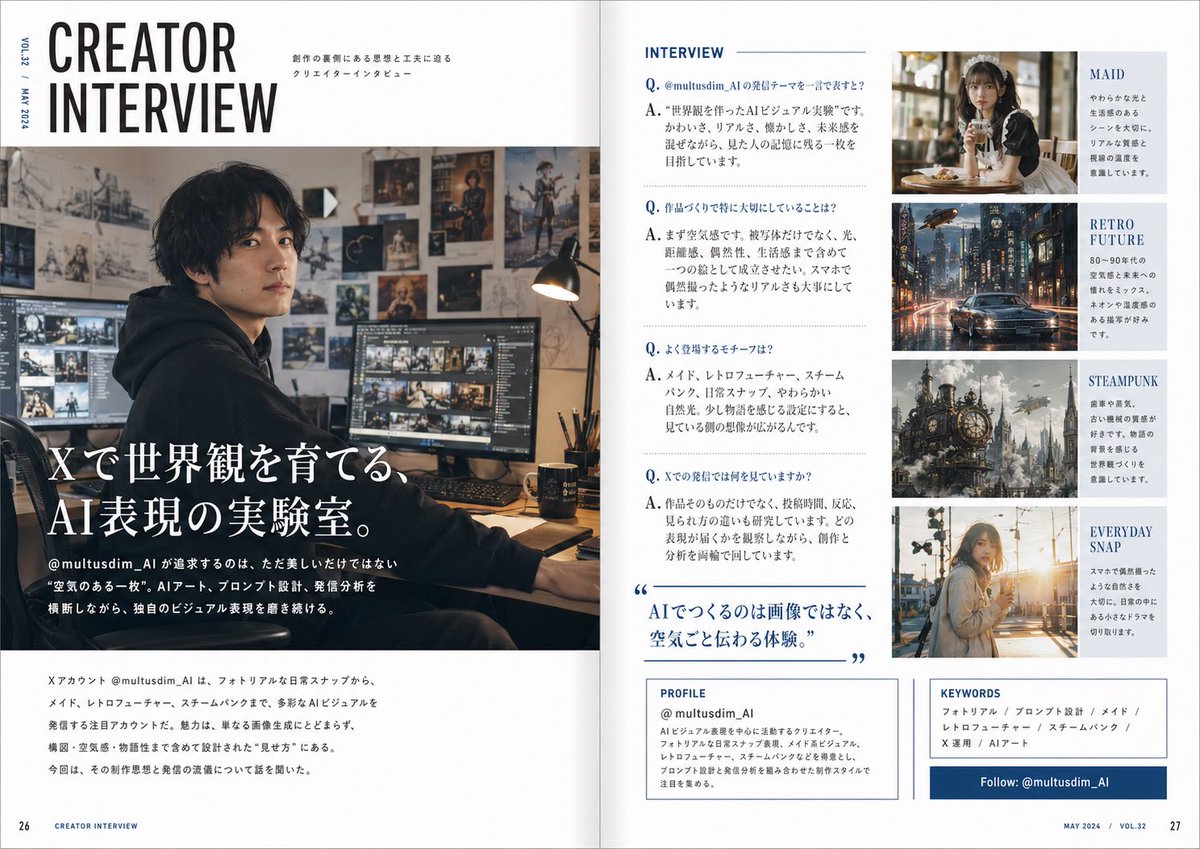
Interview met een Japanse maker in een tijdschrift.
Een stijlvolle, twee pagina's tellende Japanse redactionele spread met een interview over een AI-ontwikkelaar, handig voor magazine-mockups, profielartikelen en presentaties van contentmakers op sociale media.
Dit is een voorbeeld van een GPT Image 2 prompt voor Grafisch ontwerp & poster . Gebruik de onderstaande kant-en-klare prompt om vergelijkbare afbeeldingen te genereren en controleer de Awesome GPT Image 2 Prompts en de rechten voor commercieel gebruik voordat u de afbeeldingen hergebruikt.
Free 1K preview
Generate one preview image instantly, no sign-up required.
Free text preview doesn’t preserve reference-image consistency.
Snel
Schrijfklare prompt
Create a polished two-page magazine spread in Japanese, styled like a contemporary creator profile feature in a premium design and culture magazine. The layout is a clean editorial interview spread with a white background, navy blue accents, thin rule lines, elegant typography, and a balanced grid. The overall feeling is sophisticated, modern, and slightly masculine, like a feature on a handsome AI visual creator.

On the left page, place a very large stacked English headline at the top left reading “CREATOR INTERVIEW” in bold condensed sans-serif, with small vertical issue text along the outer margin such as “VOL.23 / MAY 2024.” Beneath and across most of the left page, use a large cinematic photo of a {argument name="creator identity" default="male AI visual creator"} sitting at a desk in a dark hoodie in a moody studio workspace. The face is intentionally soft-blurred or anonymized. The room is warm and dimly lit, with multiple monitors showing image-editing or visual-generation work, a desk lamp, and walls covered in concept art, posters, sketches, and fantasy artwork. Overlay the lower-left of the photo with a large Japanese feature title in white Mincho-style serif text: “Xで世界観を育てる、AI表現の実験室。” Add smaller Japanese body text beneath introducing the account @multusdim_AI and describing an experimental AI art practice that values atmosphere, prompt design, and visual worldbuilding. At the bottom of the left page, include a horizontal block of smaller Japanese editorial text summarizing the creator’s focus and interview context.

On the right page, create 5 clearly separated editorial sections. Section 1 is the main interview column titled “INTERVIEW” at the top in blue uppercase sans-serif. Below it, format 4 Q&A entries in Japanese, each beginning with a blue “Q.” and “A.” The questions and answers should discuss the creator’s reason for posting on X, what they care about when making work, recurring motifs, and what they observe in audience reactions. Midway down this same interview column, add a large blue pull quote in Japanese with oversized quotation marks: “AIでつくるのは画像ではなく、空気ごと伝わる体験。” Section 2 is a top-right image card with a warm café portrait of a soft, elegant maid-themed woman holding a drink, paired with the visible label “MAID” and a short Japanese blurb. Section 3 is a second image card below it showing a rainy retro-futuristic city street with a car and neon reflections, labeled “RETRO FUTURE” with a short Japanese blurb. Section 4 is a third image card below that featuring a detailed steampunk city or giant clockwork structure with smoke and brass machinery, labeled “STEAMPUNK” with a short Japanese blurb. Section 5 is a fourth image card at the bottom showing a casual everyday snapshot of a young woman outdoors in warm sunset light, labeled “EVERYDAY SNAP” with a short Japanese blurb.

At the bottom of the right page, add 3 boxed information panels. The first is a “PROFILE” box with the account name “@multusdim_AI” and several lines of Japanese profile text describing an AI visual creator focused on atmosphere-rich work blending photorealism, retro future, maid aesthetics, and steampunk. The second is a “KEYWORDS” box listing exactly 6 keyword items in Japanese separated by slashes: “フォトリアル / プロンプト設計 / メイド / レトロフューチャー / スチームパンク / X運用 / AIアート” with the same editorial feel. The third is a dark blue horizontal follow banner reading “Follow: @multusdim_AI”. Add page numbers 26 and 27 at the bottom corners and small footer text like “CREATOR INTERVIEW” and “MAY 2024 / VOL.32”. Use realistic magazine print spacing, sharp editorial hierarchy, and a highly believable Japanese magazine layout.
Vraagvariabelen
Bewerkbare argumentplaceholders in de prompt, met hun standaardwaarden.
Best for
- - Grafisch ontwerp & poster visual exploration
- - Image generation and reference-image edits
- - Reusable briefs that keep source attribution visible
Change these parts
- - Subject, product, character, or scene
- - Aspect ratio, camera, lighting, and background
- - Brand, text, color, and output constraints
Recommended model and settings
- - Model: gpt-image-2
- - Input mode: Afbeelding naar afbeelding
- - Aspect ratio: source
- - Commercial status: review original source
How to use this prompt
- 1. Copy the prompt and preserve its structure for the first test.
- 2. Replace the subject, context, and publishing channel.
- 3. Change one camera, lighting, or style variable per iteration.
- 4. Inspect the output, source, text, and rights before reuse.
Limitations, source, and reuse cautions
- - Generated output is an editable draft, not factual, legal, or rights evidence.
- - Review the linked source, people, brands, logos, text, and third-party media before commercial use.
Meer gevallen in deze categorie
Geprioriteerd op basis van categorie, compatibiliteit met invoermodus, kwaliteit en lager risico.






Hergebruik en bronvermeldingen
Gebruik deze prompt veilig nadat u de casus hebt bekeken.
- 1.Kopieer de prompt of open deze direct in Dovoo met de knop 'Genereren'.
- 2.Pas de variabelen, beeldverhouding en referentieafbeeldingen aan uw eigen toepassing aan.
- 3.Controleer vóór publicatie of betaald gebruik de auteursrechten, de vereisten voor naamsvermelding en de risico's met betrekking tot merk of beeltenis.