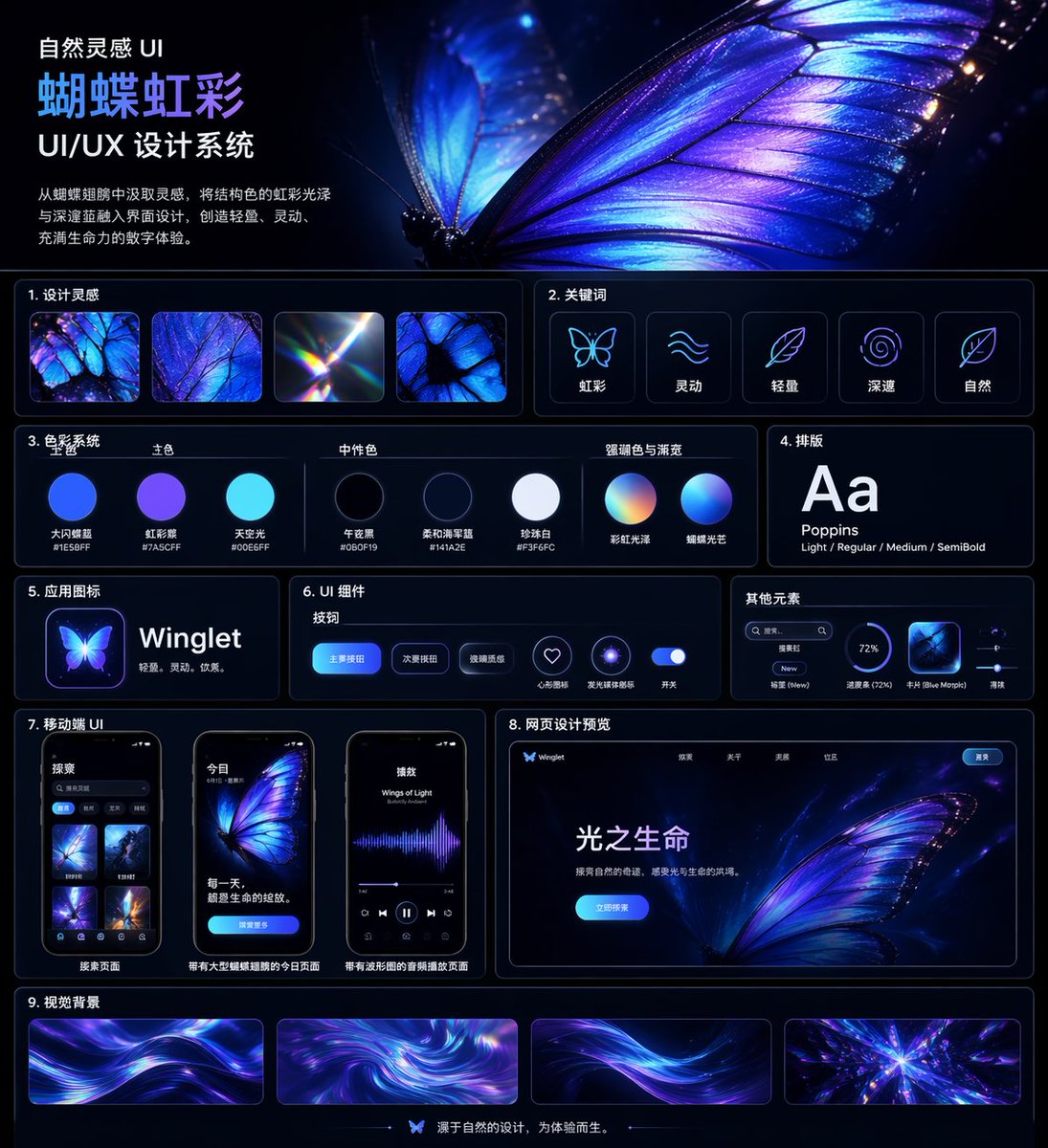
Iridescent Butterfly UI-systeemkaart
Een stijlvol presentatiebord in donkere modus voor een Chinees UI/UX-ontwerpsysteem, met een thema van een gloeiende vlinder, geschikt voor designcasestudies, portfolio-omslagen en presentaties van stijlsystemen.
Dit is een voorbeeld van een GPT Image 2 prompt voor Andere inspiratie . Gebruik de onderstaande kant-en-klare prompt om vergelijkbare afbeeldingen te genereren en controleer de Awesome GPT Image 2 Prompts en de rechten voor commercieel gebruik voordat u de afbeeldingen hergebruikt.
Free 1K preview
Generate one preview image instantly, no sign-up required.
Snel
Schrijfklare prompt
{
  "type": "UI/UX design system showcase board",
  "theme": "dark mode, nature-inspired, luminous iridescent aesthetic",
  "language": "Chinese",
  "canvas": {
    "aspect_ratio": "square poster",
    "background": "deep midnight navy to black with subtle glow",
    "style": "premium futuristic presentation board with thin neon-blue panel outlines, glossy highlights, soft bloom, and high contrast"
  },
  "header": {
    "title": "Natural Inspiration UI\n{argument name=\"system title\" default=\"Butterfly Iridescence\"}\nUI/UX Design System",
    "description": "{argument name=\"chinese description\" default=\"Inspired by butterfly wings, incorporate structural color iridescence with deep blues into the interface design, creating a light, dynamic, and vibrant digital experience.\"}",
    "hero_image": "an oversized, ultra-detailed glowing butterfly wing in electric blue, violet, and iridescent cyan filling the upper-right half, with visible vein structure, translucent edges, spark-like particles, and a second blurred wing behind it"
  },
  "layout": {
    "sections": [
      {
        "title": "1. Design inspiration",
        "position": "upper left below header",
        "count": 4,
        "labels": [
          "iridescent butterfly wing macro",
          "blue-purple wing texture close-up",
          "light refraction prism flare",
          "butterfly wing cell pattern"
        ]
      },
      {
        "title": "2. Keywords",
        "position": "upper right below hero",
        "count": 5,
        "labels": [
          "Iridescent",
          "Dynamic",
          "Lightweight",
          "profound",
          "Natural"
        ],
        "icon_style": "simple glowing line icons inside rounded dark cards"
      },
      {
        "title": "3. Color System",
        "position": "mid left",
        "subsections": [
          {
            "title": "Primary Color",
            "count": 3,
            "labels": [
              "Big Flash Butterfly Blue #1E5BFF",
              "Iridescent Purple #7A5CFF",
              "Sky Light #00E6FF"
            ]
          },
          {
            "title": "Neutral Color",
            "count": 3,
            "labels": [
              "Midnight Black #060F19",
              "Soft Navy Blue #141A2E",
              "Pearl White #F3F6FC"
            ]
          },
          {
            "title": "Accent Color & Gradient",
            "count": 2,
            "labels": [
              "Rainbow Iridescence",
              "Butterfly Lighting"
            ]
          }
        ],
        "visual": "circular color swatches and gradient spheres with Chinese labels beneath"
      },
      {
        "title": "4. Typography",
        "position": "mid right",
        "count": 1,
        "labels": [
          "Aa Poppins Light / Regular / Medium / SemiBold"
        ],
        "visual": "large white Aa on dark card"
      },
      {
        "title": "5. App Icons",
        "position": "left center",
        "count": 1,
        "text": "{argument name=\"app name\" default=\"Winglet\"} Lightweight. Agile. Elegant.",
        "visual": "glowing butterfly app icon beside app name"
      },
      {
        "title": "6. UI Components",
        "position": "center",
        "subsections": [
          {
            "title": "Button",
            "count": 3,
            "labels": [
              "Primary Button",
              "Secondary Button",
              "Glass texture"
            ]
          },
          {
            "title": "Icon",
            "count": 2,
            "labels": [
              "Heart-shaped collection",
              "Glowing ring"
            ]
          },
          {
            "title": "Switch",
            "count": 1,
            "labels": [
              "Switch"
            ]
          }
        ],
        "visual": "rounded blue buttons, neon icon buttons, and a glowing toggle on a dark panel"
      },
      {
        "title": "Other elements",
        "position": "right center",
        "count": 4,
        "labels": [
          "Search box",
          "Label New",
          "Progress bar (72%)",
          "Card Blue Morpho"
        ],
        "visual": "small utility UI widgets in a compact horizontal card"
      },
      {
        "title": "7. Mobile UI",
        "position": "lower left",
        "count": 3,
        "labels": [
          "Search Page",
          "Today page with a large butterfly illustration",
          "Audio playback page with a waveform"
        ],
        "visual": "three smartphone mockups with rounded corners, dark interface, blue-violet butterfly visuals"
      },
      {
        "title": "8. Web design preview",
        "position": "lower right",
        "count": 1,
        "labels": [
          "Light of Life"
        ],
        "visual": "desktop landing page mockup with butterfly hero image, top navigation, bright blue call-to-action button, and Chinese body text"
      },
      {
        "title": "9. Visual Background",
        "position": "bottom full width",
        "count": 4,
        "labels": [
          "flowing light ribbon background 1",
          "swirling iridescent vortex",
          "flowing light ribbon background 2",
          "radiant crystalline burst"
        ],
        "visual": "four elongated rectangular background samples in purple, blue, and cyan"
      }
    ],
    "footer": {
      "count": 1,
      "text": "Designs originating from nature, created for experience.",
      "center_icon": "small butterfly icon"
    }
  },
  "art_direction": {
    "materials": "glassmorphism, neon edge lighting, smooth gradients, subtle reflections",
    "colors": "electric blue, indigo, violet, cyan, white",
    "composition": "clean grid with 9 numbered content sections, generous spacing, thin rounded borders, and a dominant butterfly hero image",
    "render_quality": "highly polished, crisp typography, premium Behance-style design system board"
  }
}
Vraagvariabelen
Bewerkbare argumentplaceholders in de prompt, met hun standaardwaarden.
Best for
- - Andere inspiratie visual exploration
- - Image generation and reference-image edits
- - Reusable briefs that keep source attribution visible
Change these parts
- - Subject, product, character, or scene
- - Aspect ratio, camera, lighting, and background
- - Brand, text, color, and output constraints
Recommended model and settings
- - Model: gpt-image-2
- - Input mode: Tekst naar afbeelding
- - Aspect ratio: source
- - Commercial status: review original source
How to use this prompt
- 1. Copy the prompt and preserve its structure for the first test.
- 2. Replace the subject, context, and publishing channel.
- 3. Change one camera, lighting, or style variable per iteration.
- 4. Inspect the output, source, text, and rights before reuse.
Limitations, source, and reuse cautions
- - Generated output is an editable draft, not factual, legal, or rights evidence.
- - Review the linked source, people, brands, logos, text, and third-party media before commercial use.
Meer gevallen in deze categorie
Geprioriteerd op basis van categorie, compatibiliteit met invoermodus, kwaliteit en lager risico.






Hergebruik en bronvermeldingen
Gebruik deze prompt veilig nadat u de casus hebt bekeken.
- 1.Kopieer de prompt of open deze direct in Dovoo met de knop 'Genereren'.
- 2.Pas de variabelen, beeldverhouding en referentieafbeeldingen aan uw eigen toepassing aan.
- 3.Controleer vóór publicatie of betaald gebruik de auteursrechten, de vereisten voor naamsvermelding en de risico's met betrekking tot merk of beeltenis.